


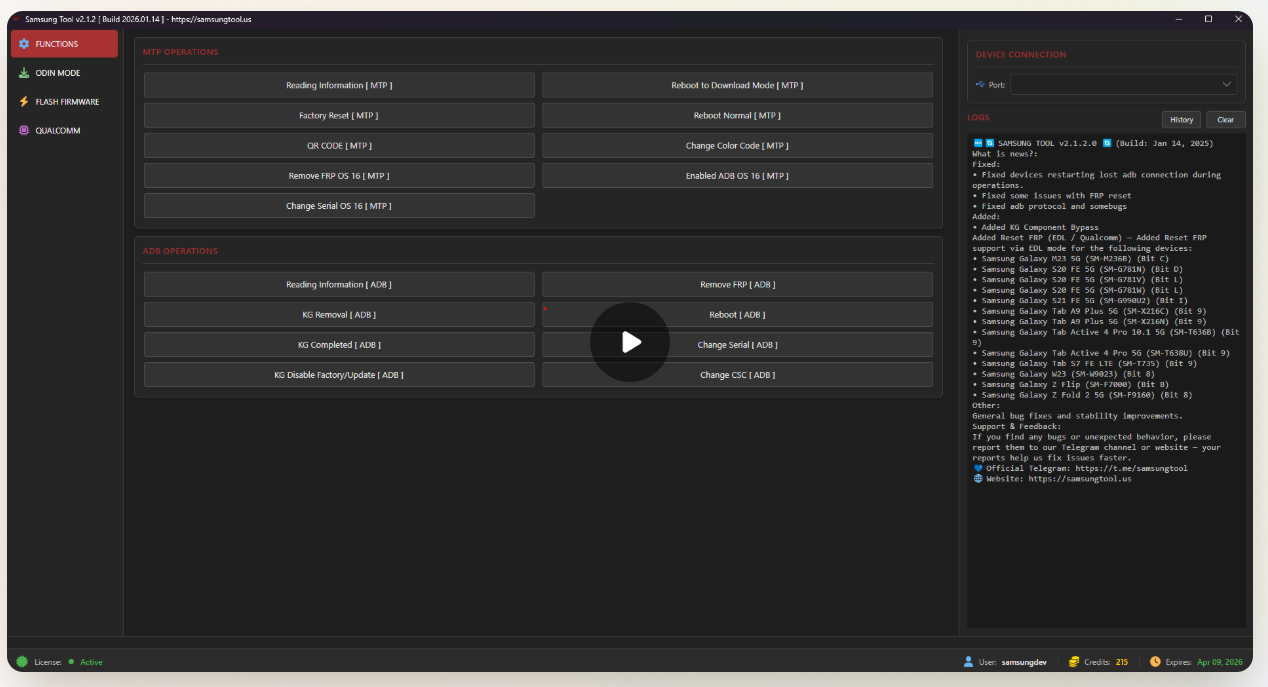
Samsung KG Lock is a common issue after factory reset or flashing, especially in EMI, demo, or refurbished Samsung phones.
Samsung KG Bypass Activation 3 Months offers a safe, official solution to remove KG Lock and use the device normally.

Table of Contents
WHAT IS SAMSUNG KG LOCK AND WHY IT HAPPENS
Samsung KG Lock, also known as Knox Guard Lock, is a security feature added by Samsung.
It is mainly used in financed phones, demo devices, and enterprise-managed smartphones.
When a device is reset or flashed without proper authorization, Samsung servers activate KG Lock.
The phone then shows messages like “Device Managed”, “Please Call Me”, or Knox Guard warnings.
In India, this issue is very common in second-hand Samsung phones.
Many users buy a phone cheaply, reset it, and suddenly the phone becomes locked.
Normal flashing or free tricks do not fix this issue permanently.
That is why a professional KG bypass solution is required.
ALT text suggestion: Samsung KG Lock error on Samsung phone
Buy 3 Months Samsung KG
- Computer with Samsung USB drivers installed
- High-quality USB cable for stable connection
- KG Remove All OS 14 tool ready
- Phone battery above 50%
- Access QR Code scanning mode from Hello screen
- Scan QR code to enable ADB debugging
- Run bypass tool with USB connection
- Reboot and perform factory reset
- Setup device normally
WHAT IS SAMSUNG KG BYPASS ACTIVATION 3 MONTHS
Samsung KG Bypass Activation 3 Months is a professional digital license.
It allows users to bypass KG Lock safely and properly.
The tool completely hides Knox Guard notifications and restrictions.
After bypass, the device works like a normal unlocked Samsung phone.
The 3-month validity makes it ideal for technicians and resellers.
You can handle multiple devices during this period.
Unlike free tools, this activation uses updated patches and official protocols.
That is why the device does not re-lock after factory reset.
ALT text suggestion: Samsung KG Bypass Tool activation screen
WHO SHOULD USE THIS TOOL
This tool is not only for advanced engineers.
It is designed for anyone dealing with Samsung phones regularly.
Mobile repair shop owners can solve KG Lock cases confidently.
Refurbished phone sellers can reduce returns and customer complaints.
Advanced users who accidentally bought a KG-locked device can also use it.
Basic computer knowledge is enough.
Best for:
- Mobile repair technicians
- Refurbished phone sellers
- GSM software engineers
- Advanced Samsung users
KEY FEATURES OF SAMSUNG KG BYPASS TOOL
This tool is built as a professional-grade solution.
Its focus is stability, safety, and long-term results.
Stable KG Lock Bypass
All Knox Guard notifications and restrictions are hidden completely.
Factory Reset Safe
You can reset the phone anytime without re-lock issues.
Quick and Easy Operation
The process completes in just a few clicks.
Safe for Device
No hardware damage and no risky test points.
SUPPORTED SAMSUNG MODELS AND VERSIONS
Samsung KG Bypass Activation 3 Months supports more than 300 Samsung Qualcomm models.
Support is updated regularly with new loaders and patches.
Samsung 2025 and selected 2026 Qualcomm devices are supported.
Android support goes up to Android 14.
Security patch support ranges from August 2025 to January 2026 for selected models.
ALT text suggestion: Supported Samsung Qualcomm models list
HOW SAMSUNG KG LOCK BYPASS WORKS
The tool uses official communication methods like Odin, MTP, and ADB.
This ensures the phone’s core system remains safe.
Updated Knox Guard patches are applied during the process.
These patches prevent the device from re-locking after reset.
As long as instructions are followed properly, the result is stable and reliable.
STEP-BY-STEP GUIDE TO BYPASS KG LOCK
PART 1: Preparation
- Windows computer
- Samsung USB drivers installed
- High-quality USB cable
- KG Remove All OS 14 tool ready
- Phone battery above 50%
PART 2: Steps
- Open QR code scanning mode from the Hello screen
- Scan the QR code to enable ADB debugging
- Connect the phone via USB
- Run the bypass tool
- Reboot and perform factory reset
- Complete normal device setup
PART 3: Troubleshooting
If KG Lock appears again after reset, repeat the process.
In most cases, running it again fixes the issue.
SAMSUNG 2026 QUALCOMM UPDATES EXPLAINED
The latest updates add better support for 2026 Qualcomm Samsung devices.
Old re-lock issues have been fixed.
Odin Direct ZIP support allows flashing without extraction.
This saves time and reduces flashing errors.
MTP and ADB enhancements allow CSC change, serial change, and more.
These features are very useful for technicians.
MDM, IT ADMIN, AND PAYJOY LOCK SUPPORT
This tool also supports MDM and IT Admin bypass for selected models.
It is useful for corporate and enterprise devices.
PayJoy Lock, Device Control Lock, and Offline Lock are also supported.
After bypass, the phone becomes fully usable.
PROS AND CONS OF SAMSUNG KG BYPASS ACTIVATION
Pros
- Official and stable solution
- No re-lock after factory reset
- Supports latest Samsung models
- Safe and software-based
Cons
- Paid activation required
- Windows PC is necessary
FREE KG TOOLS VS OFFICIAL TOOL
Free KG tools usually work temporarily.
After reset, the phone locks again.
Samsung KG Bypass Activation 3 Months provides a long-term solution.
For professional work, official tools always perform better.
FREQUENTLY ASKED QUESTIONS
Is Samsung KG Bypass Activation 3 Months safe?
Yes, it is software-based and safe when used correctly.
Will the phone re-lock after factory reset?
No, the device will not re-lock if steps are followed properly.
Does it support Indian Samsung models?
Yes, most Qualcomm Samsung models sold in India are supported.
CONCLUSION
Samsung KG Lock is a major challenge in the second-hand and repair market, and free methods rarely offer permanent results.
Samsung KG Bypass Activation (3 Months) provides a stable and reliable solution—making it a smart choice for serious repair professionals and resellers.
