The repair industry is evolving fast, and accurate hardware data is essential. Borneo Schematics February 9 2026 provides the latest schematic diagrams and repair solutions for efficient device fixing.

What Is Borneo Schematics February 9 2026 and Why It Is Needed
Borneo Schematics February 9 2026 is a professional-grade mobile and laptop hardware schematic platform that provides structured access to:
- Schematic diagrams
- Board layouts
- Bitmap values
- IC-on-board fixes
- Sub-board and main-board solutions
- BIOS and boardview references
Modern smartphones such as OPPO, Samsung, Xiaomi, Vivo, Motorola, and Infinix now use multilayer PCBs, encrypted firmware, and compact IC placement. Guesswork-based repair is no longer viable.
Why technicians rely on Borneo Schematics February 9 2026
- Reduces trial-and-error during repairs
- Saves time diagnosing motherboard faults
- Improves repair success rate
- Supports the latest Android versions and patches
- Covers both mobile phones and laptops
For repair shops, this tool directly impacts profitability by reducing rework, minimizing board damage, and increasing customer trust.
Key Features of Borneo Schematics February 9 2026 (Latest Version)
The Best Borneo Schematics February 9 2026 2026 update focuses on real-world repair problems faced by technicians daily.
Core Features
- Latest mobile and laptop schematic diagrams
- Updated bitmap values for Samsung, Vivo, and OPPO devices
- Sub-board level schematics for precise fault isolation
- IC-on-board diagrams for faster component identification
- Power key, charging, and display troubleshooting references
- BIOS and motherboard documentation for laptops
Version-Specific Improvements
- Optimized support for newer Android security patches
- Faster loading of schematic files
- Improved compatibility with modern repair workflows
- Enhanced coverage for budget and mid-range devices
This makes Borneo Schematics February 9 2026 suitable for both experienced technicians and learners entering the repair industry.
Supported Devices and Brands
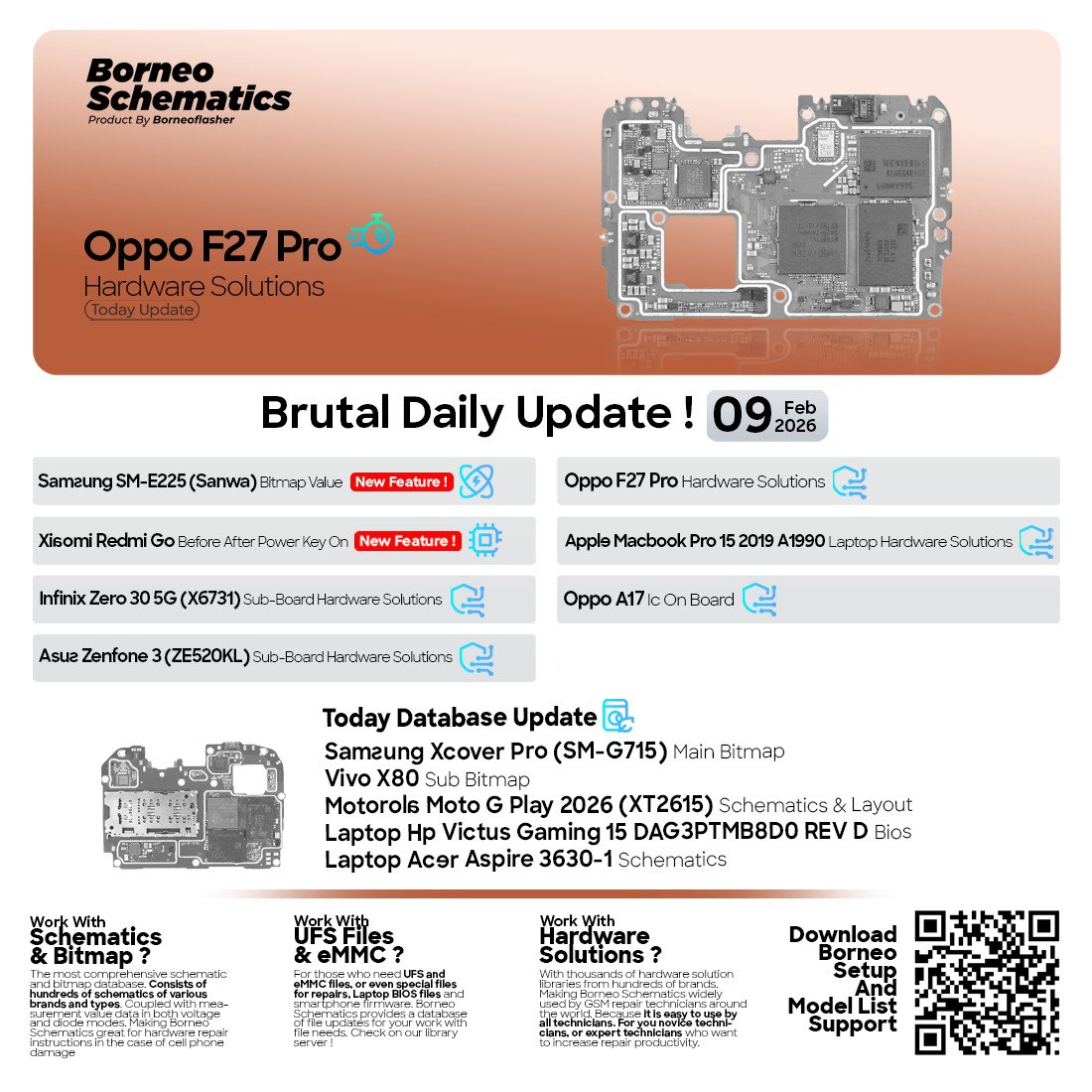
The February 9, 2026 update includes wide coverage across smartphones and laptops.
Mobile Devices Included
- Mobile Devices Included
- OPPO F27 Pro hardware solution
- OPPO F27 Pro schematic diagram
- Redmi Go power key problem solution
- Redmi Go before after power on schematic
- Samsung SM-E225 Sanwa bitmap value
- Samsung E225 hardware repair solution
- Infinix Zero 30 5G sub board schematic
- Infinix X6731 hardware solution
- Asus Zenfone 3 ZE520KL sub board schematic
- Oppo A17 IC on board diagram
- Samsung XCover Pro SM-G715 main bitmap
- Vivo X80 sub bitmap diagram
- Motorola Moto G Play 2026 schematic layout
- XT2615 schematic diagram
- Samsung SM-A10S IC On Board Fix
Laptop Devices Included
- Apple MacBook Pro 15 2019 A1990 820-01814-A
- HP Victus Gaming 15 DAG3PTMB8D0 BIOS
- Acer Aspire 3630-1 schematic
This broad compatibility makes Borneo Schematics February 9 2026 a complete solution for mixed-device repair shops.
Download and Installation Process
Getting started with Borneo Schematics February 9 2026 is straightforward.
Step-by-Step Installation Guide
- Visit the official Borneo Schematics download page
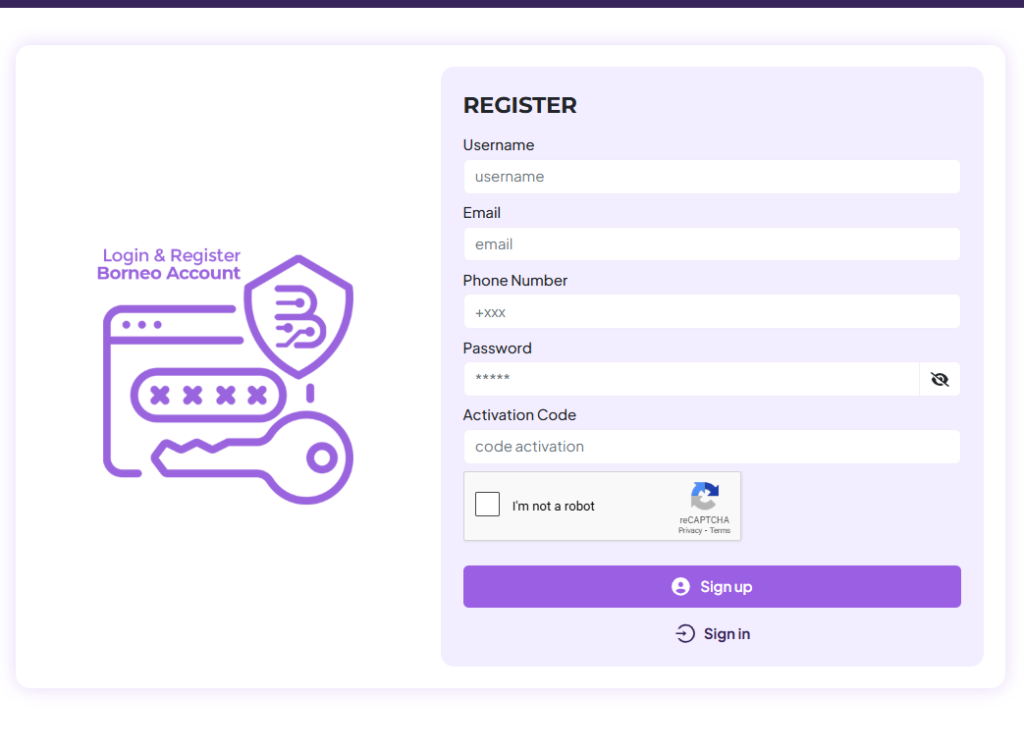
- Create a registered account using email or mobile number
- Download the latest February 9 2026 version
- Install the software on a Windows-based system
- Launch the program and log in
The installation process is lightweight and does not require high-end hardware.

How to Register and Activate
To access full schematic files and advanced features, registration is required.
Registration Steps
- Open the software after installation
- Click on Register or Login
- Enter your credentials
- Choose a subscription plan
- Complete activation
Once activated, all supported schematic diagrams and hardware solutions become accessible.
How to Use Borneo Schematics February 9 2026 (For Owners and Technicians)
The software is designed to be intuitive for beginners while powerful enough for professionals.
For Individual Users
- Identify basic motherboard issues
- Understand power and charging circuits
- Learn hardware-level troubleshooting
- Avoid unnecessary component replacement
For Professional Technicians
- Diagnose dead boot issues
- Trace power lines and signal paths
- Apply bitmap values accurately
- Perform IC-on-board level repairs
- Reduce repair turnaround time
IMEI Repair and Other Services
While Borneo Schematics February 9 2026 is primarily a hardware reference tool, it complements workflows involving:
- IMEI repair tools
- Mobile unlock program usage
- Phone unlock app operations
- Firmware flashing and board-level diagnostics
Used together with professional unlocking tools, it enhances repair accuracy and success rates.
Comparison with Other Tools
| Feature | Borneo Schematics February 9 2026 | Free Schematics | Generic Repair PDFs |
|---|---|---|---|
| Latest Models | Yes | Limited | No |
| Bitmap Values | Yes | No | No |
| Sub Board Support | Yes | Rare | No |
| IC On Board Fixes | Yes | No | No |
| Laptop Coverage | Yes | Limited | No |
| Professional Use | High | Low | Very Low |
Safety Tips and Legal Considerations
Before using Borneo Schematics February 9 2026, keep these points in mind:
- Always follow local repair laws and regulations
- Do not use schematics for unauthorized access
- Ensure proper ESD protection during repairs
- Backup customer data before hardware work
- Use original tools and components
Ethical and legal repair practices protect both technicians and customers.
Troubleshooting Common Errors
Common Issues and Fixes
- Software not opening: Run as administrator
- Login failed: Check internet connection
- Files not loading: Update to latest version
- Activation error: Contact official support
Most issues are easily resolved through proper installation and account verification.
Pricing and Subscription Plans
Borneo Schematics February 9 2026 is available under flexible subscription models:
- Monthly plan for individual users
- Quarterly plan for small repair shops
- Annual plan for professional technicians
Pricing varies based on region and access level. For the latest offers, contact the official distributor.
Frequently Asked Questions (FAQs)
Is Borneo Schematics February 9 2026 suitable for beginners?
Yes. The interface is beginner-friendly while offering advanced features for professionals.
Does it support the latest Android security patches?
Yes, the February 9 2026 version includes updated device coverage.
Can it be used in a repair shop?
Absolutely. It is designed for professional repair environments.
Does it include laptop schematics?
Yes, selected MacBook, HP, and Acer models are supported.
Is registration mandatory?
Yes, registration is required to unlock full features.
Final Thoughts – Why You Should Use Borneo Schematics February 9 2026
If you are serious about mobile and laptop repair, Borneo Schematics February 9 2026 is not just a tool—it is a professional necessity. From detailed schematic diagrams to bitmap values and IC-on-board fixes, this update empowers technicians to work smarter, faster, and more accurately.