


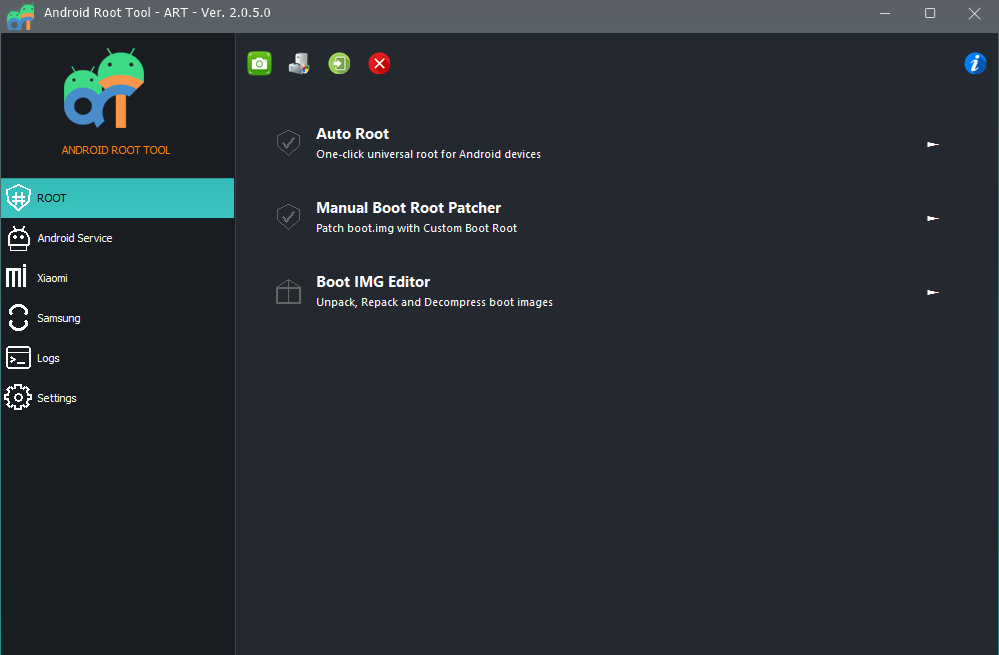
The Android Root Tool v2.0.5.0 (March 2026) is a powerful utility designed for both Android users and professional mobile technicians. It helps root devices, remove system restrictions, manage partitions, and fix software issues using advanced features like BOOT IMG Editor, Manual Boot Root Patcher, Xiaomi Virus Remove, Samsung Android 16 FRP Remove, and ADB GPT Manager.
This guide covers its key features, supported devices, installation steps, and how technicians can use the Android Root Tool for mobile repair and servicing.
What is Android Root Tool and Why It Is Needed
An Android Root Tool is a specialized software designed to give users administrative (root) access to Android devices.
Root access allows you to:
- Remove preinstalled system apps
- Modify system files
- Unlock hidden Android features
- Repair software problems
- Install custom ROMs
- Fix boot errors
- Remove device restrictions
For technicians and mobile repair shops, the Android Root Tool acts as a powerful phone unlock app and mobile servicing utility.
Why professionals use it
Mobile technicians often deal with issues like:
- FRP locks
- System corruption
- Malware infections
- Device management restrictions
- Bootloop problems
- Partition errors
Instead of using multiple programs, the Android Root Tool update v2.0.5.0 integrates all essential features in one place.
Key Features of Android Root Tool (Latest Version)
The latest Android Root Tool v2.0.5.0 introduces several powerful improvements and new functions designed for modern Android systems.
Manual Boot Root Patcher
The Manual Boot Root Patcher allows users to patch boot images manually for rooting.
Supported architectures:
- ARMV7a
- ARMv8a
Benefits:
- Advanced rooting control
- Compatible with custom boot images
- Works with new Android security systems
Android BOOT IMG Editor
The built-in BOOT IMG Editor allows unpacking and repacking Android boot images easily.
Functions include:
- Boot image unpack
- Boot image repack
- Boot modification
- Kernel editing
This feature is extremely useful for developers and advanced technicians.
Android Ramdisk Unpack
The Android Ramdisk Unpack function allows users to extract and modify the Android ramdisk.
Why it matters:
- Enables deeper system modifications
- Allows boot configuration editing
- Helps fix boot issues
Xiaomi Virus Remove
Many Xiaomi devices suffer from malware installed by unauthorized firmware.
The Xiaomi Virus Remove feature helps technicians:
- Detect malicious system apps
- Remove hidden malware
- Restore system integrity
This makes the Android Root Tool a reliable malware removal utility.
Xiaomi IT Admin Remove (Hyper OS)
Corporate-managed Xiaomi devices sometimes have IT Admin restrictions.
With the Xiaomi IT Admin Remove Hyper OS feature, technicians can:
- Remove device admin restrictions
- Disable corporate management
- Restore full device control
ADB GPT Manager
One of the most powerful additions is the ADB GPT Manager.
It supports:
- Qualcomm
- MediaTek
- Unisoc devices
Features include:
- List partitions
- Read partitions
- Write partitions
- Erase partitions
This feature transforms the Android Root Tool into a professional-level device management system.
Android Apps Manager
The Android Apps Manager allows users to manage applications directly from the tool.
Functions:
- List installed apps
- Disable apps
- Enable apps
- Remove bloatware
This is especially useful for cleaning system apps and improving device performance.
Samsung Android 16 MTP FRP Remove
FRP lock removal is one of the most requested repair services.
The Samsung Android 16 FRP Remove feature allows technicians to bypass FRP directly through MTP mode.
Benefits:
- No complicated steps
- Faster unlocking
- Compatible with new Samsung Android 16 devices
Fastboot Flash Patched Boot IMG
With Fastboot Flash Patched Boot IMG, users can flash patched boot images instantly.
This is commonly used after rooting using the Manual Boot Root Patcher.
Improved Auto Root Function
The Auto Root Xiaomi Samsung feature is optimized in this update.
Supported brands include:
- Xiaomi
- Samsung
This allows automatic rooting without manual boot patching.
UI and Performance Improvements
The new Android Root Tool update also includes:
- Improved software UI
- Faster performance
- Better device detection
- Enhanced compatibility
Supported Devices and Brands
The Android Root Tool supports a wide range of Android devices.
Major Supported Brands
| Brand | Support Level |
|---|---|
| Samsung | Full support |
| Xiaomi | Full support |
| Redmi | Full support |
| Poco | Full support |
| Oppo | Partial support |
| Vivo | Partial support |
| Realme | Partial support |
Chipset support:
- Qualcomm
- MediaTek
- Unisoc
Download and Installation Process
Before installing the Android Root Tool, ensure your computer meets these requirements.
System Requirements
- Windows 10 / Windows 11
- 4GB RAM minimum
- USB drivers installed
- Stable internet connection
Step-by-Step Installation Guide
Follow these steps to install the Android Root Tool.
Step 1
Download the latest version of the Android Root Tool v2.0.5.0 from the official website.
Step 2
Extract the ZIP file.
Step 3
Run the setup file.
Step 4
Install required USB drivers.
Step 5
Launch the Android Root Tool.
Step 6
Connect your device using a USB cable.
The software will automatically detect your device.
How to Register and Activate
After installing the Android Root Tool, you need to activate the software.
Activation Steps
- Open the software
- Click Register
- Enter your license key
- Restart the program
Once activated, all features become available.
How to Use Android Root Tool
The Android Root Tool is designed for both beginners and professional technicians.
For Individual Users
Normal users can use the tool for:
- Rooting Android devices
- Removing bloatware
- Fixing software issues
- Installing patched boot images
Example workflow:
- Connect device
- Enable USB debugging
- Select Auto Root Xiaomi Samsung
- Wait for process completion

For Mobile Repair Technicians
Technicians use the Android Root Tool for advanced services.
Common repair services include:
- FRP removal
- Virus removal
- Partition repair
- Boot image patching
- Device unlocking
IMEI Repair and Other Services
Some technicians also use the tool in combination with other utilities for:
- IMEI repair
- Device unlock
- Software flashing
This makes the Android Root Tool a valuable mobile unlock program for repair shops.
Comparison with Other Tools
| Feature | Android Root Tool | Typical Phone Unlock App |
|---|---|---|
| Boot IMG Editor | Yes | No |
| GPT Partition Manager | Yes | Limited |
| Virus Removal | Yes | No |
| FRP Removal | Yes | Yes |
| Auto Root | Yes | Limited |
| Apps Manager | Yes | No |
The Android Root Tool clearly provides more professional features compared to standard phone unlock apps.
Safety Tips and Legal Considerations
Before using any Android Root Tool, users should understand potential risks.
Safety Tips
- Always backup your device
- Use official firmware files
- Avoid interrupting flashing processes
- Use original USB cables
Legal Notes
Rooting may:
- Void device warranty
- Affect security features
Technicians should only perform services with customer permission.
Troubleshooting Common Errors
Even the best Android Root Tool can encounter issues.
Device Not Detected
Solution:
- Install USB drivers
- Enable USB debugging
- Try different USB ports
Bootloop After Root
Fix:
- Reflash stock boot image
- Use Fastboot Flash Patched Boot IMG
FRP Removal Failed
Try:
- Updating the Android Root Tool
- Switching USB mode
Pricing and Subscription Plans
The Android Root Tool offers flexible plans for technicians and businesses.
| Plan | Best For |
|---|---|
| Monthly | Small repair shops |
| Quarterly | Professional technicians |
| Annual | Service centers |
Technicians who handle multiple devices daily benefit most from annual subscriptions.
Frequently Asked Questions (FAQs)
What is Android Root Tool?
The Android Root Tool is a software used to root Android devices, manage partitions, remove FRP locks, and perform advanced Android modifications.
Is Android Root Tool safe?
Yes, when used correctly. Always backup your device before using any rooting tool.
Can beginners use Android Root Tool?
Yes. The interface is beginner-friendly, but advanced features are designed for technicians.
Does Android Root Tool support Xiaomi devices?
Yes. The tool supports Xiaomi features like:
- Xiaomi Virus Remove
- Xiaomi IT Admin Remove Hyper OS
- Auto Root Xiaomi Samsung
Does it support Samsung Android 16?
Yes. The latest update includes Samsung Android 16 FRP Remove via MTP.
Final Thoughts
The Android Root Tool v2.0.5.0 is one of the most powerful Android servicing utilities available today.
With advanced capabilities like:
- Manual Boot Root Patcher
- BOOT IMG Editor
- Android Ramdisk Unpack
- Xiaomi Virus Remove
- Samsung Android 16 FRP Remove
- ADB GPT Manager
- Fastboot Flash Patched Boot IMG
It is an excellent choice for both Android enthusiasts and professional mobile technicians.
