


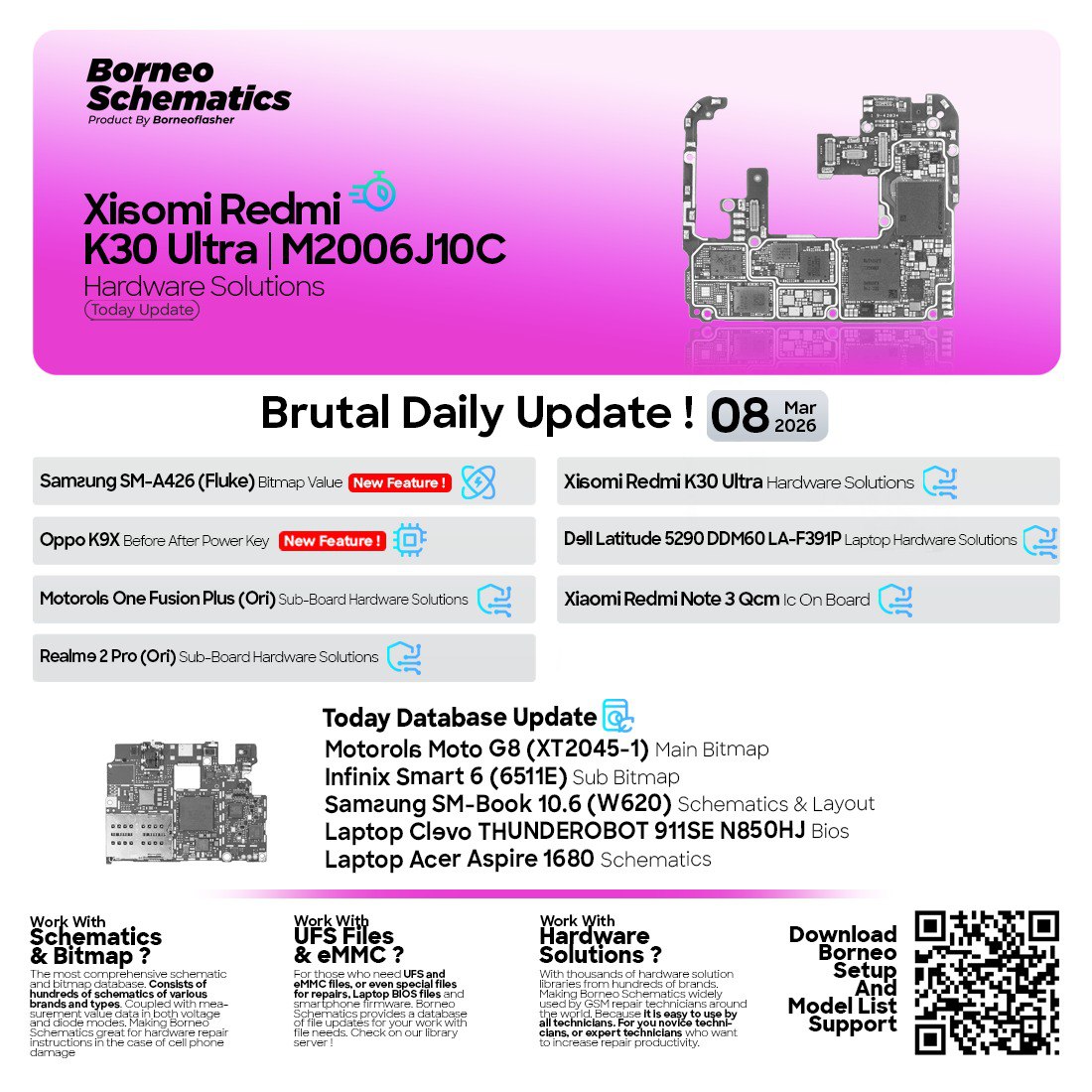
The Borneo Schematics March 8 2026 Update introduces new hardware solutions, updated schematics, and expanded device support for mobile and laptop repair technicians. It includes solutions for brands like Xiaomi, Samsung, Oppo, Motorola, Infinix, and Realme. This update helps technicians diagnose motherboard faults and hardware issues more quickly and accurately.
What is Borneo Schematics March 8 2026 Update and Why It Is Needed
The Borneo Schematics March 8 2026 Update is part of the continuous development of the Borneo Schematics platform, which provides:
- Mobile phone motherboard schematics
- Laptop motherboard diagrams
- Hardware repair solutions
- Bitmap values and board layouts
- BIOS files and technical documentation
Technicians often face problems such as:
- Phone not powering on
- Charging issues
- Dead motherboard
- Network signal problems
- Hardware component failures
Without proper schematic diagrams, identifying faulty components becomes extremely difficult.
The Borneo Schematics Hardware Solutions Update solves this problem by providing detailed diagrams and repair paths for technicians.
Why technicians need this update:
- Faster hardware troubleshooting
- Accurate component identification
- Reduced repair time
- Higher repair success rate
- Access to latest device schematics
For professional repair shops, using tools like Borneo Schematics Laptop and Mobile Schematics significantly improves service efficiency.
Key Features of Borneo Schematics March 8 2026 Update
The Latest Borneo Schematics Update introduces several new technical resources.
New Hardware Solutions Added
The March 8 update includes:
- Xiaomi Redmi K30 Ultra Hardware Solutions
- Oppo K9X Power Key On Solution
- Samsung SM-A426 Bitmap Value
- Motorola One Fusion Plus Sub Board Solutions
- Realme 2 Pro Sub Board Hardware Solutions
These additions help technicians resolve common hardware failures quickly.
Laptop Schematics and BIOS Files
Laptop repair technicians will benefit from the newly added motherboard files.
New laptop support includes:
- Dell Latitude 5290 DDM60 LA-F391P REV 1.0 Solutions
- ThunderRobot 911SE N850HJ BIOS
- Acer Aspire 1680 Schematic
- Samsung SM-Book 10.6 W620 Layout
These schematics provide board layouts, voltage lines, and IC locations.
Updated Bitmap and IC Information
The update also includes new bitmap and IC board references such as:
- Motorola Moto G8 XT2045-1 Main Bitmap
- Infinix Smart 6 6511E Sub Bitmap
- Xiaomi Redmi Note 3 QCM IC On Board
These files help technicians locate exact chip positions during board repair.
Borneo Schematics Supported Models List
The Borneo Schematics Supported Models List continues to grow with each update.
The Borneo Schematics March 8 2026 Update adds support for several new models.
| Brand | Model | Type |
|---|---|---|
| Xiaomi | Redmi K30 Ultra | Hardware Solutions |
| Oppo | K9X | Power Key Repair |
| Samsung | SM-A426 | Bitmap Value |
| Motorola | One Fusion Plus | Sub Board Solution |
| Realme | 2 Pro | Hardware Repair |
| Motorola | Moto G8 XT2045-1 | Main Bitmap |
| Infinix | Smart 6 6511E | Sub Bitmap |
| Dell | Latitude 5290 | Laptop Motherboard |
| Samsung | SM-Book 10.6 | Schematic & Layout |
| Acer | Aspire 1680 | Laptop Schematic |
These additions further strengthen Borneo Schematics New Models 2026 support.
Download and Installation Process
Downloading and installing the Borneo Schematics March 8 2026 Update is simple and quick.
Before installation ensure:
- Windows PC
- Stable internet connection
- Active Borneo Schematics account
Step-by-Step Installation Guide
Follow these steps to install the latest version.
Step 1
Visit the official Borneo Schematics website.
Step 2
Download the latest Borneo Schematics update package.
Step 3
Extract the downloaded ZIP file.
Step 4
Run the installer as administrator.
Step 5
Complete the installation process.
Step 6
Open the software and login to your account.
Once installed, you will automatically gain access to the Borneo Schematics March 8 2026 Update database.

How to Register and Activate
To use all features, you must activate your account.
Registration process:
- Open Borneo Schematics software
- Click on Register
- Enter email address
- Create password
- Activate via email verification
After activation you can purchase credits or subscription plans.
Professional repair shops usually choose monthly or yearly plans for uninterrupted access.

How to Use Borneo Schematics March 8 2026 Update
The Borneo Schematics Hardware Solutions Update is extremely helpful for technicians performing advanced repairs.
Below are some common use cases.
FRP Unlock
Factory Reset Protection is a security feature on Android devices.
Using Borneo Schematics technicians can:
- Identify hardware test points
- Locate EDL or download mode points
- Access board layouts for FRP bypass
This helps when software methods fail.
Network Unlock
Some phones remain locked to specific carriers.
With Borneo Schematics Laptop and Mobile Schematics, technicians can:
- Identify baseband circuits
- Diagnose network IC faults
- Repair signal related issues
IMEI Repair and Other Services
Technicians often require board level information to repair IMEI related problems.
The Latest Borneo Schematics Update helps with:
- RF circuit tracing
- CPU and baseband IC location
- Network signal path identification
Other services include:
- Dead boot repair
- Charging circuit repair
- Display line troubleshooting
- Power IC diagnostics
Comparison with Other Tools
Below is a simple comparison of popular repair tools.
| Feature | Borneo Schematics | ZXW Tool | Wuxinji |
|---|---|---|---|
| Mobile Schematics | Yes | Yes | Yes |
| Laptop Schematics | Yes | Limited | No |
| Bitmap Layouts | Yes | Yes | Yes |
| Hardware Solutions | Yes | Limited | Limited |
| Daily Updates | Yes | Sometimes | Rare |
The Borneo Schematics Daily Update system gives it an advantage over other platforms.
Safety Tips and Legal Considerations
Technicians must follow safety and legal guidelines when performing hardware repairs.
Important safety practices:
- Always disconnect battery before repair
- Use proper ESD protection
- Avoid overheating components
- Use correct soldering temperature
Legal considerations:
- Avoid unauthorized IMEI modification
- Respect manufacturer restrictions
- Use tools only for legitimate repair purposes
Following these guidelines protects both technicians and customers.
Troubleshooting Common Errors
Some users may face issues during installation or usage.
Common problems and solutions:
Login Failed
Check internet connection and verify account credentials.
Database Not Updating
Restart the software and check firewall settings.
Software Not Opening
Run the program as administrator.
Missing Device Files
Update the database to access the latest models from the Borneo Schematics Supported Models List.
Pricing and Subscription Plans
The pricing model varies depending on subscription type.
Typical options include:
| Plan | Access |
|---|---|
| Monthly Plan | Full database access |
| Quarterly Plan | Discounted access |
| Yearly Plan | Best value for repair shops |
Repair centers usually choose the yearly subscription to receive all Borneo Schematics New Models 2026 updates.
Frequently Asked Questions
What is Borneo Schematics used for?
Borneo Schematics is a professional repair tool that provides motherboard schematics, hardware solutions, and board layouts for mobile phones and laptops.
Is the Borneo Schematics March 8 2026 Update free?
The software may require an active subscription depending on the features and database access.
Can beginners use Borneo Schematics?
Yes. While it is designed for technicians, beginners can learn hardware repair using schematic diagrams and tutorials.
Does it support laptop schematics?
Yes. The platform includes Borneo Schematics Laptop and Mobile Schematics, including many popular laptop models.
How often does Borneo Schematics update?
New device files and hardware solutions are added regularly through the Borneo Schematics Daily Update system.
Final Thoughts
The Borneo Schematics March 8 2026 Update continues to expand the platform’s database with valuable mobile and laptop repair solutions.


The expansion of supported brands like Xiaomi, Samsung, and Infinix is especially useful for technicians who regularly deal with mixed-device repair workloads. Updated schematics can make a big difference when tracing motherboard faults that aren’t obvious during basic diagnostics. It would be interesting to know if the update also improves clarity in component-level diagrams for newer board designs.