



In the fast-paced mobile repair industry, staying updated with the latest unlocking and flashing tools is essential. MDMFixTool Latest Update is a powerful utility designed specifically for Samsung smartphones and tablets. Whether you are an individual trying to fix your device or a professional technician managing a repair shop, MDMFixTool delivers everything you need — FRP removal, MDM bypass, firmware flashing, SN change, and more.
This guide explains everything about the MDMFixTool Latest Update, including its features, supported devices, installation steps, and usage guide, making it ideal for both beginners and experts.
What is MDMFixTool Latest Update and Why It’s Needed
MDMFixTool Latest Update is an advanced Windows-based software tool built to handle Samsung device maintenance, unlocking, and firmware management.
It allows users to:
- Remove FRP (Factory Reset Protection)
- Bypass MDM (Mobile Device Management) locks
- Remove KG (Knox Guard) restrictions
- Perform Factory Reset and Firmware Flash
- Change Serial Numbers (SN) and more
This tool is essential for users who:
- Are locked out of their Samsung phones after a factory reset
- Need to unlock corporate or MDM-controlled devices
- Want to flash new firmware or repair software issues
- Require a reliable professional-grade tool for Samsung maintenance
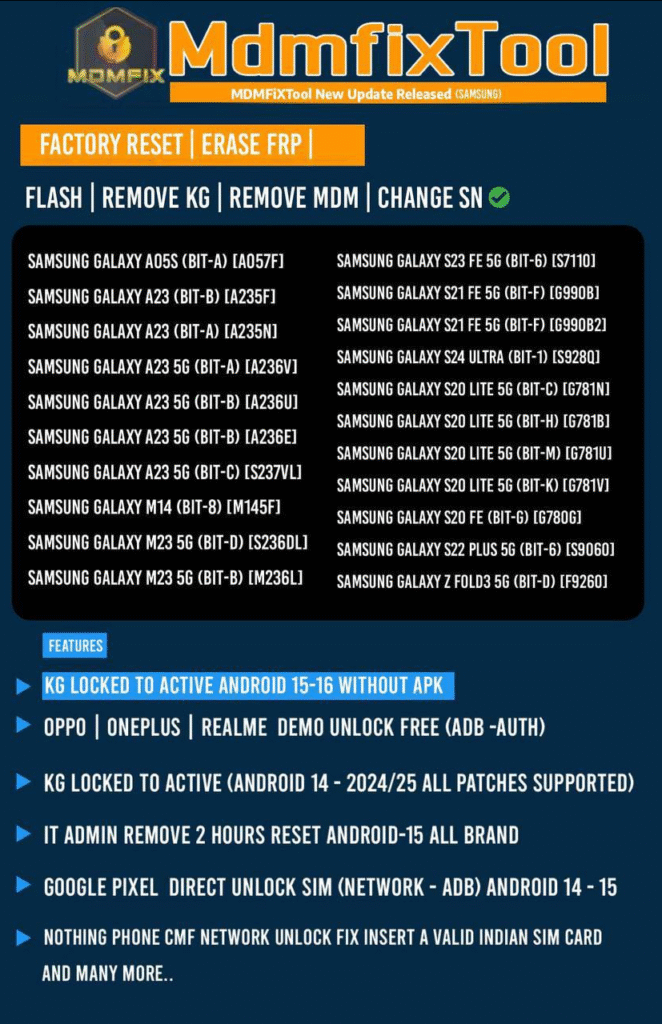
Key Features of MDMFixTool Latest Update
Here’s what the new version of MDMFixTool brings for 2025:
| Feature | Description |
|---|---|
| FRP Remove | Instantly erase Google Account lock (FRP) from Samsung devices. |
| Remove MDM Lock | Bypass or disable MDM restrictions for corporate-controlled phones. |
| Flash Samsung Firmware | Flash official firmware files safely without data corruption. |
| Factory Reset Tool | Wipe user data or perform full factory resets within seconds. |
| Change SN (Serial Number) | Modify or repair SN for advanced technical services. |
| KG Lock Remove | Remove Knox Guard (KG) to enable full device access. |
| User-Friendly Interface | Simple UI with clear options for both new and advanced users. |
| Regular Updates | Frequent support for new Samsung models and firmware builds. |
Supported Devices and Brands
The MDMFixTool Latest Update (2025) supports a wide range of Samsung devices, including the latest models.
Recently Added Models:
- Samsung Galaxy A05s (BIT-A) [A057F]
- Samsung Galaxy A23 (BIT-A/B) [A235F / A235N]
- Samsung Galaxy A23 5G (BIT-A/B/C) [A236V / A236E / S237VL]
- Samsung Galaxy M14 (BIT-8) [M145F]
- Samsung Galaxy S21 FE 5G (BIT-F) [G990B / G990B2]
- Samsung Galaxy S23 FE 5G (BIT-6) [S7110]
- Samsung Galaxy S24 Ultra (BIT-1) [S928Q]
- Samsung Galaxy Z Fold3 5G (BIT-D) [F9260]
Also supports older Samsung models from Galaxy A, M, S, and Note series.
Download and Installation Process
Step-by-Step Installation Guide
Complete Installation
Follow on-screen prompts to finish setup and restart your PC.
Download the Setup File
Visit the official source or authorized reseller to download the MDMFixTool Latest Update for Windows.
(Use genuine sources to avoid malware.)
Extract the ZIP File
Use WinRAR or 7-Zip to extract the downloaded package.
Run as Administrator
Right-click on MDMFixTool.exe and choose “Run as Administrator”.
Install Required Drivers
Ensure Samsung USB and ADB drivers are installed properly.

How to Register and Activate
- Launch MDMFixTool.
- Go to the Registration tab.
- Enter your email and license key (provided after purchase).
- Click Activate.
- Once verified, you’ll have full access to all features.
For bulk or workshop users, multi-PC activation is supported.
How to Use MDMFixTool Latest Update
The interface is designed to be intuitive. Below are the most common operations.
FRP Unlock (Factory Reset Protection)
- Connect your Samsung device in Download Mode.
- Click on “Erase FRP” in the tool interface.
- Wait for the confirmation message.
- Device will reboot without the Google Account lock.
Use this feature only for your own devices or with customer authorization.
Remove MDM Lock
- Connect the locked device via USB.
- Select “Remove MDM” option.
- Wait for the bypass process to complete (usually 2–3 minutes).
- Reboot the phone — MDM Lock will be removed.
Flash Samsung Firmware
- Load the
.tar/.md5firmware file. - Choose the correct model.
- Click “Flash.”
- Wait for the progress bar to reach 100%.
- Device reboots automatically.
Change SN (Serial Number)
- Navigate to “Advanced Tools” → “Change SN”
- Enter new serial number (for repair use only)
- Save and reboot the device
Comparison with Other Tools
| Tool | FRP Remove | MDM Bypass | Flash Firmware | Price | Ease of Use |
|---|---|---|---|---|---|
| MDMFixTool | Yes | Yes | Yes | Affordable | ★★★★★ |
| SamFW Tool | Partial | No | Yes | Free | ★★★ |
| UnlockTool | Yes | Partial | Yes | Moderate | ★★★★ |
Verdict: MDMFixTool offers a complete, all-in-one solution for technicians at an affordable rate.
Safety Tips and Legal Considerations
- Always use MDMFixTool on devices you own or have permission to service.
- Avoid pirated or cracked versions, as they may contain malware.
- Keep Samsung drivers up to date to prevent connection issues.
- MDMFixTool is intended for educational and professional repair use only.
Troubleshooting Common Errors
| Issue | Cause | Solution |
|---|---|---|
| Tool not detecting device | Missing drivers | Reinstall Samsung USB drivers |
| FRP removal stuck | Wrong mode | Use Download Mode |
| Activation failed | Invalid key | Contact support |
| Firmware flash error | Corrupt file | Download firmware again |
| Device reboot loop | Incomplete flash | Re-flash with official firmware |
MDMFixTool Subscription Plans
| Plan Type | Access Duration | Features | Price (USDT) |
|---|---|---|---|
| Standard Plan | 3 Months | All Functions, Single PC | 45 USDT |
| Professional Plan | 12 Months | All Features + Updates | 80 USDT |
For license purchase or renewal, users can contact via WhatsApp or Telegram (details below).
Frequently Asked Questions (FAQs)
1. Is MDMFixTool Free?
No. It’s a paid professional tool, but affordable compared to other premium utilities.
2. Does it support the latest Samsung Galaxy models?
Yes. The MDMFixTool Latest Update 2025 supports new models like S24 Ultra, A23 5G, and M14.
3. Can it remove both FRP and MDM locks?
Absolutely. It supports FRP Remove, MDM Lock Bypass, and KG Lock Disable.
4. What are system requirements?
- Windows 10 or 11 (64-bit preferred)
- Minimum 4GB RAM
- Active internet connection for activation
5. Is it safe to use?
Yes, it’s secure if downloaded from the official or trusted distributor source.
Final Thoughts – Why Choose MDMFixTool Latest Update
The MDMFixTool Latest Update stands out as one of the most complete and reliable Samsung servicing utilities. It covers FRP removal, MDM bypass, flashing, KG removal, and SN repair — all under a single interface.
Whether you’re an individual user locked out of your Samsung phone or a technician managing a repair workshop, MDMFixTool helps you perform tasks with speed, safety, and accuracy.
Why Buy from GsmRadix
- 100% genuine and verified firmware
- Official download mirror of MDM Fix Tool 3 Months
- Instant auto-delivery 24/7
- Secure checkout with fast technical support
