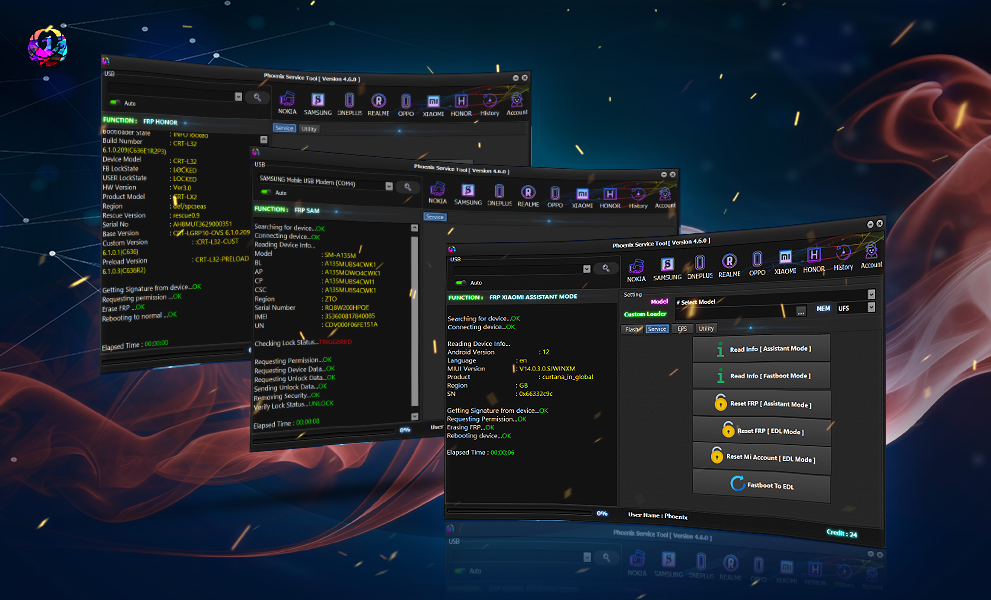
The smartphone repair industry is evolving quickly—new chipsets, improved security, and updated Android versions are making it harder for both users and technicians to fix software issues. That’s where the Phoenix Service Tool v7.0.6 Update comes in. The 2025 version of this widely trusted utility introduces enhanced compatibility, advanced unlocking options, and support for the newest Android 15 devices, making it a go-to solution for Infinix, Tecno, and other major brands.
Whether you’re a beginner, a professional technician, or running a mobile repair shop, this guide will help you understand everything about the latest update—including its features, supported devices, installation instructions, troubleshooting, pricing, and how to unlock or repair devices using the tool.
What Is Phoenix Service Tool v7.0.6 Update and Why It Is Needed?
Phoenix Service Tool v7.0.6 Update is the upgraded 2025 release of the professional smartphone repair tool designed for Android device servicing. It allows users to perform software-level operations such as:
- FRP removal
- Bootloader unlocking
- Network/Carrier unlocking
- IMEI repair (where legally permitted)
- Firmware flashing
- Factory reset & data recovery
- Security bypass functions

Why This Update Matters in 2025
The smartphone ecosystem is seeing major shifts:
- Android 15 introduces stricter bootloader and FRP security.
- New Infinix & Tecno 2024–2025 models use customized security layers.
- The increase in “Trigger_P7” related issues requires an updated fix.
- Many older tools fail on newer chipsets, especially MediaTek Dimensity series.
The Phoenix Service Tool v7.0.6 Update directly addresses these challenges by providing:
- Updated loaders and DA/SLA auth methods
- Faster processing
- Improved success rate for read/write operations
- Support for 2025 generation devices
This makes it essential for anyone involved in mobile phone repair or self-maintenance.
Key Features of Phoenix Service Tool v7.0.6 Update (Latest Version)
The 2025 upgrade introduces several enhancements. Below is a detailed list of the latest features included with Phoenix Service Tool v7.0.6.
1. Full Android 15 Compatibility
- Supports flashing, FRP removal, and unlocking on Android 15-powered devices.
- Now includes enhanced partition mapping for the latest firmware structures.
2. Updated Brand Library (Infinix, Tecno, iTel & More)
- Optimized DA/Boot files
- Refreshed security bypass model list
- Better detection for 2023–2025 devices
3. Phoenix Tool Trigger_P7 Fix
A major highlight of this update is the Trigger_P7 fix—it solves the widespread “Trigger_P7 error” triggered during:
- Authentication stages
- FRP unlocking
- Flashing operations
The tool now automatically patches the error for uninterrupted processing.
4. Improved FRP Removal (Faster + 98% Success Rate)
FRP (Factory Reset Protection) can be removed via:
- Fastboot
- ADB
- MTK Bypass Module
- Phoenix Smart FRP Module (new)
5. Network Unlock & Carrier Unlock
- Unlock 4G/5G network locks
- Disable carrier restrictions
- Fix “No Service” or “Emergency Calls Only” issues
6. IMEI Repair (Legal Regions Only)
- IMEI1/IMEI2 write
- Baseband fix
- Security patch repair
- QCN/Backup restore
Note: IMEI repair usage must comply with your country’s laws.
7. Flash & Format Options
- Scatter flash
- PAC flash
- Custom ROM flashing
- Safe format without data loss
- Firmware backup & restore
8. Enhanced UI & Fast Operations
- Cleaner dashboard
- Optimized device detection
- Real-time log tracking
Supported Devices and Brands
The Phoenix Service Tool v7.0.6 Update supports a wide range of devices from entry-level to flagship phones. Below is the updated list.
Supported Brands
- Infinix (Hot series, Note series, Smart series, Zero series)
- Tecno (Spark, Pova, Camon, Phantom)
- iTel full range
- Vivo (MTK models)
- Oppo (MTK models)
- Xiaomi/Sub-brands (Redmi, Poco – MTK variants)
- Realme (MTK)
- Nokia (MTK)
- Lava, Blu, Symphony, QMobile, Gionee
- All MediaTek (MTK) devices
Chipset Support
- MTK Helio series
- MTK Dimensity series
- Spreadtrum/Unisoc (partial)
- New 2025 secure boot chipsets
Operating System Versions Supported
- Android 8 to Android 15
Download & Installation Process
Downloading and installing Phoenix Service Tool v7.0.6 Update is simple if you follow each step carefully. Below is a complete guide.
Download Phoenix Service Tool v7.0.6 Update (2025)
Download Link:
👉 Contact via WhatsApp or Telegram below to receive the official download link and registration package.
Why You Need to Contact First?
Due to piracy and security issues, the developers provide verified download links only to registered users.
Step-by-Step Installation Guide
Follow these instructions to install the tool safely:
1. Extract the Downloaded Package
- Right-click the ZIP file
- Select Extract Here or Extract to
Ensure you disable antivirus temporarily (it may falsely flag flashing tools).
2. Install Required Drivers
Install the driver package included:
- MTK USB Drivers
- ADB/Fastboot Drivers
- Qualcomm drivers (optional)
Restart your PC after installation.
3. Run Phoenix Service Tool Setup
- Open the installer file
- Approve administrator permissions
- Follow on-screen instructions to install
Select installation folder (default recommended).
4. Launch the Software
Open the tool from your desktop or start menu.
How to Register & Activate Phoenix Service Tool v7.0.6
Registration is required before full access.
Activation Steps
- Open the tool.
- The tool will display a Login/Activation tab.
- Enter your Username, Email, and Registration Code.
- Click Activate.
- Wait for verification (1–2 minutes).
If you need a registration code, message via WhatsApp or Telegram.
How to Use Phoenix Service Tool v7.0.6 Update (Full Guide)
Below is a beginner-friendly and technician-friendly guide explaining how to perform common tasks.
. How to Perform FRP Unlock
FRP lock prevents unauthorized factory resets. Here’s how to remove it:
Steps:
- Launch the tool.
- Go to FRP Module.
- Connect the device in META Mode/Preloader Mode.
- Select brand → model.
- Click Remove FRP.
Methods Supported:
- MTK Bypass
- Fastboot FRP Removal
- ADB FRP Reset
Success rate is extremely high with the v7.0.6 update.
2. How to Perform Network Unlock
Steps:
- Open the Network Unlock tab.
- Select device model.
- Connect device (powered off → press Volume Up).
- Click Unlock Network.
Supports:
- 4G network lock
- 5G SA/NSA restrictions
- Carrier SIM lock issues
3. How to Repair IMEI (Where Legal)
Steps:
- Go to IMEI Repair.
- Insert IMEI numbers (from the device box).
- Connect device in META mode.
- Click Write IMEI.
Additional Features:
- Baseband fix
- NVRAM repair
- QCN backup/restore
Comparison with Other Tools (2025)
| Feature / Tool | Phoenix Service Tool v7.0.6 | SP Flash Tool | MRT Tool | CM2 MTK |
|---|---|---|---|---|
| Android 15 Support | ✔ Yes | ✘ No | ✔ Partial | ✔ Limited |
| Trigger_P7 Fix | ✔ Yes | ✘ No | ✘ No | ✘ No |
| FRP Unlock | ✔ Advanced | ✔ Basic | ✔ Medium | ✔ Good |
| Network Unlock | ✔ Full | ✘ | ✔ Partial | ✔ Partial |
| IMEI Repair | ✔ Yes | ✘ | ✔ Yes | ✔ Yes |
| Beginner Friendly | ✔ Very | Medium | Low | Medium |
| Update Frequency | ✔ High | Low | Medium | Medium |
Safety Tips & Legal Considerations
Before using Phoenix Service Tool v7.0.6 Update, keep the following in mind:
1. Use Only on Devices You Own or Have Permission For
Unauthorized unlocking is illegal.
2. IMEI Repair May Be Restricted
Only repair IMEI if your region legally permits it.
3. Backup Before Flashing
Always create a full backup to avoid data loss.
4. Use Official Firmware
Avoid modified/custom ROMs unless you fully understand the risk.
5. Avoid Pirated Versions
They are unsafe & may contain malware.
Troubleshooting Common Errors
| Error | Cause | Solution |
|---|---|---|
| Trigger_P7 Error | Security mismatch | Use built-in Trigger_P7 Fix in v7.0.6 |
| Device Not Detected | Drivers missing | Reinstall MTK drivers, reboot |
| Authentication Failed | Unsupported loader | Select correct DA or use Automatic Detect |
| Tool Crashing | Antivirus blocking | Disable antivirus temporarily |
| Unlock Failed | Wrong mode | Try META → Preloader → BROM mode |
If you still face issues, contact support via WhatsApp/Telegram.
Pricing & Subscription Plans
Note: Pricing may vary by region. Contact support to get an updated quote.
Available Plans
| Plan Name | Software Access | Credits Included | Credit Usage | Best For |
|---|
| Starter Pack | Free | 50 Credits | Credits deducted per service | New users, testing purpose |
| Standard Pack | Free | 100 Credits | Pay-per-credit usage | Small repair shops |
| Professional Pack | Free | 250 Credits | Credits used based on service type | Technicians |
| Advanced Pack | Free | 500 Credits | Credits required for premium services | Busy repair centers |
| Business Pack | Free | 1000+ Credits | Credits consumed per action, refill anytime | High-volume service centers |
All plans include:
- Updates (including new device loaders)
- Activation support
- Access to community group
FAQs – Phoenix Service Tool v7.0.6 Update
1. Is Phoenix Service Tool v7.0.6 free?
No, it requires registration. You can get the download link via WhatsApp/Telegram.
2. Does it support Android 15?
Yes—full support included in this version.
3. Can beginners use this tool?
Yes, the interface is beginner-friendly.
4. Does it fix Trigger_P7 error?
Yes, the v7.0.6 update introduces a built-in fix.
5. Is IMEI repair legal?
Only if your country permits it.
6. What brands are supported?
Infinix, Tecno, iTel, MTK devices & more.
7. How do I get the activation code?
Contact support via WhatsApp or Telegram.
Final Thoughts + Download / Contact / Subscribe CTA
The Phoenix Service Tool v7.0.6 Update is one of the best 2025 solutions for smartphone software repair, unlocking, flashing, and FRP removal—especially for Infinix, Tecno, and other MTK devices. With Android 15 compatibility, advanced security bypass functions, and a stable performance boost, it is essential for technicians and repair businesses.
Why Buy from GsmRadix
- 100% genuine and verified firmware
- Official download mirror of UnlockTool 3 months
- Instant auto-delivery 24/7
- Secure checkout with fast technical support