Borneo Schematics Today Update delivers daily repair data and schematic solutions that help technicians repair mobile phones, laptops, and other smart devices quickly and accurately. Known globally for its detailed schematics, board diagrams, and tested solutions, Borneo Schematics has become a trusted daily tool for mobile repair professionals.
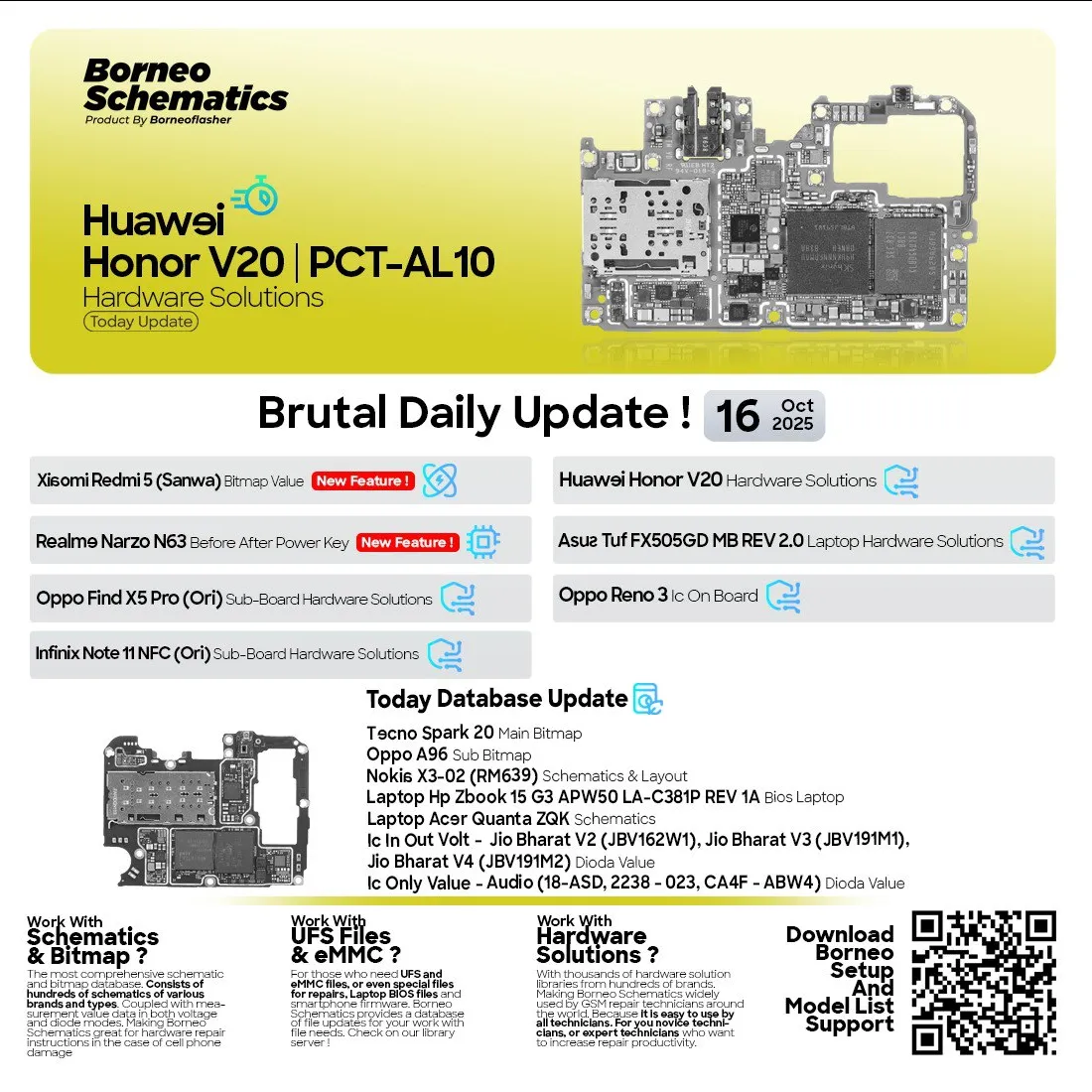
On October 16, 2025, another powerful brutal daily update was released, introducing multiple new solutions and supported devices. This update is specifically designed to keep technicians ahead of new hardware challenges in the repair market. Whether you are an individual technician or a professional repair shop, daily updates provide unmatched repair support and save valuable time during troubleshooting.
Why Daily Updates Are Important for Technicians
Mobile technology evolves rapidly, with new models being released almost every week. Technicians must stay updated to handle these new devices effectively. Borneo Schematics Today Update ensures that:
New device schematics and repair solutions are added daily
Common repair problems are solved faster with accurate diagrams
Shops and service centers can handle a larger range of devices
Technicians do not need to rely on outdated repair data
Productivity and turnaround time improve with up-to-date support
Consistent access to the latest schematics gives repair professionals a clear edge in this highly competitive market.

Latest Brutal Daily Update – October 16, 2025
The October 16, 2025 Borneo Schematics Today Update includes new models, hardware solutions, board diagrams, bitmap values, and schematic layouts.
Newly Added Devices
Huawei Honor V20 (PCT-AL10) Hardware Solutions
Realme Narzo N63 Before After Power Key On
Xiaomi Redmi 5 (Sanwa) Bitmap Value
Laptop Asus TUF FX505GD MB REV 2.0 Hardware Solutions
Oppo Find X5 Pro (Ori) Sub-Board Hardware Solutions
Infinix Note 11 NFC (Ori) Sub-Board Hardware Solutions
Oppo Reno 3 IC On Board
Tecno Spark 20 Main Bitmap
Oppo A96 Sub Bitmap
Samsung SM-A7 2016 (A710M) Schematic
Laptop HP Zbook 15 G3 APW50 LA-C381P REV 1A BIOS
Laptop Acer Quanta ZQK Schematics
Highlighted Hardware Solutions
IC In Out Volt – Jio Bharat V2, V3, V4
IC Only Value – Audio (318-ASD, 2238-023, CA4F-ABW4)
TOF 3D Depth Solutions
Touch Screen, NFC, Volume Keys, Network
CPU Volt and Dioda Mode Solutions
LCD and Camera Solutions
This update expands support for both smartphone and laptop repair technicians, ensuring maximum coverage and updated solutions.
Supported Brands and Device Types
Brand | Supported Categories | Example Models |
|---|---|---|
Huawei | Full schematics, FRP, hardware solutions | Honor V20 |
Xiaomi | Bitmap, schematic updates | Redmi 5 |
Realme | Power key and sub-board updates | Narzo N63 |
Oppo | Board and IC solutions | Find X5 Pro, Reno 3 |
Infinix | Sub-board updates | Note 11 NFC |
Samsung | Full schematics | SM-A7 2016 |
Tecno | Bitmap and layout | Spark 20 |
Laptops | Schematics, BIOS, layouts | Asus, HP Zbook, Acer Quanta series |
The variety of devices and brands covered reflects the growing demand for multi-brand repair capabilities in the global GSM market.
How Borneo Schematics Updates Work
Borneo Schematics has built a real-time update system to ensure technicians always get the latest schematics and diagrams.
Real-Time Database Refresh
New devices and solutions are uploaded directly to the cloud database.
Technicians can access them instantly after login.
Updates include hardware schematics, board values, and bitmap data.
The system ensures daily synchronization without manual updates.
How to Access Updates
Log in to your licensed Borneo Schematics account.
Navigate to the “Today Update” section.
Select the latest update by date.
Access device-specific solutions, schematics, and diagrams.
No reinstallation or manual downloading required.
This structure allows technicians to focus on actual repair work rather than wasting time searching for data.
Download and Access Guide
Step-by-Step Installation
Download the official installer from the authorized distributor.
Install the software on your Windows PC.
Launch the application after installation.
Log in with your license credentials.
The update will appear automatically once connected to the internet.
How to Activate Your Account
Purchase a valid license from an authorized reseller.
Receive your Activation Code After that You will do Register.
Log in to the software.
Automatic activation and instant access to daily updates.
How Technicians Use Borneo Schematics
Borneo Schematics has simplified the entire repair process. Technicians rely on it for multiple use cases:
Hardware Repair Assistance
Accurate schematics help identify faulty components quickly.
Circuit diagrams reduce repair trial and error.
Voltage maps and pin details enable faster diagnosis.
Bitmap and Board Solutions
Bitmap files help locate exact IC and component positions.
Sub-board solutions reduce board-level troubleshooting time.
Works effectively for both smartphones and laptops.
Borneo Schematics Today Update enhances repair precision and reduces turnaround time for every repair job.
Comparison with Other Tools
Feature | Borneo Schematics Today Update | Other Tools |
|---|---|---|
Daily Updates | Yes | Limited or Monthly |
Supported Brands | Multi-brand | Restricted |
Bitmap and Board Diagrams | Comprehensive | Partial |
Real-Time Sync | Yes | Manual Updates |
Technician Friendly | Easy | Moderate or Complex |
Borneo Schematics consistently outperforms most other platforms when it comes to daily update frequency and real-time support.
Legal and Safety Notes
Always use Borneo Schematics for legal repair and service purposes.
Purchase licenses only from official or authorized resellers.
Avoid sharing your login credentials.
Follow local regulations for unlocking and hardware servicing.
Keep your software updated for maximum security.
Troubleshooting Common Errors
Issue | Cause | Solution |
|---|---|---|
Login Failed | Incorrect credentials | Check your username and password |
Activation Error | License expired | Renew or extend your subscription |
Database Not Loading | Poor internet connection | Check and reconnect your internet |
Installation Error | Missing files or antivirus blocking | Reinstall and disable antivirus during setup |
Update Not Showing | Outdated version | Restart or update your software |
Pricing Plans and Subscription Options
Plan Type | Duration | Users | Access Type | Ideal For |
|---|---|---|---|---|
1 User | 6 Months | 1 | Full | Individual Technicians |
2 Users | 6 Months | 2 | Full | Small Shops |
1 User | 12 Months | 1 | Full | Professional Technicians |
Multi-User | Custom | Team | Full | Service Centers and Enterprises |
Subscriptions include access to all Borneo Schematics Today Updates during the active license period.
Frequently Asked Questions (FAQ)
1. What is Borneo Schematics Today Update?
It is a daily update system providing the latest schematics, bitmaps, board solutions, and hardware repair data for smartphones and laptops.
2. How often are updates released?
Updates are released every day, ensuring technicians always have access to the latest repair data.
3. Which brands are supported?
Major brands such as Huawei, Xiaomi, Realme, Oppo, Infinix, Samsung, Tecno, and popular laptop models.
4. Is the software beginner friendly?
Yes. Even entry-level technicians can easily navigate and use the tool.
5. Do I need to reinstall the software to get updates?
No. Updates are synchronized automatically with your account.
6. Can I use the same license on multiple devices?
License terms depend on the plan. Check with your authorized reseller for multi-user licenses.
Final Thoughts and CTA
Borneo Schematics Today Update is more than just a schematic database. It is a daily support system built for modern repair technicians who need fast, reliable, and up-to-date solutions. With brutal daily updates, it ensures that no device or brand is left behind.
To access the latest update, simply:
Purchase your license from an authorized reseller.
Log in to the software.
Navigate to Today Update.
Start repairing with the newest schematics and solutions.
Technicians who update daily can handle more repairs, deliver faster service, and build stronger trust with customers.
Why Buy from GsmRadix
100% genuine and verified firmware
Official download mirror of BorneoSchematics
Instant auto-delivery 24/7
Secure checkout with fast technical support

Share this article
About the author