If you are searching for a trusted and powerful solution to remove Samsung FRP, bypass Samsung MDM Lock, repair IMEI, or unlock KG/RMM on the latest Samsung models, then the MDMFiXTool Samsung Update is exactly what you need. In 2025, Samsung security patches have become more advanced, making it harder for technicians and end users to unlock devices safely. MDMFiXTool is one of the few professional tools that still works smoothly on new Android versions and the latest Knox-secured devices.
Whether you’re an individual user stuck on FRP lock, or a repair shop owner handling dozens of unlock cases every week, this guide will help you understand:
What MDMFiXTool does
Why the 2025 Samsung update is important
How to install and activate the tool
How to use it for FRP, MDM, KG, and network unlock
Pricing, troubleshooting, FAQs
And most importantly—how to download and get support via WhatsApp & Telegram
Let’s begin.
What is MDMFiXTool Samsung Update and Why It’s Needed?
The MDMFiXTool Samsung Update is a professional Android servicing software specially designed for Samsung devices. It allows users to fix security-related issues such as:
MDM (Mobile Device Management) lock
FRP (Factory Reset Protection)
KG Locked / RMM State
Samsung Factory Reset Errors
Network lock
IMEI-related issues
System repair operations
Samsung devices running Android 8 to Android 14 often come with advanced security frameworks like Knox, FRP, and enterprise MDM profiles. When these locks are triggered, normal users cannot use their phones, and technicians cannot flash custom binaries easily.
This is where MDMFiXTool becomes essential.
Why the latest 2025 Samsung update is important?
Supports newest security patches
Works with new Samsung models (A14, A34, A54, S21 FE, S22/S23 series)
Updated MTP-based FRP bypass
Improved KG/RMM bypass
Stabilized ADB/Download mode operations
Faster authentication and more reliable drivers
The latest MDMFiXTool Samsung MDM Bypass update makes the unlocking process easier, faster, and compatible with more models.
Key Features of MDMFiXTool Samsung Update (Latest Version 2025)
1. Samsung FRP Remove Tool Update
Remove Google account lock (FRP) using:
MTP mode
ADB mode
Emergency call method
Browser installation method
2. Samsung MDM Unlock / MDM Remove
Removes corporate/enterprise MDM profiles
Fixes “Device belongs to an organization” issue
Works on new patch levels of Android 13 & 14
3. Samsung KG Lock Remove Tool
Fixes KG Locked status
Removes “KG Locked – Status: Prenormal”
Allows flashing custom firmware
4. IMEI Repair & Baseband Fix
Repair IMEI (where legal)
Fix baseband and network issues
Restore null IMEI, no service problems
5. One-Click Operations
Factory reset
FRP erase
DATA wipe
CSC change
EFS backup and restore
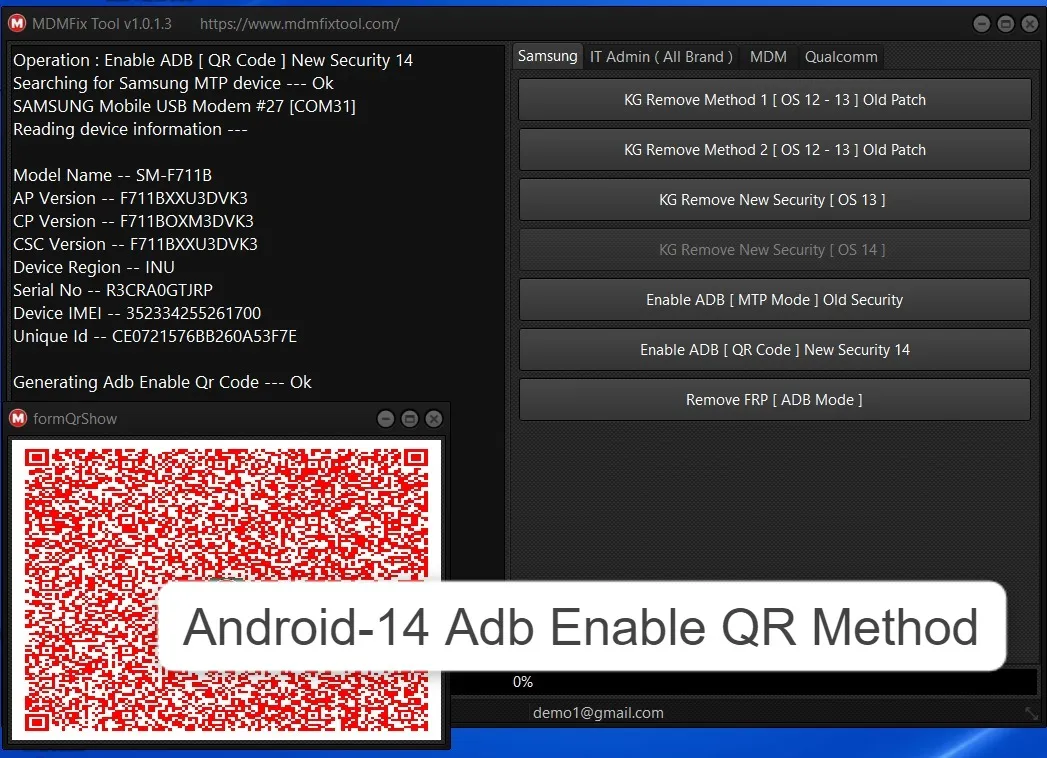
6. Full ADB + MTP Support
Works without flashing
Faster than traditional methods
7. Regular Updates
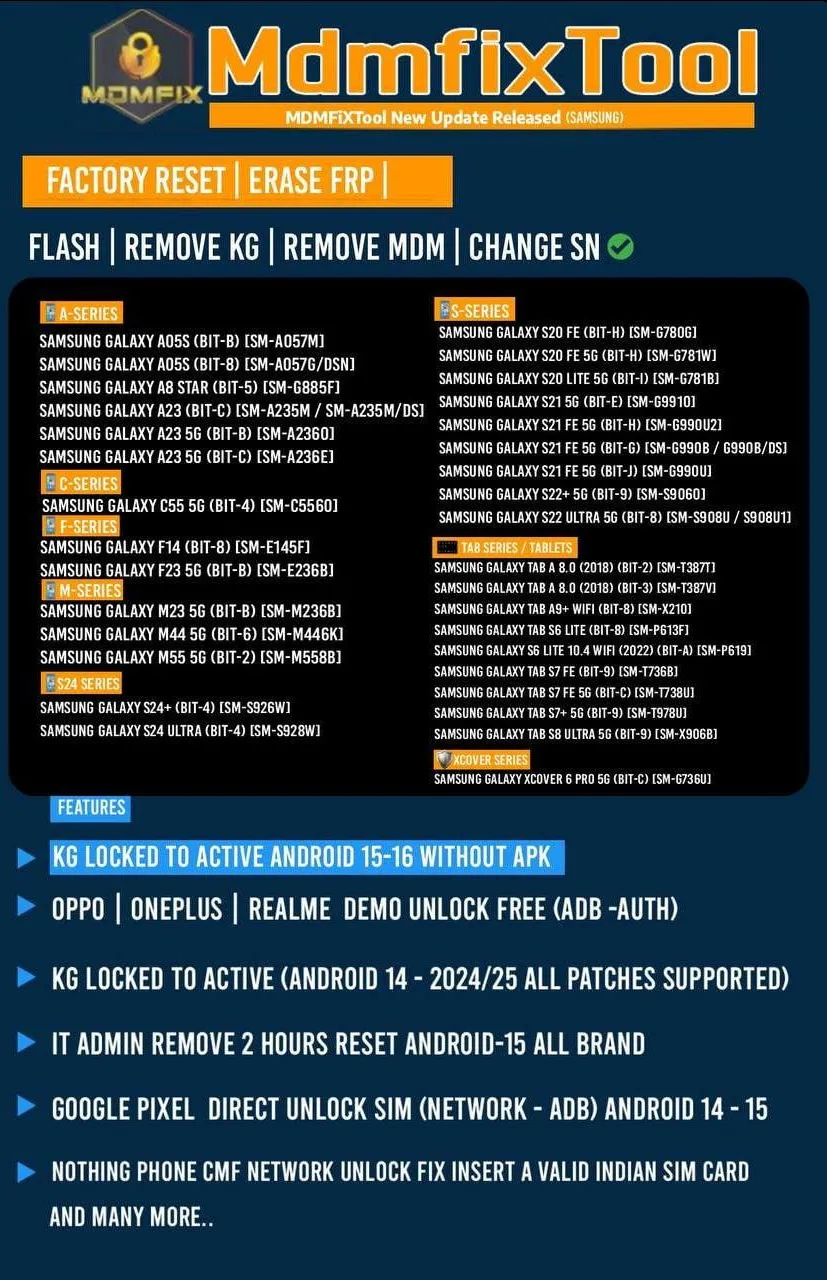
The MDMFixTool Update Log shows new devices added every month.
Supported Devices and Brands
Samsung All Series Supported
Samsung A Series (A10–A55)
Samsung M Series
Samsung F Series
Samsung S Series (S8–S23+ / S23 Ultra+)
Samsung Note Series
Samsung Tab Series
Supported Android Versions
Android 7
Android 8
Android 9
Android 10
Android 11
Android 12
Android 13
Android 14 (Latest updates supported)
Step-by-Step Installation Guide
1. Download the Installer
After contacting support, you will receive:
Setup file
Drivers pack
Activation instructions
2. Install Samsung USB Drivers
This ensures proper MTP/ADB communication.
3. Run MDMFiXTool Setup
Right click → Run as Administrator
Allow Windows Defender
Complete standard installation
4. Disable Antivirus Temporarily
Samsung unlock tools sometimes trigger false positives.
5. Open the Software
Once installed, launch it from the desktop.
How to Register and Activate MDMFiXTool
Registration is simple and handled by the official support team.
Activation Steps
Step | Description |
|---|
1. Download Software | First, download the software to your PC. |
2. Register Inside the Tool | Open the tool and complete the registration process using your email. |
3. Send Registered Email on WhatsApp | Send your registered email ID to our official WhatsApp support team. |
4. Team Activates Your Email/Account | Our team will verify and activate your account/email in the system. |
5. Activation Completed | After activation, restart the software — your MDMFiXTool Samsung Update will be fully active. |

How to Use MDMFiXTool Samsung Update
Below are beginner-friendly and technician-level guides.
1. Samsung FRP Unlock (Factory Reset Protection)
Method 1: MTP-based FRP Bypass
Connect phone in normal mode (MTP on)
Open MDMFiXTool
Select Samsung FRP Remove
Click Send Command
Tool automatically pushes the FRP unlock exploit
Phone will open browser or settings → unlock FRP
Method 2: ADB FRP Remove
If ADB is enabled:
Connect device
Select ADB FRP Remove
Wait for reboot
2. Samsung MDM Unlock (Remove Device Owner)
Supported for:
Knox MDM
Enterprise Setup
“This device belongs to your organization”
Steps:
Put device in Download Mode or ADB Mode
Open MDMFiXTool Samsung MDM Bypass section
Click Remove MDM
Device reboots and MDM profile is removed
3. Network Unlock (Carrier Unlock)
Supports:
AT&T
Verizon
Sprint
T-Mobile
Global models
Steps:
Insert USB & enable debugging
Select Network Unlock
Tool sends unlock patch
Device becomes factory unlocked
4. IMEI Repair, Baseband Fix & Other Services
Repair IMEI (where legal)
Fix no network
Restore baseband
Fix NV data corruption
EFS backup & restore
Comparison with Other Samsung Unlock Tools (Table)
Feature / Tool | MDMFiXTool Samsung Update | Odin | SamFW Tool | Chimera |
|---|---|---|---|---|
FRP Remove | ✔️ Advanced | ❌ Limited | ✔️ | ✔️ |
MDM Bypass | ✔️ Yes | ❌ | ❌ | ✔️ (paid) |
KG Lock Fix | ✔️ | ❌ | ❌ | ✔️ |
IMEI Repair | ✔️ | ❌ | ❌ | ✔️ (premium) |
ADB/MTP Support | ✔️ | ❌ | ✔️ | ✔️ |
Cost | Affordable | Free | Free | Expensive |
Safety Tips and Legal Considerations
Use the tool only on devices you own or have permission to unlock
IMEI repair may be restricted in some countries
Avoid illegal unlocking or removing security without consent
Always back up user data before unlocking
Use official firmware and trusted downloads
Troubleshooting Common Errors
1. Device Not Detected
Reinstall Samsung USB drivers
Try different USB cable
Enable USB Debugging
2. ADB Not Working
Turn on Developer Options
Allow RSA Authorization
Try another PC port
3. FRP Not Removing
Try alternate FRP method
Update to the latest MDMFiXTool version
4. KG State Remains Locked
Flash combination firmware
Re-run KG remove option
5. Tool Not Opening
Disable antivirus
Reinstall .NET Framework
Open as Administrator
Pricing and Subscription Plans
MDMFiXTool Samsung Update 2025 Pricing
1 Month License – Affordable for beginners
3 Month License – Best for small shops
1 Year License – Full access & updates
Lifetime (if available) – One-time payment
Includes:
Regular updates
All Samsung services
FRP + MDM unlock
WhatsApp/Telegram support
Contact for pricing:
WhatsApp: wa.me/917302252300
Telegram: https://t.me/GsmRadix
FAQs – MDMFiXTool Samsung Update
1. Is MDMFiXTool free?
No, it is a paid professional tool.
2. Does it work on Android 14 Samsung models?
Yes, the latest 2025 update supports Android 14.
3. Can it remove MDM lock for company devices?
Yes, but only if you have authorization.
4. Does MDMFiXTool remove FRP in one click?
Yes, via MTP, ADB, and browser-based methods.
5. How do I activate the tool?
Send your HWID to support → make payment → receive activation.
6. Can repair shops use this tool commercially?
Absolutely. It is designed for high-volume technicians.
7. Is this tool safe?
Yes, as long as you download from official support.
8. Where can I get updates?
Monthly updates are provided via Telegram.
Final Thoughts + Download / Contact / Subscribe CTA
The MDMFiXTool Samsung Update 2025 is one of the most reliable and affordable solutions for Samsung FRP, MDM bypass, KG lock removal, and IMEI/network repair. For technicians, it saves time and increases revenue. For normal users, it provides a hassle-free way to unlock Samsung devices without complicated flashing.

Share this article
About the author