Factory Reset Protection (FRP) is a security feature designed by Google to protect Android devices from unauthorized access. While FRP is useful for security, it often becomes a major problem for legitimate users and professional technicians when the original Google account credentials are forgotten or unavailable.
This is especially true for flagship gaming smartphones like the ZTE Nubia RedMagic 11 Pro, which runs on the latest Android 16 and Qualcomm hardware. Many users face Google lock issues after a reset, firmware update, or motherboard repair. In such cases, Remove FRP ZTE Nubia RedMagic 11 Pro becomes a critical solution.
This detailed guide explains everything you need to know about Remove FRP ZTE Nubia RedMagic 11 Pro, including features, supported models, installation steps, activation, usage, troubleshooting, pricing, and legal considerations. Whether you are an individual device owner or a professional mobile repair technician, this article is written to help you solve FRP issues safely and effectively.
What Is Remove FRP ZTE Nubia RedMagic 11 Pro and Why It Is Needed
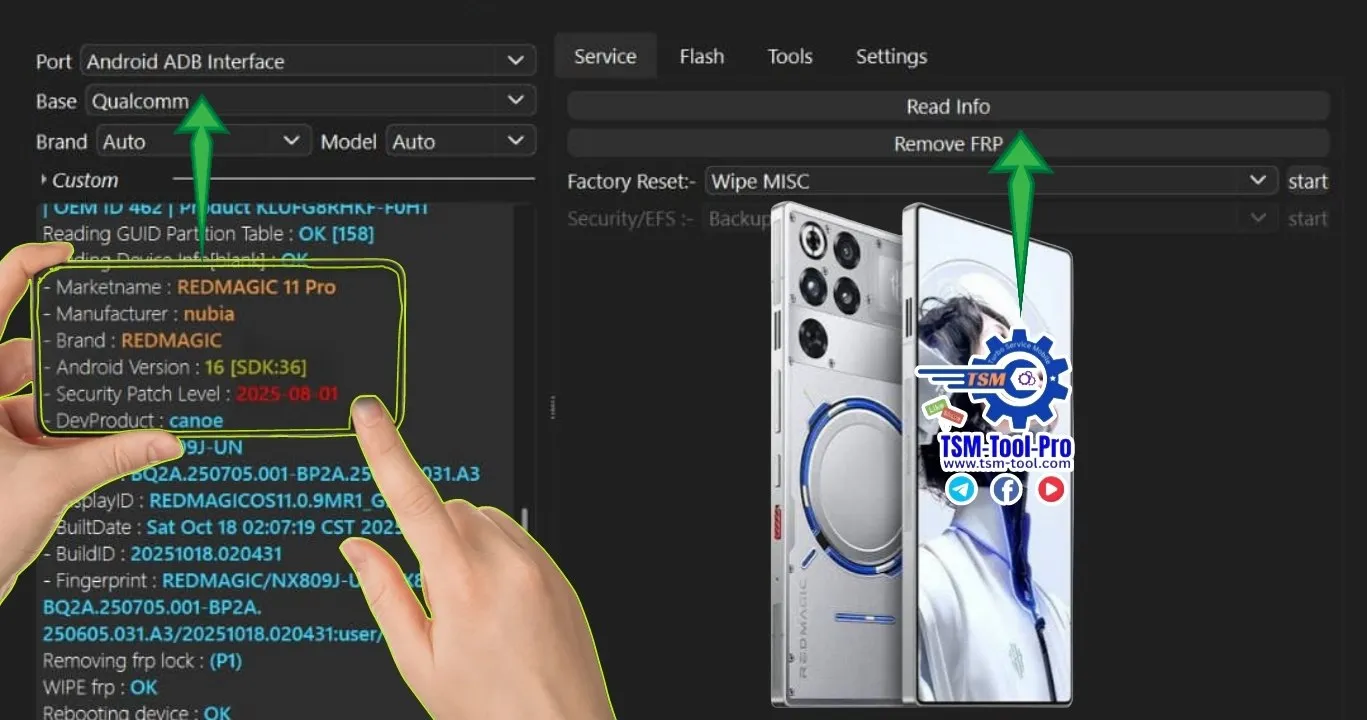
Remove FRP ZTE Nubia RedMagic 11 Pro refers to the professional process or software method used to bypass or unlock the Google FRP lock on the RedMagic 11 Pro (Model NX809J).
FRP activates automatically when:
A Google account is added to the phone
The device is factory reset without removing the account
Firmware is flashed or updated
The motherboard or memory chip is replaced
After reset, the phone asks for the previously synced Google account. Without it, the device becomes unusable.
Why FRP Removal Is Needed
FRP removal is required in situations such as:
Forgotten Google ID or password
Second-hand device purchase
Dead email or inaccessible recovery phone number
Software corruption after flashing
Repair shop testing after hardware replacement
In all these cases, ZTE Nubia RedMagic 11 Pro FRP Remove solutions help restore access legally for rightful owners.
Key Features of Remove FRP ZTE Nubia RedMagic 11 Pro (Latest Version)
The latest Remove FRP ZTE Nubia RedMagic 11 Pro 2026 solution comes with advanced compatibility and fast execution.
Core Features
Supports Android 16 FRP Unlock
Qualcomm-based EDL mode operation
Works on ZTE Nubia NX809J
Extremely fast FRP removal (under 10 seconds in most cases)
No data cable disconnection during process
Safe and non-destructive method
Compatible with latest security patch (2025-08-01)
Designed for both users and technicians
Professional-Level Benefits
Ideal for repair shops handling bulk devices
Stable performance on Windows systems
Registration-based licensed access
Reduces manual FRP bypass errors
Supports multiple models and brands
This makes it one of the best Remove FRP ZTE Nubia RedMagic 11 Pro tools available in 2026.
Supported Devices and Brands
Although this guide focuses on Remove FRP ZTE Nubia RedMagic 11 Pro, most professional tools also support multiple brands.
ZTE / Nubia Devices
ZTE Nubia RedMagic 11 Pro
Nubia gaming series
ZTE Qualcomm-based smartphones
Other Supported Brands (Tool Dependent)
Xiaomi
Samsung
Vivo
Oppo
Realme
Huawei (selected models)
Always confirm model and chipset compatibility before starting FRP removal.
Download and Installation Process
To safely Remove FRP ZTE Nubia RedMagic 11 Pro, always download tools from trusted or official sources.
System Requirements
Windows 10 or Windows 11 (64-bit)
Minimum 8 GB RAM recommended
Qualcomm USB drivers installed
Stable USB cable
Internet connection for activation
Step-by-Step Installation Guide
Download the official FRP removal software package.
Disable antivirus temporarily (some tools are falsely flagged).
Extract the downloaded ZIP file.
Run the installer as Administrator.
Complete installation and reboot your PC.
Install Qualcomm USB drivers if not already installed.
How to Register and Activate
Most professional mobile unlock programs require activation.
Open the installed software.
Click on “Register” or “Login”.
Enter your username and license key.
Connect to the internet.
Wait for activation confirmation.
After activation, the software becomes fully functional for ZTE Nubia FRP Unlock Android 16.

How to Use Remove FRP ZTE Nubia RedMagic 11 Pro
This section explains usage for both normal users and technicians.
For Individual Device Owners
Power off the RedMagic 11 Pro.
Boot the device into EDL mode (test point or hardware method).
Connect the phone to PC via USB.
Open the FRP removal software.
Select “ZTE Nubia RedMagic 11 Pro”.
Click “Remove FRP”.
Wait for the process to complete.
Reboot the device and set up without Google lock.
For Professional Technicians / Repair Shops
Technicians can handle bulk devices efficiently.
Use stable EDL connection methods
Verify model NX809J before operation
Maintain customer authorization records
Combine FRP removal with firmware repair
Offer fast turnaround services
This makes RedMagic 11 Pro EDL FRP Remove ideal for commercial use.
IMEI Repair and Other Services
Some advanced tools also offer:
IMEI repair (region-dependent)
Boot repair
Firmware flashing
Baseband restoration
Network unlock features
Always follow local laws when using IMEI-related services.
Comparison with Other Tools
Feature | Remove FRP ZTE Nubia RedMagic 11 Pro Tool | Generic FRP Tools |
|---|---|---|
Android 16 Support | Yes | Limited |
Qualcomm EDL Mode | Yes | Often No |
Speed | Very Fast | Medium |
Stability | High | Unstable |
Professional Use | Yes | Not Recommended |
NX809J Support | Full | Partial |
This comparison clearly shows why Best Remove FRP ZTE Nubia RedMagic 11 Pro 2026 solutions outperform generic tools.
Safety Tips and Legal Considerations
FRP removal must be done responsibly.
Safety Tips
Backup device data if accessible
Use original USB cables
Avoid interrupted power supply
Do not flash incorrect firmware
Legal Considerations
Perform FRP removal only on legally owned devices
Obtain customer consent in repair shops
Do not bypass security on stolen devices
Follow regional mobile repair regulations
Responsible usage protects both users and businesses.
Troubleshooting Common Errors
Device Not Detected
Reinstall Qualcomm drivers
Try another USB port
Check EDL mode properly
FRP Removal Failed
Verify Android version
Confirm model NX809J
Update software to latest version
Software Not Opening
Run as Administrator
Disable antivirus temporarily
Install missing runtime libraries
Most issues can be resolved with correct setup.
Pricing and Subscription Plans
Pricing varies depending on provider and license type.
Common Plans
Single-use license
Monthly subscription
Yearly technician plan
Unlimited shop license
Professional repair shops benefit most from long-term subscriptions.
Frequently Asked Questions (FAQs)
Is Remove FRP ZTE Nubia RedMagic 11 Pro safe?
Yes, when used correctly on legally owned devices.
Does it support Android 16?
Yes, the latest versions fully support Android 16.
Can beginners use this tool?
Yes, the interface is user-friendly with guided steps.
Is internet required?
Yes, for registration and activation.
Does it erase data?
FRP removal itself does not erase additional data, but factory reset data is already removed.
Why Buy from GsmRadix
100% genuine and verified firmware
Official download mirror of TSM PRO TOOL
Instant auto-delivery 24/7
Secure checkout with fast technical support

Share this article
About the author