If you recently reset your Samsung A12 and now face a Google account verification screen, you’re experiencing FRP lock. The Samsung A12 FRP Unlock process is essential for regaining access to your device after a factory reset.
Factory Reset Protection (FRP) is a security feature introduced by Google to prevent unauthorized access to lost or stolen devices. However, legitimate users often face issues when they forget their Google ID or buy a pre-owned phone. This guide will help you safely remove FRP from Samsung A12 using the latest and most reliable tools like Cheetah Tool Pro.
What is Samsung A12 FRP Unlock and Why It Is Needed
Factory Reset Protection (FRP) is automatically activated when you sign in with a Google account on an Android phone. After a factory reset, the phone requires the same Google account credentials before it can be used again.
Samsung A12 FRP Unlock is the process of removing this Google verification lock. It is required when:
You forget your Google account ID or password
You purchase a second-hand Samsung A12
You flash new firmware or repair your phone
You are a technician assisting customers with FRP-locked phones
FRP unlock restores full access to your Samsung A12, allowing you to use the phone normally again.
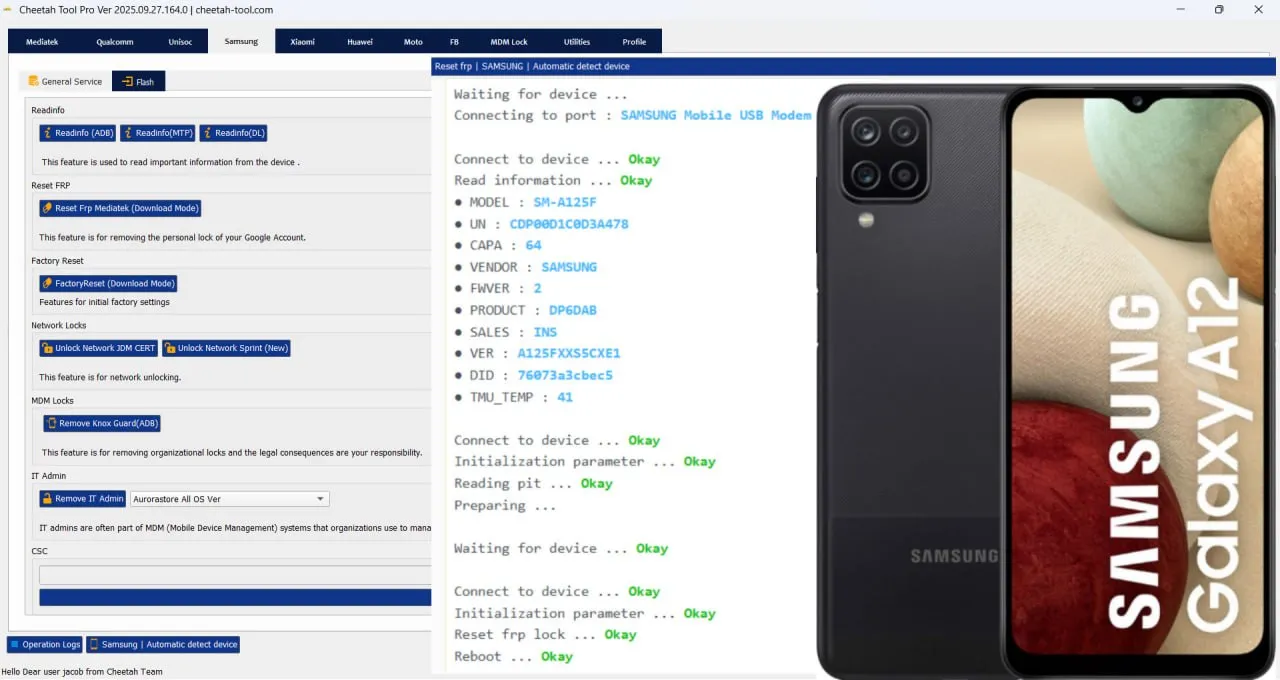
Key Features of Samsung A12 FRP Unlock (Latest Version)
The latest Samsung A12 FRP Unlock tools offer the following features:
Automatic device detection in Download Mode
One-click FRP reset function
Compatibility with Android 11 to Android 13
Safe and secure unlocking without data loss
Full MediaTek chipset support
Offline activation available after registration
Automatic software updates for new security patches
Supported Devices and Brands
Although this guide focuses on Samsung A12 (SM-A125F), most professional FRP tools like Cheetah Tool Pro support multiple brands and models.
Brand | Supported Models | Chipsets |
|---|---|---|
Samsung | A12, A13, A14, M12, M13, M14 | MediaTek / Exynos |
Xiaomi | Redmi Note, Poco Series | Qualcomm / MediaTek |
Vivo | Y Series | MediaTek |
Oppo | A Series | Snapdragon / MediaTek |
Realme | Narzo Series | MediaTek |
This wide compatibility makes it an ideal choice for both home users and repair technicians.
Download and Installation Process
Follow these steps to download and install the Samsung A12 FRP Unlock tool safely.
Step-by-Step Installation Guide
Download the latest Cheetah Tool Pro setup from the official website or a trusted reseller.
Extract the downloaded ZIP file to a new folder.
Run the installer file (CheetahToolProSetup.exe) and follow the on-screen instructions.
Install Samsung USB drivers and MediaTek VCOM drivers.
Launch the software as an administrator.
Login or register to activate your license.
How to Register and Activate
Visit the official activation page or contact an authorized reseller.
Copy your hardware ID (HWID) displayed on the screen.
Complete your payment for the selected plan.
Receive your activation key via email or WhatsApp.
Enter the key and restart the software to unlock full access.
How to Use Samsung A12 FRP Unlock (for Owners and Technicians)
After installation and activation, you can start using the tool to unlock FRP or perform other services.
FRP Unlock Process
Power off the Samsung A12.
Boot into Download Mode by pressing Volume Down + Volume Up while connecting the USB cable.
Open the Cheetah Tool Pro software.
Select Samsung → FRP Reset (MTK).
Click Start to begin the process.
The tool will automatically detect your device and remove the FRP lock.
Wait for the device to reboot without the Google verification screen.
Network Unlock
If your Samsung A12 is locked to a specific network carrier, you can also perform a network unlock:
Select Samsung Network Unlock (MTK) in the software.
Connect the phone in Download Mode.
Click Unlock and wait for the confirmation message.
Restart your phone and insert any SIM card.
IMEI Repair and Other Services
Professional users can also use the same tool for:
IMEI repair and restoration
Pattern or PIN reset
Reading and writing firmware
Rebooting devices into ADB, EDL, or BROM mode
Device information and diagnostic reading
These advanced functions make it one of the best Samsung A12 FRP Unlock tools available in 2025.
Comparison with Other Tools
Feature | Cheetah Tool Pro | SamKey | Octoplus FRP |
|---|---|---|---|
Auto Detection | Yes | No | Yes |
MediaTek Support | Yes | No | Yes |
FRP Unlock (A12) | Yes | Yes | Yes |
Network Unlock | Yes | Yes | Yes |
Price | Affordable | Medium | High |
Offline Activation | Yes | No | No |
Cheetah Tool Pro stands out for its affordable pricing and broad chipset compatibility.
Safety Tips and Legal Considerations
Only unlock FRP on devices that you own or have permission to service.
Avoid using cracked or pirated tools, as they can damage your phone.
Always install official drivers and software.
Backup your phone data when possible.
Using FRP unlock tools for stolen phones is illegal.
Technicians should always maintain proof of customer authorization for compliance.
Troubleshooting Common Errors
Issue | Cause | Solution |
|---|---|---|
Device not detected | Missing drivers | Reinstall Samsung USB and MTK drivers |
FRP reset failed | Outdated version | Update to the latest tool version |
Stuck on “Detecting” | Faulty cable | Use original USB cable |
Activation error | Invalid key | Contact reseller for help |
FRP returns after reboot | Partial unlock | Repeat full FRP reset |
Pricing and Subscription Plans
Plan | Duration | Features | Approx. Cost |
|---|---|---|---|
Trial | 1 Day | Basic FRP unlock | Free / Low cost |
Monthly | 3 Month | FRP + network unlock | $25–$30 |
Pro | 6 Months | All features | $30–$40 |
Full Access | 12 Months | Unlimited updates | $40–$50 |
Pricing may vary by reseller and payment method.
FAQs – Samsung A12 FRP Unlock
Q1. Is Samsung A12 FRP Unlock safe to use?
Yes, as long as you use genuine software like Cheetah Tool Pro.
Q2. Can I unlock FRP without a PC?
Not recommended for Android 12 and above. Use a computer for reliable results.
Q3. What should I do if my device is not detected?
Reinstall drivers and use another USB port.
Q4. Does it support Android 13?
Yes, newer versions of Cheetah Tool Pro support Android 13 firmware.
Q5. Can I unlock carrier-locked phones too?
Yes, the tool supports network unlock for many Samsung models.
Q6. Is FRP unlocking legal?
Yes, only for devices you own or have written customer consent for.
Final Thoughts, Download, and Contact
The Samsung A12 FRP Unlock process is now simpler than ever. Using the right software such as Cheetah Tool Pro, both regular users and professional technicians can easily remove FRP, reset phones, or perform IMEI repairs.
If you are a repair shop owner or mobile technician, investing in a professional FRP tool can save time and increase your service reliability.
To get started:
Download the latest version of Cheetah Tool Pro.
Register for activation and follow the steps above.
Contact our support team via WhatsApp or Telegram for setup assistance.
Subscribe to our newsletter for new updates and FRP unlocking guides
Why Buy from GsmRadix
100% genuine and verified firmware
Official download mirror of Cheetah Pro Tool
Instant auto-delivery 24/7
Secure checkout with fast technical support

Share this article
About the author