


In the fast-evolving world of mobile phone servicing, reliable and updated software is crucial. Whether you’re an independent technician, a mobile repair shop, or an advanced user, having the right unlocking tool can make your job faster, safer, and more profitable.
That’s where Sigma Plus v.1.01.03 comes in.
The Sigma Plus v.1.01.03 update has become one of the most talked-about releases of 2025, thanks to its improved support for Samsung FRP Remove, Qualcomm FRP, Exynos 1480 & 2200 chipsets, and advanced functions like Read/Write Backup for Exynos devices. This article provides a complete guide — from installation and activation to advanced usage and troubleshooting — to help you make the most of Sigma Plus.
What is Sigma Plus v.1.01.03 and Why It Is Needed
Sigma Plus v.1.01.03 is an advanced mobile servicing software developed to simplify and speed up FRP unlocking, network unlocking, and IMEI repair on Android smartphones. It is widely used by professional mobile phone repair centers, GSM service providers, and individual technicians.
Why Technicians Choose Sigma Plus:
- Wide chipset support — Qualcomm, Exynos, and MediaTek.
- One-click FRP & network unlock for major brands.
- Regular updates keep the tool compatible with the latest security patches.
- Time efficiency for busy service centers.
In 2025, Samsung FRP remove has become more challenging due to new security layers, and Sigma Plus v.1.01.03 is among the few tools that can handle Exynos 1480 and 2200 chipsets with stability and precision.
Key Features of Sigma Plus v.1.01.03 (Latest Version)
The Sigma Plus v.1.01.03 update brings a number of new features and enhancements. Below are the highlights:
1. Powerful FRP Unlock
- Supports Samsung, Huawei, Xiaomi, Oppo, Vivo, and more.
- Bypass FRP Lock on latest Android security patches.
- Qualcomm FRP unlock support with stable connection.
2. Exynos Advanced Functions
- Read / Write Backup support for Exynos 2200 and Exynos 1480.
- Improved stability during FRP and network operations.
3. Network Unlock
- Remove carrier locks in seconds.
- Works with popular operators and international devices.
4. IMEI Repair & Baseband Fix
- Advanced IMEI repair with legal guidelines.
- Baseband error fix for supported devices.
5. Latest UI and Better Stability
- Faster interface with minimal crashes.
- Compatible with Windows 10 and 11.
6. Regular Updates & Support
- Frequent updates similar to UnlockTool New Update pattern.
- Access to beta features before public release.
Supported Devices and Brands
Sigma Plus v.1.01.03 is compatible with a wide range of Android devices across multiple chipsets. Here are some examples:
| Brand | Chipset Support | Functions Supported |
|---|---|---|
| Samsung | Exynos 1480 / 2200 | FRP, Network Unlock, Read/Write Backup |
| Xiaomi | Qualcomm / MediaTek | FRP Unlock, IMEI Repair |
| Huawei | Qualcomm | FRP Unlock |
| Vivo / Oppo | Qualcomm / MTK | FRP Unlock, Network Unlock |
| Motorola / Others | Qualcomm | IMEI Repair, FRP Unlock |
Download and Installation Process
Installing Sigma Plus v.1.01.03 is simple and beginner-friendly. Follow these steps carefully to avoid errors.
Step-by-Step Installation Guide
- Download the latest version of Sigma Plus v.1.01.03 from the official or trusted reseller source.
- Extract the ZIP file to your desktop.
- Run the installer as Administrator.
- Follow the on-screen prompts and complete the installation.
- Allow Windows Defender or Antivirus exceptions (if prompted).
- Launch Sigma Plus from the desktop icon.
How to Register and Activate
- Launch the software.
- Click on “Register” to create your user account.
- Enter your valid email, password, and phone number.
- Confirm your activation link via email.
- Log in using your credentials.
- Enter the activation code (if you purchased from a reseller).
- Once activated, restart the software.
How to Use Sigma Plus v.1.01.03 (For Owners and Technicians)
Using the tool is straightforward and ideal for both new users and experienced professionals.
FRP Unlock with Sigma Plus v.1.01.03
- Connect the device to your PC using a good quality USB cable.
- Launch Sigma Plus and select FRP Unlock option.
- Choose your device brand and model.
- The software will detect the phone and display available functions.
- Click “Start FRP Unlock”.
- Wait for the process to complete — usually under 2 minutes.
- Reboot the device.
This version supports Samsung FRP remove on latest security patches including Exynos 1480 & 2200 chipsets.
Network Unlock
- Open Sigma Plus and select Network Unlock.
- Choose your device model.
- Connect via USB or fastboot mode.
- Follow the prompts to remove SIM lock.
- Restart the phone and insert any SIM card to test.
IMEI Repair and Other Services
- Select the IMEI Repair option.
- Connect your device (ADB/Download mode).
- Enter the new IMEI number (legally approved).
- Click on “Start Repair”.
- Wait for confirmation message.
Additional options:
- Read/Write Backup for Exynos devices
- Security patch bypass
- Device Info & Diagnostic panel
Comparison with Other Tools
| Feature | Sigma Plus v.1.01.03 | UnlockTool | UMT | Octoplus |
|---|---|---|---|---|
| FRP Unlock | Samsung, Qualcomm, Exynos | Yes | Yes | Yes |
| Exynos 2200 / 1480 Support | Full | No | No | Partial |
| IMEI Repair | Advanced & Stable | Yes | Yes | Yes |
| Read / Write Backup | Exynos Supported | No | No | No |
| UI & Speed | Fast | Medium | Medium | Medium |
| Pricing | Affordable | Moderate | Moderate | High |
Sigma Plus v.1.01.03 stands out in Exynos support and user-friendly UI, making it a top choice in 2025.
Safety Tips and Legal Considerations
- Always use the tool for authorized purposes.
- IMEI repair should comply with your country’s legal framework.
- Take a full Read/Write Backup before modifying system data.
- Never use cracked or pirated versions — they may contain malware.
- Maintain proper customer records if you’re a repair shop.
Troubleshooting Common Errors
| Error Message | Cause | Solution |
|---|---|---|
| Driver Not Found | Missing USB/ADB drivers | Install Samsung/Qualcomm drivers |
| FRP Unlock Failed | Unsupported security patch | Check device support list & update Sigma Plus |
| Activation Error | Wrong or expired activation key | Contact reseller or Sigma Plus support |
| Device Not Detected | Faulty cable or USB port | Try different cable, reinstall drivers |
| IMEI Repair Failed | Anti-rollback security or patch | Use latest version & follow official IMEI repair guidelines |
Pricing and Subscription Plans
Sigma Plus offers flexible pricing suitable for both individual technicians and repair centers:
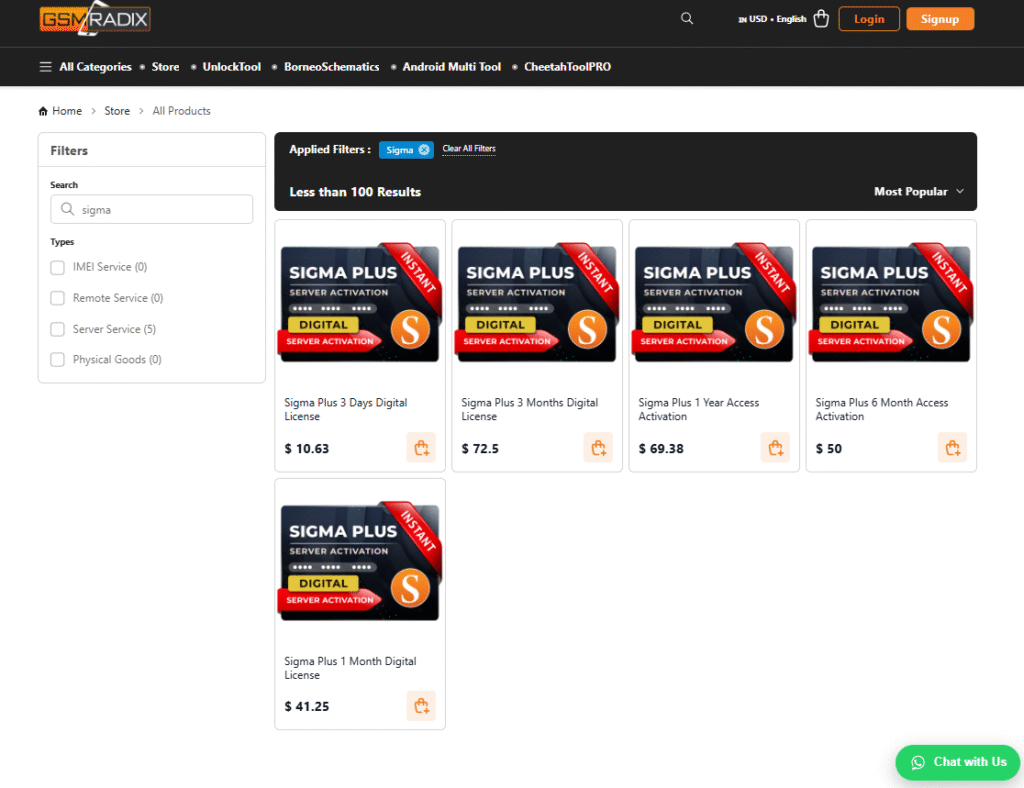
| Plan Type | Duration | Price (Approx.) | Access Level |
|---|---|---|---|
| Trial / Demo | Limited | Free | Basic features only |
| Single User License | 3 Day | $9.99 | Full access, 1 PC |
| Multi User (Shop Plan) | 1 months | $39 | Multiple activations, team use |
| Renewal Offer | 3 Months | $69 | Special promo with Borneo Schematics Renewal Offer |
For special bundle deals, contact our support team on WhatsApp or Telegram.
FAQs
1. Is Sigma Plus v.1.01.03 free to use?
No. Sigma Plus requires a valid license or activation key. However, you can use a demo version with limited features.
2. Does it work on Windows 11?
Yes, Sigma Plus is fully compatible with Windows 10 and 11 (64-bit recommended).
3. Can I remove FRP lock on Exynos 2200 devices?
Yes. This version supports Exynos 2200 and Exynos 1480 for FRP Unlock and Read/Write Backup.
4. Do I need technical knowledge to use this tool?
Basic knowledge of connecting devices and USB drivers is required. However, the UI is beginner-friendly.
5. Is Sigma Plus legal?
Yes, when used within legal frameworks (e.g., servicing authorized devices with owner consent).
6. Can I use it on multiple PCs?
Only if your license allows multi-activation. Check the pricing table above.
Final Thoughts + Download / Contact / Subscribe CTA
Sigma Plus v.1.01.03 is undoubtedly one of the best mobile servicing tools of 2025, especially for Samsung FRP remove and Exynos-based devices. Its advanced functions, stable UI, and regular updates make it an essential tool for any technician or service center.
Whether you’re unlocking Qualcomm FRP, repairing IMEI, or performing backup operations — this tool provides fast, reliable, and secure results.
Why Buy from GsmRadix
- 100% genuine and verified firmware
- Official download mirror of Sigma Digital
- Instant auto-delivery 24/7
- Secure checkout with fast technical support
