In 2025, the mobile repair landscape has evolved dramatically — especially when it comes to factory reset protection (FRP) locks on popular brands like Infinix and Techno. If you’re an individual user who’s locked out of your own phone after a factory reset, or you’re a professional technician or repair shop servicing clients, you’ll want a robust, up-to-date solution. That’s where Techno Infinix FRP Unlock 2025 comes in.
Whether you need Infinix FRP remove via Meta, a Techno FRP bypass new security 2025 solution, or even the Infinix factory reset via Meta tool – this guide covers it all. We’ll walk you through what the tool does, how to download and install, how both owners and technicians use it (for FRP unlock, network unlock, IMEI repair, etc.), compare it with other tools, highlight safety and legal considerations, and more.
By the end of this article you’ll be equipped to use Techno Infinix FRP Unlock 2025 with confidence, and you’ll also have a clear call to action to download, register, contact via WhatsApp/Telegram, and subscribe to our newsletter for updates. Let’s dive in.

What is Techno Infinix FRP Unlock 2025 and Why It’s Needed
Factory Reset Protection (FRP) is a security feature built into Android devices that prevents unauthorized access after a factory reset. The idea: if someone resets your phone without authorization, they’ll be locked out unless they know the original Google account credentials.
However, legitimate users sometimes face issues:
- They forgot their Google account details or password
- They purchased a second-hand Infinix or Techno phone that still has FRP enabled
- They are repair technicians servicing clients who need legitimate FRP unlocks
That’s where the Techno Infinix FRP Unlock 2025 tool plays a major role.
- It offers a streamlined solution to bypass FRP locks on Infinix and Techno devices, including those locked by new manufacturer security patches.
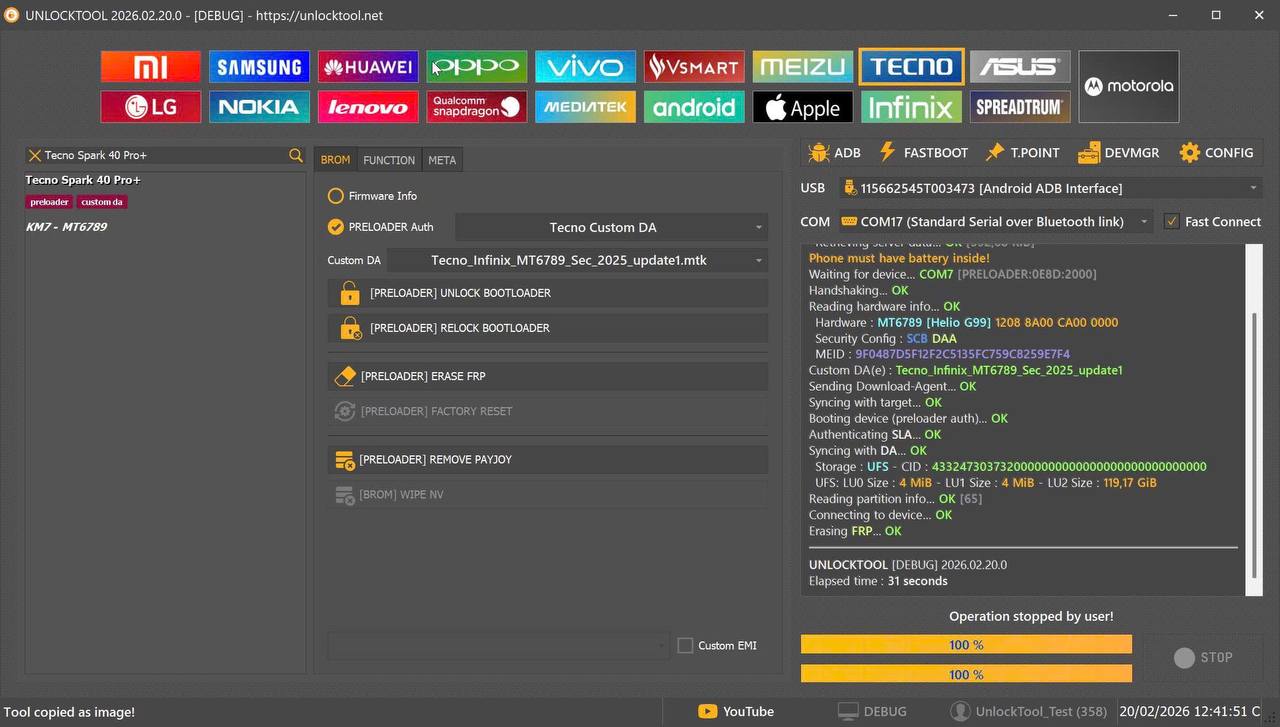
- It supports Infinix FRP remove via Meta functions, meaning it works with latest “Meta mode” firmware or security patches.
- It is also designed for Techno FRP bypass new security 2025, targeting the latest security enhancements by Techno.
- Beyond FRP unlock, it often includes network unlock, IMEI repair, and other utilities — making it a valuable tool for both individual users and professional repair shops.
For someone locked out of their device, or a technician looking to support clients, having a tool built specifically around these brands and their newest models makes all the difference.
Key Features of Techno Infinix FRP Unlock 2025 (Latest Version)
Here are the major features of the tool, and why they matter:
- FRP Unlock (Infinix & Techno): Full bypass of Google account verification on Infinix and Techno models, including those with the latest security firmware versions.
- Infinix Factory Reset via Meta Tool: A dedicated module to handle factory resets through “Meta” mode – enabling bypass even when standard methods fail.
- Network Unlock: Unlock carrier/network restrictions on supported Infinix/Techno phones. Useful in multi-SIM and cross-region repair scenarios.
- IMEI Repair & Other Services: Repair or update IMEI for supported models (within legal constraints), fix corrupted IMEI, update software, repair bootloop, etc.
- Support for Latest Security Patches: Built for 2025 security updates from Infinix/Techno, ensuring compatibility with new lock methods.
- User-friendly Interface: Works for non-technical users (owners) and has advanced options for technicians.
- Registration & License Module: Secure activation, update support, live module updates when new patches arrive.
- WhatsApp/Telegram Support & Updates: Direct contact option for troubleshooting, updates, and license renewals.
These features make Techno Infinix FRP Unlock 2025 a comprehensive tool rather than a single-function bypass. Whether you’re unlocking your own device or running a shop with dozens of models, the feature set covers your needs.
Supported Devices and Brands
The tool focuses on the Infinix and Techno brands but may also support associated models or sub-brands. Typical supported devices include:
- Techno models (latest as of 2025) – e.g., Techno Spark series, Camon series, Phantom series
- Infinix models (2024–2025) – e.g., Infinix Note series, Infinix Hot series, Infinix Zero models
- Supported firmware versions including Meta mode, latest security patches, new UI builds
- Both GAPPS & non-GAPPS variants, global & regional models
Before downloading, users and technicians should confirm:
- Exact model of the phone
- Current firmware version and security patch date
- Whether the phone is locked under FRP / network carrier / both
This compatibility ensures the tool works effectively for your specific device.
Download and Installation Process
Step-by-step Installation Guide
- Visit the official download page – Use the link provided by the vendor/brand.
- Download the setup file for your PC (Windows recommended).
- Install the software on your PC, following standard installation prompts.
- Launch the application, accept terms and register your license (see registration below).
- Connect the phone to your PC with a good USB cable, ensure USB debugging enabled (if required) and ensure the phone is recognized.
- Select your phone model, firmware version (if prompted).
- Choose the desired function: FRP unlock, network unlock, IMEI repair, etc.
- Follow on-screen instructions to start the process (this may include switching device to Meta mode, entering test menu, etc.).
- Wait for completion, then safely disconnect and reboot the phone.
How to Register and Activate
- After installation, open the tool and go to Registration or License menu.
- Enter your license key (provided at purchase) and your WhatsApp/Telegram contact ID for updates.
- Activate the tool online – verify via internet connection.
- You may receive periodic updates to keep up with new security patches (especially for the “Techno new security FRP solution” aspect).
- Keep your license active via subscription or lifetime plan depending on your purchase.
How to Use Techno Infinix FRP Unlock 2025 (For Owners and Technicians)
FRP Unlock
For owners who are locked out of their own device:
- Use the FRP Unlock module.
- Connect the phone in Meta mode or standard mode as instructed.
- Select the Infinix/Techno model and firmware version.
- Click “Start” and follow prompts.
- After completion, reboot the phone. You should bypass the Google account verification screen and regain access.
Network Unlock
For phones locked to carrier networks:
- In the tool select the Network Unlock module.
- Choose the correct region/carrier and model.
- The tool will apply the unlock procedure (may require IMEI input).
- Once done your device can work with other networks.
IMEI Repair and Other Services
Advanced functions for technicians:
- Use the IMEI Repair module to fix corrupted IMEI or update IMEI (within local regulatory compliance).
- Use Repair/Flash modules for bootloop, brick recovery, software update.
- For professional shops servicing many devices: Use batch mode, logs, and client-management features built into the tool.
This versatility makes Techno Infinix FRP Unlock 2025 suitable for both single-user recovery and full-service repair shops.
Comparison with Other Tools
In short, while many FRP unlock tools exist, the “Techno Infinix FRP Unlock 2025” is tailor-made for Infinix and Techno devices and offers full service features rather than just a simple bypass.
Safety Tips and Legal Considerations
Safety Tips
| Feature | Techno Infinix FRP Unlock 2025 | Generic All-Brand FRP Tools |
|---|
| Brand-specific support (Infinix/Techno) | ✅ Highly optimized | ❌ Often generic, less optimized |
| Latest security patch support | ✅ Built for 2025 patches | ⚠ May lag behind patches |
| Network unlock + IMEI repair | ✅ Included | ❌ May be separate modules |
| Non-tech user friendly | ✅ Very user-friendly | ⚠ Some require advanced skills |
| Technical/Shop features | ✅ Batch mode, logs, client mgmnt | ⚠ Often limited for pro use |
| Ongoing updates & support | ✅ Active WhatsApp/Telegram | ❌ Varies widely |
- Always download from the official vendor website or trusted source to avoid malware. fonelab.com
- Verify device ownership before proceeding — if device is not yours or you don’t have authorization, bypassing may be illegal.
- Back-up any data before performing operations — FRP removal often requires a factory reset, which erases data.
- Use a quality USB cable and a stable power source — interruptions mid-process can brick the device.
- Keep the tool updated — manufacturers release patches to block bypass methods, so frequent updates matter.
Legal Considerations
- The feature of FRP (Factory Reset Protection) was introduced by Google to prevent unauthorized use of devices after reset.
- Bypassing FRP on a device you legitimately own or have authorization to service is generally legal.
- Attempting to bypass FRP on a stolen, lost or unauthorized phone is illegal and may lead to criminal charges.
- As a technician or repair shop, you should maintain proof of ownership or client authorization before unlocking devices.
- Note: Laws vary by region — always check local regulations before offering FRP unlock as a service.
By following these safety and legal guidelines, you can use Techno Infinix FRP Unlock 2025 responsibly and confidently.
Troubleshooting Common Errors
Here are some typical issues and solutions:
- Tool does not detect the device:
- Ensure USB debugging is enabled (if required)
- Try a different USB cable/port
- Install the necessary drivers (MTK/Qualcomm)
- Unsupported model or firmware version:
- Check that you selected the exact model and firmware in the tool
- If latest security patch not yet supported, wait for update from vendor
- Process fails midway / stuck at 90%:
- Reboot the PC and phone
- Disconnect other USB devices to avoid interference
- Try again in “Meta mode” or alternate mode if offered
- After unlock, phone still asks for Google account:
- Ensure you selected the correct brand (Infinix vs Techno)
- If device was tied to a corporate or MDM account, additional steps may be needed
- Try factory reset after unlock completes
- Network unlock fails / no signal:
- Verify that the phone is supported for network unlock in your region
- Check IMEI is valid and not black-listed
- Try resetting network settings and reboot
If persistent issues persist, reach out to WhatsApp/Telegram support (contact details in download section) for live assistance.
Pricing and Subscription Plans
The pricing structure for Techno Infinix FRP Unlock 2025 typically includes:
- Single-Device License: Ideal for individual owners unlocking their own phone.
- Technician / Shop License: Multi-device license or unlimited-device license for repair shops.
- Annual Subscription: Access to updates for 12 months.
- Lifetime License (optional): One-time payment, lifetime updates.
- Support Add-On: WhatsApp/Telegram priority support, module updates, device request queue.
Pricing details vary and may change over time — check the official website or contact via WhatsApp for current offers, regional pricing (especially for India/Mumbai), and any promotional discounts.
FAQs
Q1: Is the Techno Infinix FRP Unlock 2025 tool legal to use?
Yes — when used on a device you own or have authorization to service, it is legal. However, using the tool on stolen or unauthorized devices is illegal and may have legal consequences.
Q2: Can this tool remove FRP locks from all Infinix and Techno phones?
It supports a wide range of models, especially those released recently. But you should always check the exact model and firmware in the tool’s supported list, as some very new patches may take time to be supported.
Q3: Will using this tool void the phone’s warranty?
It depends on the brand warranty terms in your region. For individual users unlocking their own devices, there may be no warranty concern. For repair shops, you should inform clients about warranty implications before proceeding.
Q4: After unlocking, can the phone still receive official firmware updates?
In most cases yes, but if you change network locks or IMEI repair functions, updates may be affected. Always check compatibility after unlock.
Q5: What if I get an error during the process and the phone becomes unresponsive?
If something goes wrong, you can use the tool’s Repair/Flash module (if available) or contact WhatsApp/Telegram support for help. Back-up any data before unlocking to minimise risk.
Q6: Is data on the phone erased after using the tool?
Often yes — FRP removal usually requires a reset which erases user data. Backup before proceeding.
Final Thoughts + Download / Contact / Subscribe CTA
Whether you’re an individual who’s locked out of a phone or a professional technician servicing Infinix and Techno devices, Techno Infinix FRP Unlock 2025 is built to deliver an effective, reliable solution. With support for Infinix FRP remove via Meta, Techno FRP bypass new security 2025, factory reset and network unlock capabilities — it covers the full spectrum of needs.
Why Buy from GsmRadix
- 100% genuine and verified firmware
- Official download mirror of UnlockTool 3 Months
- Instant auto-delivery 24/7
- Secure checkout with fast technical support