In the fast-evolving world of mobile repair and servicing, having the right tool can make all the difference. The UMT Pro Latest Update brings technicians and individual users an advanced solution for Samsung devices. Designed to simplify complex tasks such as FRP reset, firmware flashing, and root management, the Ultimate Samsung Tool v0.8 (UltimateSams v0.8) is a must-have for anyone looking to unlock, repair, or optimize Samsung smartphones efficiently.
Whether you are a professional repair shop or a tech-savvy user, the UMT Pro Latest Update combines intelligence, flexibility, and ease-of-use to deliver high-speed, reliable results. In this guide, we will explore all its features, supported devices, usage instructions, and why it has become the most trusted Samsung FRP unlock tool in 2025.
What is UMT Pro Latest Update and Why It Is Needed
UMT Pro Latest Update is the newest version of the Ultimate Samsung Tool, popularly known as UMTv2, designed for Samsung smartphones and tablets. It allows users to perform advanced operations like:
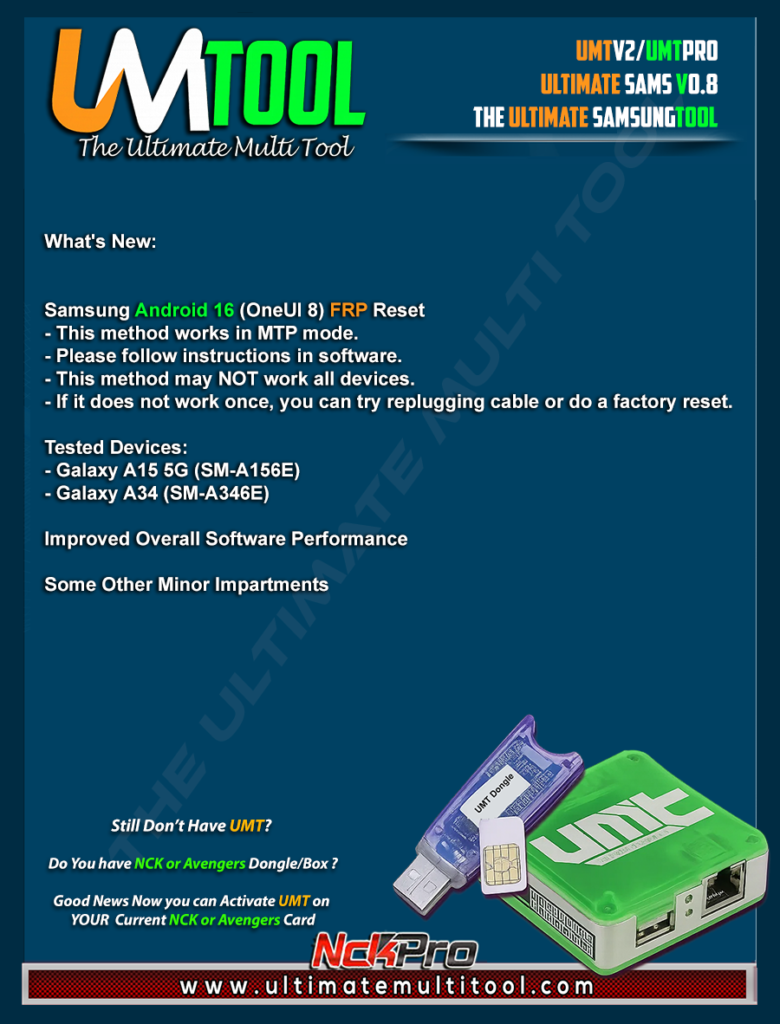
- FRP Reset on Samsung devices running Android 16 (OneUI 8)
- Firmware flashing (single file or 4-file options)
- ENG root management for supported models
- Userlock and MDM bypass
- IMEI repair and device optimization
With each Android update, Samsung introduces enhanced security features to protect users, which sometimes makes unlocking, repairing, or flashing firmware difficult. The UMT Pro Latest Update addresses these challenges with innovative algorithms and scenario-based flashing options that ensure tasks can be completed efficiently and safely.
Key reasons why the UMT Pro Latest Update is essential:
- Supports the latest Samsung security patches
- Works with multiple FRP reset methods including MTP, ADB, and Download (Odin) mode
- Offers root options for advanced customization
- Provides safe and reliable firmware flashing without data loss
By using this tool, technicians can save time, reduce errors, and expand their service capabilities, while users gain access to a trustworthy solution for Samsung device maintenance.
Key Features of UMT Pro Latest Update (v0.8)
The UltimateSams v0.8 comes loaded with advanced features that make it an all-in-one Samsung unlocking and repair tool. Some of the key features include:
- Flash Single / 4 File Firmware: Fully customizable firmware flashing for all Samsung models.
- Scenario-Based Flashing: Choose flashing options based on specific device conditions.
- Advance Flasher: Flash partitions selectively using custom files.
- Skip Reboot Option: Useful for flashing custom recovery without restarting the device.
- ENG Root Option: Root supported devices using factory binary.
- FRP Reset Without Data Loss: Reset FRP lock safely on supported devices.
- FRP Reset in ADB Mode: Automatically selects method if ENG root is available.
- MDM Lock Removal: Remove MDM restrictions (requires root).
- Android Locks Removal: Bypass screen locks for supported devices.
- Userlock & FRP Bypass with Special Firmware: Use specially crafted firmware to bypass locks without losing data.
- Samsung CSC Change: Modify CSC on Samsung devices in MTP mode.
- FRP Reset for Samsung Android 16 (OneUI 8): Specifically designed for the latest OneUI 8 models.
- FRP Reset in Download (Odin) Mode: Supports resetting via Odin mode.
- USA Variants Support: Reset FRP on Samsung 2024 USA models.
- IMEI Repair & Rooted Boot: Advanced features for professional use.
These features ensure technicians and users can perform a wide range of tasks using a single tool, eliminating the need for multiple software solutions.
Supported Devices and Brands
The UMT Pro Latest Update is primarily built for Samsung smartphones and tablets, including the latest 2024–2025 models. Supported devices include:
| Device Category | Supported Features |
|---|---|
| Samsung Smartphones | FRP reset, firmware flashing, root management, userlock bypass |
| Samsung Tablets | FRP reset, MTP mode support, Android lock removal |
| USA Variants | FRP reset for region-specific firmware |
| Android Version | Android 8 to Android 16 (OneUI 8) |
| Chipsets | Exynos, Qualcomm, MediaTek |
The tool is designed to support the latest Samsung security patches, making it suitable for both newly released devices and older models.
Download and Installation Process
Downloading and installing UMT Pro Latest Update is straightforward. Follow these steps to ensure a smooth setup.
Step-by-Step Installation Guide
- Download the Latest Version
- Visit the official website or trusted distributor links for UMT Pro Latest Update v0.8.
- Save the file on your computer (Windows OS recommended).
- Extract the Tool
- Use any standard extractor (WinRAR, 7-Zip) to extract the files to a folder.
- Run the Installer
- Open the extracted folder and run
setup.exeas administrator. - Follow the on-screen prompts to complete the installation.
- Open the extracted folder and run
- Install Required Drivers
- Install Samsung USB drivers if not already present.
- Ensure your device is recognized in MTP, ADB, or Download mode.
How to Register and Activate
- Launch the UMT Pro tool.
- Navigate to the Registration/Activation tab.
- Enter your license key or request a trial version if available.
- Connect your Samsung device and verify activation.
- You are now ready to use the tool for all supported operations.
How to Use UMT Pro Latest Update
Whether you are a professional technician or an individual user, UMT Pro Latest Update is designed to be intuitive and efficient.
For FRP Reset
- Connect your Samsung device in MTP or ADB mode.
- Select FRP Reset from the main menu.
- Choose the appropriate method based on your device status (ENG root available or not).
- Click Start to initiate the FRP reset.
- Wait for the process to complete and verify by rebooting the device.
IMEI Repair and Other Services
- Select IMEI Repair for devices with invalid or corrupted IMEI numbers.
- Use Firmware Tool to flash custom or stock firmware.
- Utilize Userlock Bypass for devices with locked user accounts.
- All processes come with safety warnings to prevent data loss or device bricking.
Mobile Unlocking
- Supports both screen lock and FRP bypass.
- Can remove Android locks, MDM, and call restrictions.
- Special firmware options allow safe bypass without resetting data.
Comparison with Other Tools
| Feature | UMT Pro Latest Update | Other Samsung Tools | Comments |
|---|---|---|---|
| FRP Reset Android 16 | Yes | Limited | Fastest support for latest Android |
| ENG Root Option | Yes | Some | Full flexibility for advanced users |
| Firmware Flashing | Scenario-based | Standard | More control and customization |
| Userlock / MDM Bypass | Yes | Partial | Special firmware ensures data safety |
| Supported Devices | All Samsung Models | Select models | Comprehensive coverage |
The comparison shows why UMT Pro Latest Update remains the preferred choice for professional technicians.
Safety Tips and Legal Considerations
- Always backup your device before performing any flashing or FRP reset.
- Use only official or verified versions of UMT Pro Latest Update.
- Do not use the tool for illegal purposes; it is intended for personal repair and authorized unlocking only.
- Follow local laws regarding IMEI repair and device unlocking.
- Avoid third-party or cracked versions that can compromise your computer or device security.
Troubleshooting Common Errors
| Error | Solution |
|---|---|
| Device not detected | Reinstall Samsung USB drivers; enable USB debugging |
| FRP reset failed | Check connection mode (MTP/ADB); use ENG root if available |
| Firmware flashing stuck | Restart device and tool; ensure correct firmware files |
| IMEI repair unsuccessful | Verify network compatibility; use admin mode on PC |
Most errors can be resolved by following the official guidelines and ensuring software and drivers are up-to-date.
Pricing and Subscription Plans
UMT Pro Latest Update is available in multiple subscription tiers:
| Plan | Features | Price |
|---|---|---|
| Trial Version | Limited features, FRP reset only | Free |
| Standard Plan | Full FRP reset, firmware flashing, updates for 6 months | $49 |
| Professional Plan | All features, priority updates, premium support | $99 |
| Lifetime License | All features, lifetime updates, WhatsApp/Telegram support | $199 |
Payments can be processed via official channels, and licenses are activated through the tool interface.
FAQs
Q1: Is UMT Pro Latest Update safe to use?
Yes, as long as you use the official version and follow safety instructions. Backup your device to prevent data loss.
Q2: Can I use it on Samsung Android 16 devices?
Absolutely, the tool fully supports Android 16 (OneUI 8) and all compatible Samsung models.
Q3: Do I need ENG Root for FRP reset?
Some methods require ENG root, but the tool automatically selects the optimal method based on your device.
Q4: Can I unlock USA variant Samsung phones?
Yes, the tool includes support for 2024 USA variants in MTP mode.
Q5: How do I contact support?
You can reach the official team via WhatsApp or Telegram for registration, activation, or troubleshooting.
Final Thoughts and Call to Action
The UMT Pro Latest Update is the ultimate solution for Samsung technicians and users looking for fast, reliable, and safe FRP reset, firmware flashing, and mobile unlocking. With its advanced features, scenario-based operations, and support for the latest Samsung devices, it is a must-have tool in 2025.
Why Buy from GsmRadix
- 100% genuine and verified firmware
- Official download mirror of UnlockTool 3 months
- Instant auto-delivery 24/7
- Secure checkout with fast technical support