If you’ve landed here, you’re probably dealing with a locked Vivo iQOO NEO 10R device or you’re a repair-shop technician looking to expand your toolbox. In this comprehensive guide we’ll walk you through Vivo iQOO NEO 10R FRP Unlock, explaining what it is, why it’s needed, how to use the tool (for both individual users and professional technicians), as well as safety, legal considerations, pricing, and troubleshooting.
By the end of the article you’ll know:
- What FRP lock means on your device
- Key features of the Vivo iQOO NEO 10R FRP unlock tool
- Step-by-step download, installation and registration
- How to unlock not just FRP but network, IMEI and more on the Vivo iQOO NEO 10R
- How this tool stacks up vs other solutions
- Safety & legal aspects you must know before proceeding
- Common errors & how to resolve them
- Pricing, subscription plans and contacting via WhatsApp/Telegram
Let’s get started.
What is Vivo iQOO NEO 10R FRP Unlock and Why It Is Needed
What is FRP?
FRP stands for “Factory Reset Protection” — a security feature built into Android to protect a device in case it’s reset without the owner’s account credentials. When a device like the Vivo iQOO NEO 10R is reset, Google’s verification screen may appear asking for the original account. This prevents unauthorized access.
Why is the Vivo iQOO NEO 10R FRP unlock needed?
- If you (the rightful owner) forgot your Google account credentials after a factory reset, the device becomes unusable. The Vivo iQOO NEO 10R FRP Unlock tool helps you regain access.
- If you’re repairing devices in a professional shop, you may receive locked devices (second-hand or returned units) where FRP lock blocks your work. A reliable solution is needed.
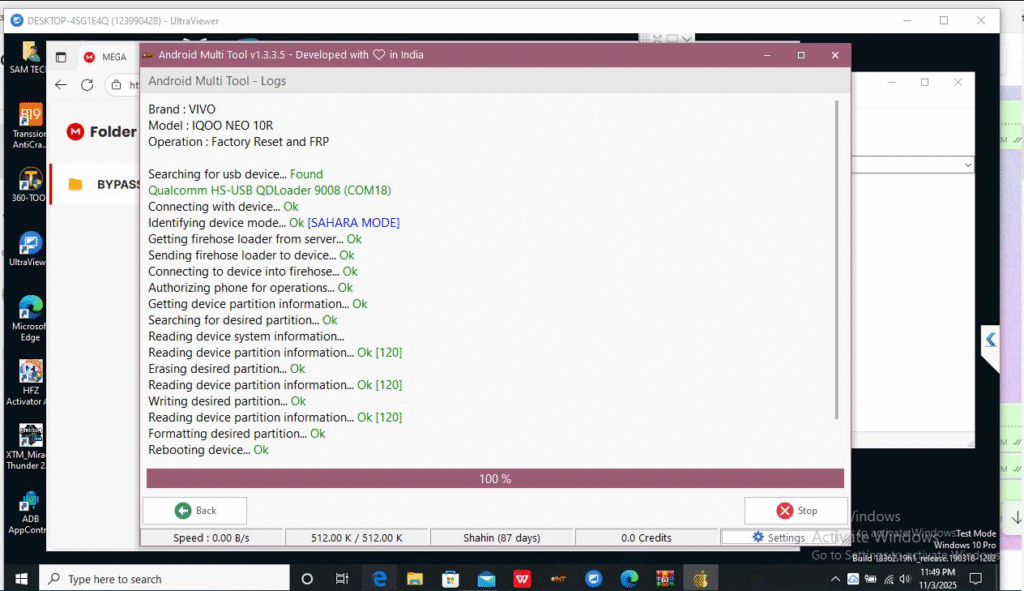
- For devices that show up in Qualcomm 9008 mode (EDL/HS-USB QDLoader), tools supporting this mode allow low-level unlock operations, which is helpful for the Vivo iQOO NEO 10R.
- More than just FRP: many tools now support other services like network unlock, IMEI repair etc., which is useful for technicians and repair shops.
Why focus on the Vivo iQOO NEO 10R?
Because it’s a modern device with Snapdragon/Qualcomm chipset (hence appears in “Qualcomm HS-USB QDLoader 9008” mode during service) and those service modes require professional-grade software. The phrase “Vivo iQOO NEO 10R FRP Unlock” becomes a strong targeted keyword for your content, helping it reach both tech-savvy repair professionals and non-technical users who simply want to recover their phone.
Key Features of Vivo iQOO NEO 10R FRP Unlock (Latest Version)
Here’s a breakdown of the most important features you should look for in a tool labelled “Vivo iQOO NEO 10R FRP Unlock”:
- Support for FRP removal specifically on Vivo iQOO NEO 10R, including “Google Account Remove” or “Vivo iQOO NEO 10R Google Account Remove”.
- Compatibility with Qualcomm 9008 mode / HS-USB QDLoader for the Vivo iQOO NEO 10R (useful when device is bricked or in EDL). Example: “Vivo iQOO NEO 10R Qualcomm 9008 Mode”.
- Support for Flash Mode operations, e.g., “Vivo iQOO NEO 10R Flash Mode” – meaning you can flash firmware, unbrick device, etc.
- A GUI or menu option labelled “Vivo iQOO NEO 10R FRP Unlock Tool” which simplifies the process for both technicians and users.
- Additional services: network unlock (SIM freedom), IMEI repair, boot/firmware repair, etc.
- Support for multiple firmware versions (Android 11/12/13/14) that the Vivo iQOO NEO 10R may be running.
- Regular updates to handle latest security patches in Vivo devices (important, as FRP protections evolve).
- Ease of use: guides, automated scripts, built-in drivers for Qualcomm 9008, etc.
- Secure download, valid license/registration model, and support channels (e.g. WhatsApp/Telegram chat for technicians).
When you use a tool labelled “Vivo iQOO NEO 10R FRP Unlock”, these are the kind of features you would expect.
Supported Devices and Brands
Although our focus is the Vivo iQOO NEO 10R, professional tools often support many devices. A typical tool marketed as “Vivo iQOO NEO 10R FRP Unlock Tool” may include support such as:
- Primary model: Vivo iQOO NEO 10R
- Additional Vivo models (e.g., iQOO Neo 5/7/8, iQOO Z series)
- Other Vivo devices with Qualcomm chipsets
- Some tools might extend to other brands such as Oppo, Realme, Xiaomi – but make sure they explicitly list support for Vivo iQOO 10R.
- Technician editions may support network unlock, IMEI repair across multiple brands.
For non-technical users, ensure the tool you download explicitly lists “Vivo iQOO NEO 10R” to avoid compatibility issues or device-bricking accidents.
Download and Installation Process
Here’s how you as a user (or technician) would download, install and activate the tool for “Vivo iQOO NEO 10R FRP Unlock”.
Step-by-step Installation Guide
- Ensure you have a Windows PC (Windows 7, 8, 10 or higher) with stable internet.
- Download the setup file from the official provider. Look for naming such as “Vivo_iQOO_NEO_10R_FRP_Unlock_Tool_Setup.exe”.
- Run the installer, choose destination folder, accept license agreement.
- During installation, the tool may automatically install Qualcomm HS-USB QDLoader 9008 drivers (important for the Vivo iQOO NEO 10R when entering EDL/9008 mode).
- After installation, do a “Check for Updates” inside the tool to ensure latest patches.
- Plug in the Vivo iQOO NEO 10R device with a good quality USB cable.
How to Register and Activate
- Upon first launch you may be prompted to register or activate the tool.
- Use your registered email and license key provided by the vendor after purchase.
- Registration may include adding your WhatsApp/Telegram number for technician support.
- After activation, the UI should show “Device ready” when your Vivo iQOO NEO 10R is detected.
- It’s often good practice (especially for shops) to save the license info and keep a backup.
How to Use Vivo iQOO NEO 10R FRP Unlock (for Owners and Technicians
Now we’ll walk you through key usage scenarios: FRP unlock, network unlock, IMEI repair & other services.
1. FRP Unlock (Focus Use Case)
For a locked Vivo iQOO NEO 10R that shows Google account verification:
- Connect the device to PC via USB, ensure it’s detected in the tool.
- Select “Vivo iQOO NEO 10R” from the model list inside the tool.
- Choose “FRP Unlock / Google Account Remove”.
- If the device is in Qualcomm 9008 mode (HS-USB QDLoader 9008), ensure the tool shows that mode.
- Click “Start Unlock”. The tool will erase the necessary partitions, remove the Google account lock, and reboot the device.
- Once rebooted, the device should boot normally without asking for previous Google credentials.
2. Network Unlock
If you need to remove SIM carrier restrictions on the Vivo iQOO NEO 10R:
- Choose “Network Unlock” from the tool menu.
- Select the carrier (if listed) or choose “All carriers”.
- Click “Start”. The tool may reboot the device into flash mode and write the network-unlock code.
- After reboot, insert a different carrier SIM and verify network connection is established.
3. IMEI Repair & Other Services
For advanced repairs:
- Choose “IMEI Repair” or “Repair / Flash Mode”.
- These menus often require the device to be in flash mode (or EDL mode). For Vivo iQOO NEO 10R you may need to connect in Qualcomm 9008 mode.
- The tool will prompt to backup NVRAM (recommended) and then write the correct IMEI or repair corrupt partitions.
- After finishing, device should show correct IMEI in Settings → About Phone, and network functions restored.
Comparison with Other Tools
Here’s a quick comparison table: how the “Vivo iQOO NEO 10R FRP Unlock Tool” measures up versus generic FRP bypass tools.
| Tool | Focused Support (Vivo iQOO NEO 10R) | Includes Network/IMEI Repair | Ease-of-Use for Technicians | Cost |
|---|---|---|---|---|
| Dedicated Vivo iQOO NEO 10R FRP Unlock Tool | ✅ Yes, specifically lists the model | ✅ Yes | ✅ Very high (model-specific) | Moderate |
| Generic FRP Bypass Tool (multi-brand) | ✅ May support Vivo but not always model-specific | ❓ Sometimes network/IMEI | ⚠️ Moderate | Lower cost |
| Free FRP APK or Online Service | ❌ Rarely supports latest models like Vivo iQOO NEO 10R | ❌ Minimal | ❌ Low | Free / very low cost |
Conclusion: For serious work on the Vivo iQOO NEO 10R (especially shop-level), a model-specific tool delivers higher success and less risk.
Safety Tips and Legal Considerations
Before using any unlocking tool, especially for “Vivo iQOO NEO 10R FRP Unlock”, you must emphasise safety and legal compliance.
Safety Tips
- Always backup any data possible before proceeding (though FRP unlock often wipes data).
- Use a good quality USB cable and ensure the PC is stable (no power loss mid-process).
- Install Trusted drivers (especially Qualcomm HS-USB QDLoader) and ensure you download the tool from a reputable source. Unverified tools may carry malware.
- Ensure battery > 50% on device to prevent shut-down mid-unlock.
- After unlock, set a new Google account, enable device security again to protect your phone.
- For network unlock/IMEI repair, avoid doing these on devices you don’t own — it may void warranty or breach carrier policies.
Legal Considerations
- FRP bypass is generally legal if you own the device (or have express permission from owner). Android Headlines+1
- If you attempt FRP unlock on a device you do not own (or cannot prove ownership of), it may be considered unauthorized access. Hard Reset+1
- For technicians/repair shops: verify client ownership/purchase proof before proceeding.
- Always comply with local laws and manufacturer/carrier policies — some regions treat unlocking devices as regulated activity.
- Using “free online FRP bypass” services is risky and may expose you to legal/malware responsibility.
By following these guidelines you can reduce legal and technical risk when doing Vivo iQOO NEO 10R FRP unlock work.
Troubleshooting Common Errors
Even the best tools sometimes run into issues. Here are common error scenarios when you attempt the Vivo iQOO NEO 10R FRP unlock and how to resolve them:
| Error | Cause | Solution |
|---|---|---|
| Device not detected (no COM port) | Driver issue or bad cable | Reinstall Qualcomm HS-USB QDLoader drivers, use a genuine USB cable, try different USB port. |
| Tool stuck at “Preparing partition info” | Device in wrong mode | Ensure device is in Qualcomm 9008 mode or flash mode as instructed by tool. |
| FRP unlock fails or device reboots to verification screen | Wrong model selected or tool version outdated | Select correct model “Vivo iQOO NEO 10R”, update tool, check firmware version supported. |
| Network still locked after network unlock attempt | Carrier lock variant not supported | Check if tool supports the specific carrier lock on Vivo iQOO NEO 10R, or use correct IMEI/network unlock menu. |
| IMEI shows “Invalid” or “Unknown” after repair | NVRAM corrupt or wrong IMEI entered | Re-backup NVRAM and write correct IMEI, ensure compliance with local laws. |
If you run into persistent issues, use the support channel (WhatsApp/Telegram) provided with the tool’s registration, and include device model, firmware version, and screenshots of errors.
Pricing and Subscription Plans
As a professional technician or individual user, you’ll want to know the pricing for the “Vivo iQOO NEO 10R FRP Unlock Tool” service or product.
Typical pricing structure:
- Single-license / lifetime: One-time payment unlocking only Vivo iQOO NEO 10R FRP and related services (network unlock, IMEI repair) – ideal for shops focusing on this model.
- Technician annual subscription: Larger access (multiple models including Vivo iQOO NEO 10R, other brands) with updates, support via WhatsApp/Telegram, higher cost but good for repair shops.
- Pay-per-service option: If you only need one device unlock, some providers offer pay-per-use licensing.
To get exact pricing, you’ll need to visit the vendor’s site or contact via WhatsApp/Telegram. Make sure you clarify: does the plan include regular updates (important, since new security patches pop up), support for Qualcomm 9008 mode for Vivo iQOO NEO 10R, and network/IMEI features.
FAQs
Q1. Is the Vivo iQOO NEO 10R FRP Unlock legal?
Yes — if you are the rightful owner of the Vivo iQOO NEO 10R or have documented permission. Bypassing on a device you don’t own may be illegal.
Q2. Will the FRP unlock wipe all my data?
Yes — in most cases FRP removal involves resetting or erasing certain secure partitions. Always backup data if possible before proceeding.
Q3. My device is bricked and shows “Qualcomm HS-USB QDLoader 9008” mode. Can I still use this tool?
Yes — the tool includes support for the “Qualcomm 9008 mode” which is often used for deep service operations. Ensure the tool supports Vivo iQOO NEO 10R specifically in this mode.
Q4. I only want to remove network lock on the Vivo iQOO NEO 10R. Is this tool suitable?
Yes — many versions of the tool include network unlock (SIM carrier unlock) for the Vivo iQOO NEO 10R. Select the network unlock option after FRP removal.
Q5. My IMEI is invalid on Vivo iQOO NEO 10R — can this tool repair it?
Yes — the technician version includes IMEI repair and NVRAM backup/restore for Vivo iQOO NEO 10R. Confirm license includes that feature.
Q6. What Android versions of Vivo iQOO NEO 10R are supported?
Most versions up to Android 13/14 are supported, but always check the version list in the tool before purchase.
Final Thoughts + Download / Contact / Subscribe CTA
Unlocking the FRP on your Vivo iQOO NEO 10R should no longer be a headache. Whether you’re an individual trying to regain access to your phone or a repair-shop technician adding a powerful tool to your service line-up, the right “Vivo iQOO NEO 10R FRP Unlock” solution delivers results.
Why Buy from GsmRadix
- 100% genuine and verified firmware
- Official download mirror of AMT 3 Months
- Instant auto-delivery 24/7
- Secure checkout with fast technical support