


INTRODUCTION
Are you a mobile technician struggling to find a reliable solution for servicing Android devices? Many professionals face delays, errors, and incompatibility issues when using outdated tools. This is where HW-Key Tool Credits come to the rescue. With HW-Key Tool, technicians can unlock advanced features, perform quick operations, and work with multiple Android brands without hassles.
HW-Key Tool Credits allow you to access premium functions, ensuring your workflow is smooth, efficient, and fully compliant with modern Android firmware. In this guide, we will explore everything about HW-Key Tool Credits – from setup, benefits, step-by-step usage, to real-life examples for Indian technicians.
Table of Contents
1. What is HW-Key Tool?
HW-Key Tool is a professional-grade mobile servicing software designed for Android technicians. Whether you are repairing a Samsung, Xiaomi, Oppo, or Vivo device, HW-Key Tool simplifies your workflow. With continuous updates, it supports modern Android security patches and firmware versions.
- Compatible with Windows PCs and laptops
- Supports both Qualcomm and MediaTek chipsets
- Enables fast operations like FRP unlock, pattern removal, and more
- Digital license-based, ensuring secure and authentic usage
Technicians in India and worldwide prefer HW-Key Tool for its reliability and multi-brand compatibility.
2. Understanding HW-Key Tool Credits
HW-Key Tool Credits are digital tokens that unlock premium features within the software. Every operation, like unlocking FRP, repairing firmware, or bypassing security, requires a certain number of credits.
- Credits ensure fair usage and security of the tool
- They prevent misuse of advanced features
- Different operations consume different numbers of credits
- Credits can be purchased anytime and added instantly to your account
Having sufficient HW-Key Tool Credits is essential for uninterrupted mobile servicing.
3. Benefits of HW-Key Tool Credits
Investing in HW-Key Tool Credits comes with several advantages:
- Instant Access: Start servicing devices immediately without waiting for authorization.
- Multi-Device Support: Works across multiple Android brands and chipsets.
- Secure Operations: Digital credits reduce the risk of unauthorized tool usage.
- Regular Updates: Premium users get access to the latest software improvements.
- Cost-Effective: Pay only for what you use with digital credits.
For Indian technicians, this means faster repairs, higher customer satisfaction, and more business growth.
4. HW-Key Tool Supported Devices & Chipsets
HW-Key Tool supports a wide range of devices and chipsets:
- Chipsets: Qualcomm, MediaTek, Exynos, Spreadtrum
- Brands: Samsung, Xiaomi, Oppo, Vivo, Realme, Huawei, Motorola
- Operations: FRP Unlock, Pattern Reset, Firmware Flash, IMEI Repair
Whether you have a new Samsung Galaxy phone or a mid-range Xiaomi device, HW-Key Tool works seamlessly. Credits ensure you can access each feature without restrictions.
5. How to Buy HW-Key Tool Credits in India
Buying HW-Key Tool Credits is simple and digital:
- Visit the official HW-Key website (hwkey.com)
- Create an account or log in
- Select the Credits package that suits your servicing needs
- Make payment via UPI, Paytm, or international payment methods
- Credits are instantly added to your account
For Indian technicians, digital purchase is safe, fast, and hassle-free.

6. Step-by-Step Guide to Activate Credits
After buying HW-Key Tool Credits, follow these steps:
- Open HW-Key Tool on your Windows PC
- Log in using your registered account
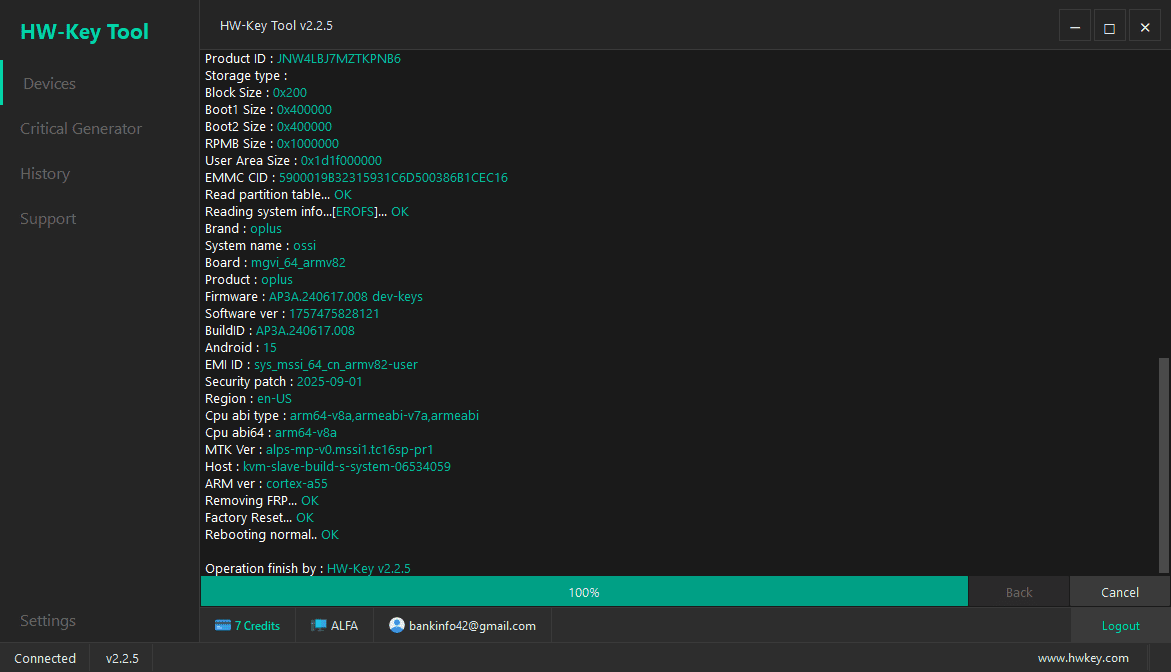
- Go to the “Credits” section in the dashboard
- Check your available balance
- Select the operation you want to perform (e.g., FRP unlock)
- Credits are automatically deducted after successful operation
Using credits is straightforward and keeps your workflow smooth.
7. Pricing and Digital License Options
HW-Key Tool Credits come in various packages:
| Package | Credits | Price (INR) |
|---|---|---|
| Starter | 10 | ₹899 |
| Professional | 20 | ₹1750 |
| Advanced | 50 | ₹4200 |
| Unlimited | 100 | ₹8500 |
Choose the package based on your daily operations and client load. Indian technicians often start with the Starter or Professional package.
8. Comparison with Other Mobile Servicing Tools
HW-Key Tool stands out from competitors like Miracle Box, UMT Pro, or Sigma Tool:
- Multi-brand support: HW-Key covers more devices in India than most alternatives.
- Digital credit system: Pay only for used operations, unlike lifetime licenses.
- Regular updates: Ensures compatibility with latest Android firmware.
- User-friendly: Simple dashboard for beginners and pros alike.
Credits system makes it more cost-effective for small service centers in India.
9. Real-Life Use Cases for Indian Technicians
Here are examples of how HW-Key Tool Credits help in real-life scenarios:
- Scenario 1: A technician in Delhi receives a Samsung Galaxy with FRP lock. Using HW-Key Tool Credits, the unlock is done in 5 minutes.
- Scenario 2: A repair shop in Mumbai handles multiple Xiaomi devices. Credits allow simultaneous operations without software delays.
- Scenario 3: A freelance technician in Bangalore services Oppo and Vivo phones. Digital credits prevent any unauthorized operations and secure client trust.
Credits simplify operations and increase technician efficiency across India.
10. Pros and Cons of HW-Key Tool Credits
Every tool has advantages and minor drawbacks. Here’s a clear picture:
- Pros: Easy purchase, multi-brand support, secure, cost-effective, fast updates
- Cons: Credits can run out quickly for heavy users, dependent on internet connection
Overall, the pros outweigh cons for professional technicians.
11. Tips for Maximizing HW-Key Tool Efficiency
- Keep your credits topped up regularly
- Always update HW-Key Tool for latest firmware compatibility
- Use stable USB cables to avoid operation errors
- Check device model and firmware before starting any operation
- Track credit usage to optimize costs
Following these tips ensures smooth operations and higher client satisfaction.
12. HW-Key Tool Updates & Maintenance
HW-Key Tool releases regular updates to support new devices, Android versions, and security patches. Updates are easy:
- Open the HW-Key Tool dashboard
- Click “Check for Updates”
- Download and install latest version
- Credits remain intact after updates
Indian technicians benefit from continuous updates to handle the latest smartphones efficiently.
CONCLUSION
HW-Key Tool Credits are essential for modern mobile technicians in India and worldwide. They provide secure, reliable, and cost-effective access to premium features. By investing in credits, you can handle multiple devices, perform operations faster, and grow your business efficiently.
For any technician looking to upgrade their workflow, HW-Key Tool Credits are a must-have. Get started today, top up your digital license, and enjoy hassle-free mobile servicing.
Q1: What are HW-Key Tool Credits?
HW-Key Tool Credits are digital tokens used to perform premium operations like FRP unlock or firmware repair.
Q2: How can I buy HW-Key Tool Credits in India?
You can purchase credits from the official HW-Key website using UPI, Paytm, or other payment methods.
