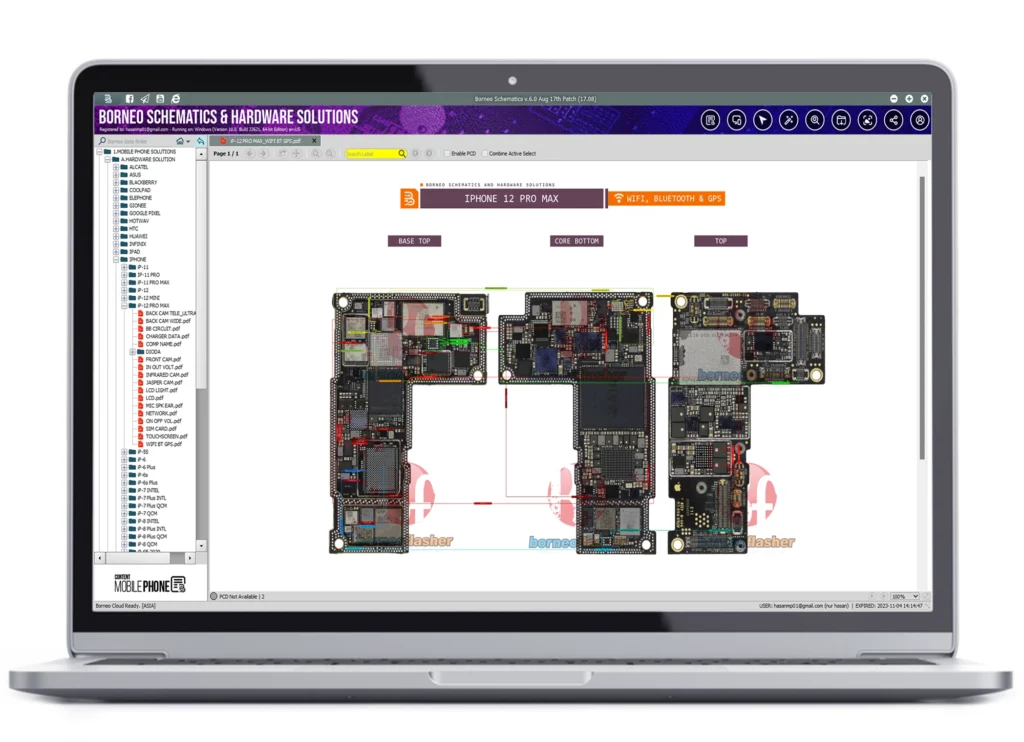
Mobile phone repairing has become more complex in recent years because modern smartphones contain thousands of tiny components. When issues like charging failure, network problems, or power issues appear, finding the exact fault can be difficult.
This is where Borneo Schematics helps technicians. It provides detailed circuit diagrams, board layouts, bitmap images, and component datasheets for many smartphone models.
With Borneo Schematics, GSM technicians can quickly trace motherboard lines, identify faulty components, and repair devices more accurately. This tool is widely used by mobile repair professionals to improve repair speed and efficiency.

Table of Contents
What is Borneo Schematics
Borneo Schematics is a professional hardware repair software designed specifically for mobile phone technicians and GSM repair shops.
It provides access to thousands of hardware repair resources such as:
• Mobile phone schematics
• Circuit diagrams
• Board layouts
• Bitmap motherboard images
• Component datasheets
These resources help technicians understand the internal structure of a smartphone motherboard.
Instead of randomly testing components, a technician can directly identify the faulty part using the schematic diagram.
For example, if a phone has a charging issue, the technician can open the board layout and locate the charging IC, resistor lines, and voltage paths.
This dramatically reduces repair time.
The platform is widely used by professional repair engineers because it offers accurate information, regular updates, and support for new smartphone models.
Another important advantage is its continuously updated database. New phone models are added frequently, ensuring technicians always have access to the latest repair information.
Why Mobile Repair Technicians Need Borneo Schematics
Modern smartphones contain extremely compact and complex motherboard designs.
Without proper diagrams, repairing these devices can be very challenging.
This is where Borneo Schematics becomes a powerful solution.
Here are some major reasons technicians rely on this platform:
Faster Fault Detection
Technicians can quickly trace the exact circuit responsible for a problem.
Accurate Component Identification
Schematics clearly show every resistor, capacitor, and IC.
Reduced Repair Time
Instead of testing multiple parts, technicians can directly target the faulty component.
Higher Repair Success Rate
When technicians know exactly where the problem lies, repair success improves significantly.
Professional Workflow
Using professional tools makes the repair process more systematic.
For GSM repair businesses, this means faster service, happier customers, and increased revenue.
Key Features of Borneo Schematics
The popularity of Borneo Schematics comes from its powerful features designed for hardware technicians.
Here are some of the most important features:
Detailed Circuit Diagrams
These diagrams show the complete electrical connections inside a device.
Board Layout View
Technicians can see the exact placement of components on the motherboard.
Bitmap Motherboard Images
Bitmap images provide a high-resolution view of the motherboard layout.
Component Datasheets
Datasheets explain component specifications and functionality.
eMMC and UFS Storage Support
Helps technicians understand memory circuits.
Daily Database Updates
New models are added frequently.
Laptop BIOS Support
Some motherboard layouts for laptops are also available.
Power and Charging IC Information
Important for solving charging and power issues.
These features make Borneo Schematics an essential toolkit for serious repair professionals.
Circuit Diagrams and Board Layouts Explained
Circuit diagrams and board layouts are two of the most important elements in hardware repair.
Circuit diagrams represent the electrical design of a device.
They show how different components are connected through electrical lines.
For example:
• Power IC connections
• Charging circuits
• CPU communication lines
• Display circuits
On the other hand, board layouts show the physical arrangement of components on the motherboard.
Technicians can visually identify where each component is located.
By combining both views, technicians can:
• Trace voltage lines
• Find broken connections
• Identify damaged components
This approach significantly simplifies complex motherboard troubleshooting.
Supported Mobile Brands and Devices
One of the strongest advantages of Borneo Schematics is its massive device database.
It supports thousands of smartphones across many popular brands.
Major Supported Brands
| Brand | Supported Models |
|---|---|
| Samsung | Galaxy A, S, Note Series |
| Xiaomi | Mi, Redmi, Poco |
| Oppo | All major models |
| Vivo | Y, V, X Series |
| Realme | Latest Realme devices |
| Huawei | Multiple Huawei models |
| Infinix | Budget smartphones |
| Tecno | Latest Tecno devices |
In addition to smartphones, some laptop motherboard diagrams are also available.
This makes the tool useful for technicians who repair multiple device types.
Laptop BIOS and Advanced Hardware Support
Apart from mobile phone schematics, Borneo Schematics also includes advanced hardware resources.
These include:
• Laptop BIOS files
• Laptop motherboard layouts
• Power IC diagrams
• Charging IC circuits
• Chipset architecture details
Laptop motherboard repairs are often more complicated than mobile phone repairs.
Having access to BIOS information and motherboard diagrams can make troubleshooting much easier.
Technicians working with brands like Dell, Acer, and Lenovo can benefit from this feature.
How to Buy Borneo Schematics Activation Code
Buying the activation code for Borneo Schematics is a simple process.
Follow these steps:
Step 1 – Visit Official Store
Go to the official website or an authorized reseller.
Step 2 – Choose Subscription Plan
Common plans include:
• Monthly plan
• 3-month plan
• Yearly plan
Choose the plan depending on your repair business needs.
Step 3 – Enter Account Details
Provide basic information such as:
• Email address
• Username
• Contact number
Step 4 – Complete Payment
Secure payment options are available.
Step 5 – Receive Activation Code
After payment confirmation, the activation code will be sent to your email.
Keep the code safe for software activation.
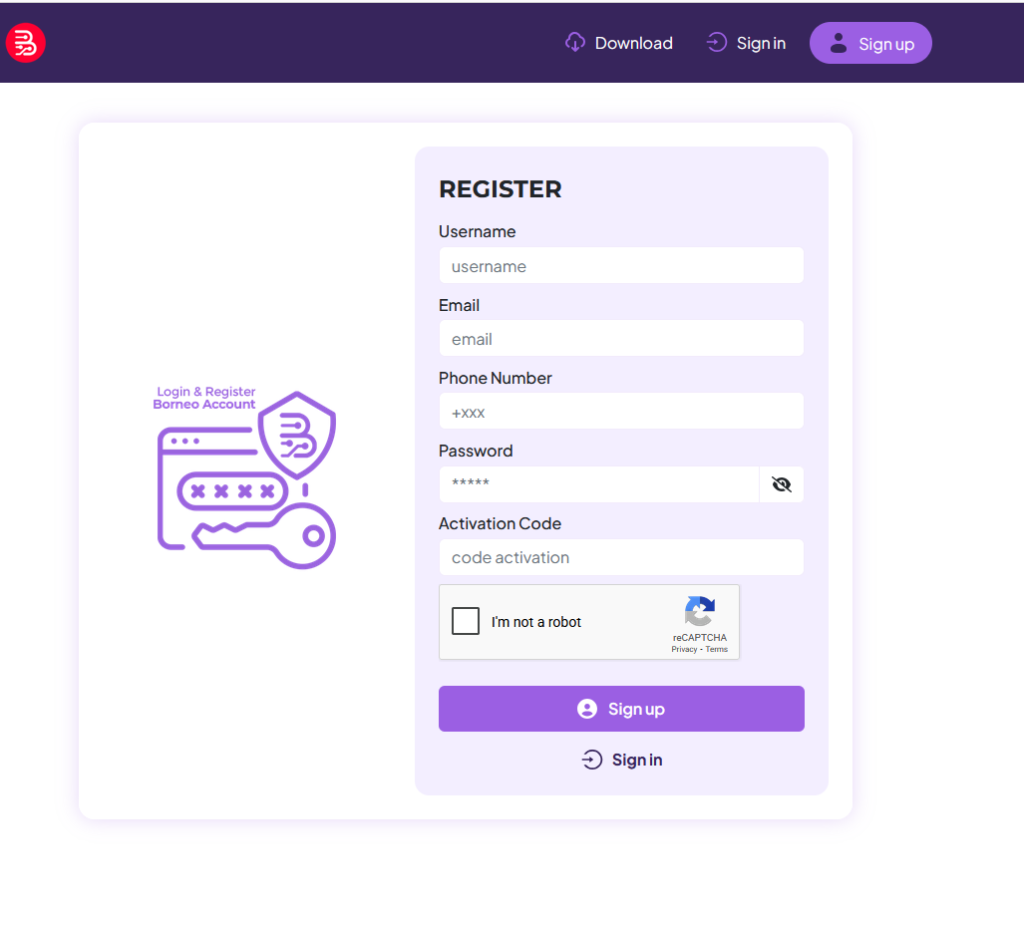
Step-by-Step Registration Guide
Registering for Borneo Schematics is very straightforward.
Follow these simple steps:
- Open the registration page
- Enter your username
- Add your email address
- Provide phone number
- Create a strong password
- Enter the activation code if required
Once registration is completed, you can log in and access the schematics database.
Benefits of Using Borneo Schematics for Repair Shops
Mobile repair businesses can gain multiple advantages from using Borneo Schematics.
Major Benefits
• Faster diagnosis
• Professional repair workflow
• Higher repair success rate
• Access to latest device schematics
• Reduced troubleshooting time
For example, a technician repairing a Samsung phone with charging problems can quickly locate the charging IC circuit and identify the faulty resistor.
This saves both time and effort.
For busy repair shops handling many devices daily, this tool becomes extremely valuable.
Pros and Cons of Borneo Schematics
Like any professional software, Borneo Schematics has both advantages and limitations.
Pros
• Large database of devices
• Accurate motherboard diagrams
• Daily updates
• Easy to use interface
• Professional repair tool
Cons
• Requires paid subscription
• Beginners may need time to understand schematics
Despite these minor limitations, it remains one of the best tools for hardware repair professionals.
Real-Life Example of Mobile Repair Using Schematics
Imagine a customer brings a smartphone that does not charge.
Without diagrams, a technician might randomly replace multiple components.
But with Borneo Schematics, the process becomes easier.
The technician opens the board layout and checks the charging circuit.
The diagram shows the connection between:
• USB port
• Charging IC
• Power management IC
After checking the voltage line, the technician identifies a faulty capacitor.
Replacing the capacitor fixes the problem instantly.
This is why professional technicians rely on schematic tools.
Tips to Use Borneo Schematics Effectively
To get the best results from Borneo Schematics, follow these tips:
• Always check the correct device model
• Use both schematic and board view together
• Follow voltage lines carefully
• Learn basic electronics concepts
• Keep the software updated
These practices help technicians perform accurate repairs.