

1. Introduction
Finding the right GSM tool for newer Samsung and Qualcomm devices can be challenging. EFT Dongle Pro V5.5.9 Build 001 brings new Samsung Android 16 USA MTP FRP beta support along with Qualcomm FRP Lock Reset and Factory Reset features.
The update also adds support for several Samsung Galaxy models with specific BIT versions. This guide covers the latest features, supported devices, installation, activation and servicing information.

Table of Contents
2. What Is EFT Pro Dongle and Why You Need It
EFT Pro Dongle is a professional GSM servicing platform designed for mobile technicians working with operations such as firmware servicing, device diagnostics, FRP-related servicing, factory reset functions and chipset-level communication. Its current platform covers Qualcomm, MediaTek, Spreadtrum/Unisoc and other mobile architectures.
For a repair shop, the main advantage is having multiple servicing functions inside one software ecosystem rather than maintaining a separate utility for every chipset.
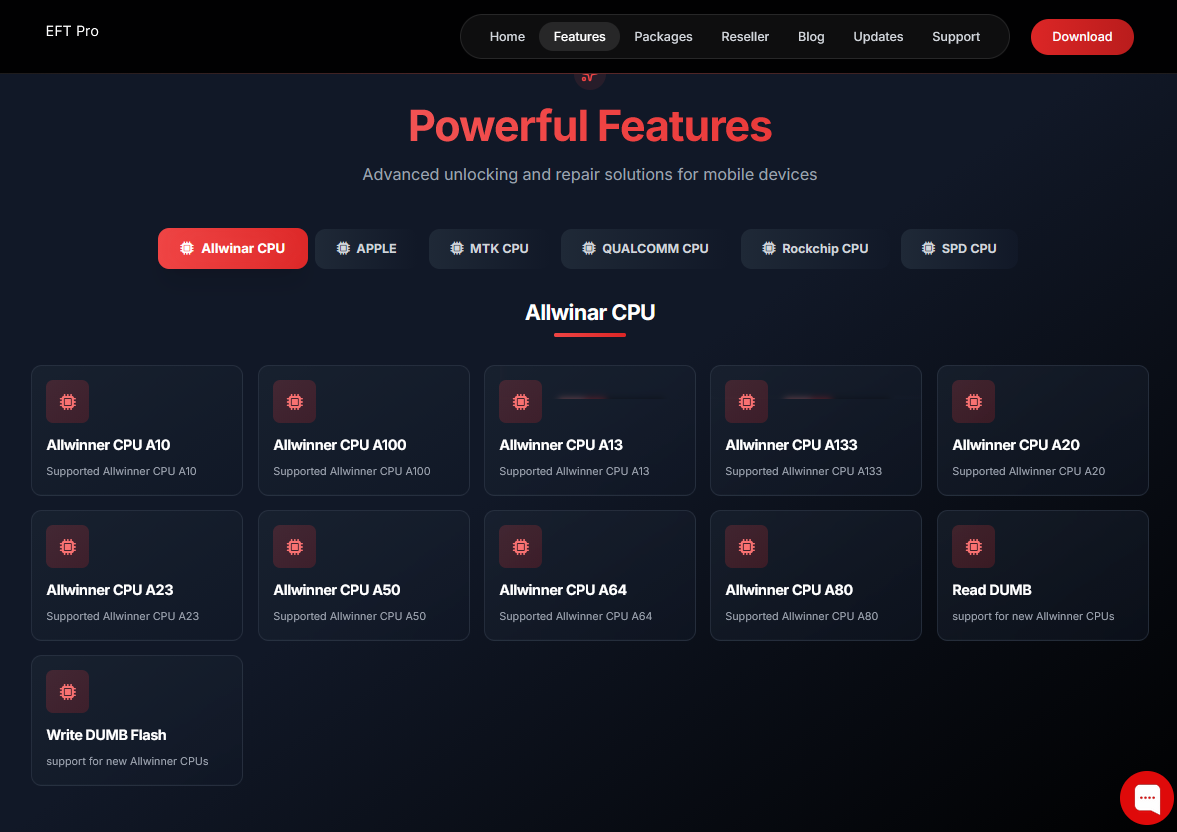
EFT Pro supports different communication levels, including ADB, Fastboot and lower-level chipset interfaces. Its official feature listing includes Qualcomm, MediaTek, Spreadtrum, Rockchip, Allwinner and Kirin-related support.
The EFT Dongle Pro V5.5.9 release is particularly relevant to technicians handling supported Samsung Android 16 USA beta devices and Qualcomm-based Samsung models.
Why technicians consider EFT Pro
- Multi-brand GSM servicing environment
- Qualcomm and MTK support
- Samsung FRP-related functions
- Factory Reset operations
- Firmware flashing support
- ADB and Fastboot operations
- Device information and diagnostic functions
- Regular software updates
- Activation-based professional usage
3. Key Features of EFT Pro Dongle Latest Version
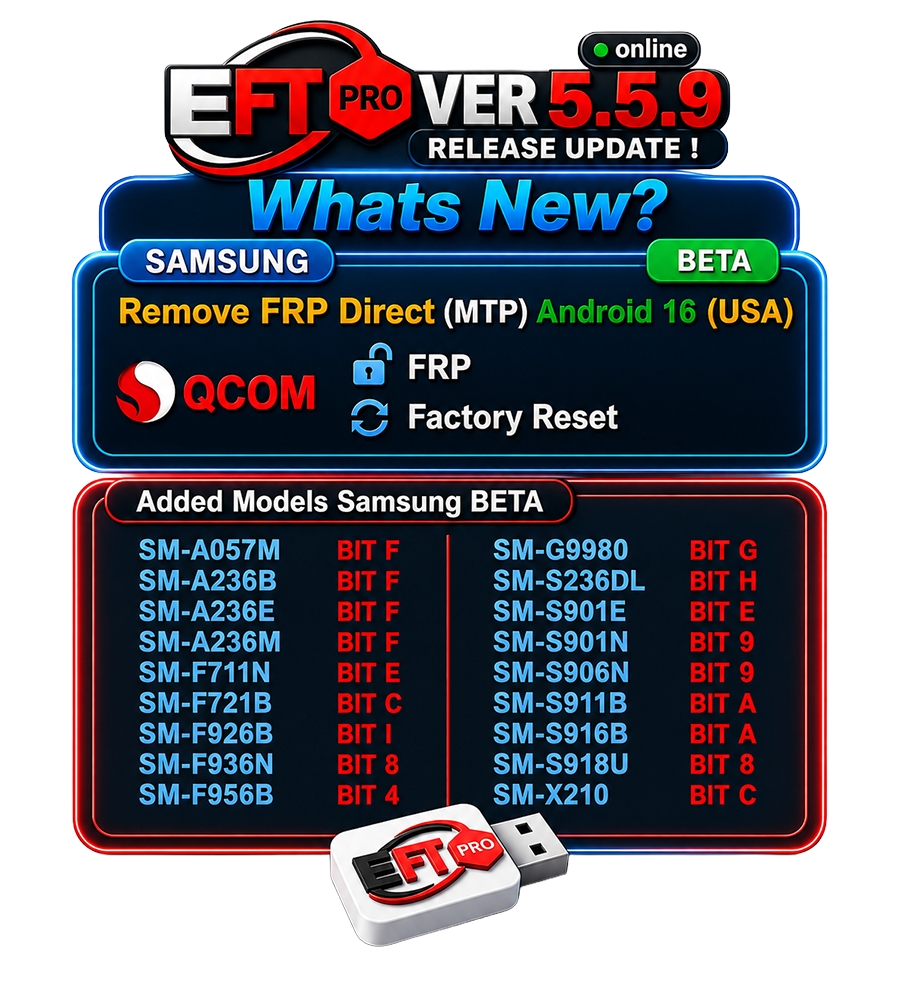
The EFT Dongle Pro V5.5.9 update was released as Build 001. According to the published release notes, the most important additions are Samsung Android 16 USA beta MTP FRP functionality and Qualcomm FRP/Factory Reset operations.
| Feature | V5.5.9 Status | Details |
|---|---|---|
| Samsung Direct MTP FRP | Added | Android 16 USA Beta |
| Qualcomm FRP Lock Reset | Added | Supported Qualcomm devices |
| Qualcomm Factory Reset | Added | Supported Qualcomm devices |
| Samsung Models | Expanded | Multiple Galaxy models |
| Build | 001 | V5.5.9 release |
| Activation | Required | Use a valid license |
| Supported BIT Versions | Model dependent | Check exact model/BIT |
| Future Models | Planned | More devices after testing |
Samsung Android 16 MTP FRP Beta
One of the headline changes is Remove FRP Direct (MTP) Android 16 (USA) BETA for supported Samsung devices. Because this is explicitly marked beta, technicians should verify the exact model, security state and firmware before attempting any service.
Qualcomm FRP and Factory Reset
The Qualcomm section adds:
- Reset FRP Lock
- Factory Reset
These functions are model and security dependent. A supported chipset alone does not guarantee that every firmware revision will work.
Broader GSM servicing platform
The official EFT Pro feature overview also lists functions across Qualcomm, MediaTek, Spreadtrum, Rockchip, Allwinner, Kirin and Apple-related workflows, although availability can vary by device, software release and license.
4. Supported Devices and Brands
The V5.5.9 Build 001 announcement specifically lists Samsung models and BIT versions. The following list should be treated as the published V5.5.9 supported-model list rather than a guarantee for every regional firmware variant.
Samsung Galaxy A Series
- Samsung Galaxy A05s — SM-A057M — BIT F
- Samsung Galaxy A23 5G — SM-A236B — BIT F
- Samsung Galaxy A23 5G — SM-A236E — BIT F
- Samsung Galaxy A23 5G — SM-A236M — BIT F
- Samsung Galaxy A23 5G — SM-S236DL — BIT H
Samsung Galaxy S Series
- Samsung Galaxy S21 Ultra 5G — SM-G9980 — BIT G
- Samsung Galaxy S22 — SM-S901E — BIT E
- Samsung Galaxy S22 — SM-S901N — BIT 9
- Samsung Galaxy S22+ — SM-S906N — BIT 9
- Samsung Galaxy S23 — SM-S911B — BIT A
- Samsung Galaxy S23+ — SM-S916B — BIT A
- Samsung Galaxy S23 Ultra — SM-S918U — BIT 8
Samsung Galaxy Z Series
- Samsung Galaxy Z Flip3 5G — SM-F711N — BIT E
- Samsung Galaxy Z Flip4 — SM-F721B — BIT C
- Samsung Galaxy Z Fold3 5G — SM-F926B — BIT I
- Samsung Galaxy Z Fold4 — SM-F936N — BIT 8
- Samsung Galaxy Z Fold6 — SM-F956B — BIT 4
Samsung Galaxy Tab
- Samsung Galaxy Tab A9+ — SM-X210 — BIT C
Important: Samsung model numbers can have different regional variants and security configurations. Always check the complete model number, binary/BIT information and software version before servicing.
5. Download and Installation Process
The safest way to obtain EFT Dongle Pro V5.5.9 is through the official EFT Pro download/update channel. The official website provides a dedicated software updates section, while its main platform identifies the product and supported servicing ecosystem.
⚠️ Download Safety Warning
Only download from official source — cracked/mirrored builds cause bricked devices and stolen accounts.
Avoid modified executables, unknown Telegram file mirrors and unofficial activation patches. A GSM servicing computer normally contains drivers, device credentials, customer data and other sensitive information, so software integrity matters.
5a. Step-by-Step Installation Guide
- Verify your licenseMake sure your EFT Pro Dongle activation is valid before starting.
- Use a Windows service PCKeep Windows updated and make sure the PC has sufficient free storage.
- Download the official setup/updateUse the official EFT Pro software/update page rather than an unknown mirror.
- Install required driversQualcomm, MediaTek, Samsung and other device communication may require appropriate drivers.
- Run the installerUse administrator privileges if Windows requires elevated permissions.
- Restart Windows if requestedThis helps newly installed device drivers initialize correctly.
- Connect the EFT hardwareUse a reliable USB port and avoid unstable USB hubs.
- Open EFT ProConfirm that the application detects the licensed dongle correctly.
- Check the software versionConfirm that the installed build corresponds to the required release before beginning customer work.
- Test device detection
Use a non-critical authorized test device first whenever possible.

5b. How to Register and Activate
Activation should always be completed through the legitimate EFT Pro registration system or authorized reseller.
- Install the latest supported EFT Pro software.
- Connect the genuine EFT Pro hardware if required.
- Open the registration/activation section.
- Enter the requested account or license information.
- Complete any verification requested by the official system.
- Confirm that the activation appears correctly.
- Restart the application if necessary.
- Check available modules before servicing a customer device.
For current registration and support options, use the official EFT Pro support resources.
6. How to Use EFT Pro Dongle
EFT Pro should be used by matching the exact device model, chipset, software state and supported operation before starting a service. The safest workflow is to identify the phone first, back up permitted data, confirm authorization, select the correct module and use only functions supported for that device.
6a. For Phone Owners
Phone owners should not treat GSM servicing functions as a shortcut around ownership verification.
For an authorized device, EFT Pro can be relevant when a professional technician needs to diagnose or service problems involving:
- FRP status
- Factory reset
- Screen-lock servicing
- Firmware problems
- Software corruption
- Boot and recovery issues
- Device detection problems
FRP bypass and account protection
FRP, or Factory Reset Protection, is an Android security mechanism designed to protect a device after an unauthorized reset.
If you own the phone but are locked out after a reset, the preferred approach is to recover the original Google account or obtain manufacturer-supported assistance. A technician should only perform FRP-related servicing when the customer can establish ownership or authorization.
6b. For Technicians
Professional technicians may use EFT Pro for broader workflows involving:
- Firmware flashing
- Device information
- Qualcomm servicing
- MTK servicing
- Unisoc/Spreadtrum servicing
- ADB communication
- Fastboot operations
- Factory reset
- Authorized FRP servicing
- Bootloader-related workflows
- Software repair
The official EFT Pro feature listing also includes Xiaomi/Redmi/POCO, Huawei/Honor, Oppo, Realme, Vivo, Tecno, Infinix and other brands across different modules.
IMEI repair
IMEI-related servicing is particularly sensitive. Technicians should only perform IMEI repair or restoration where permitted by local law and where the identifier belongs to the authorized device being serviced.
Never use a servicing tool to alter an IMEI to conceal a stolen device, bypass network restrictions or misrepresent device identity.
Flashing firmware
Before flashing:
- Confirm the exact model.
- Check the firmware region.
- Check the binary/BIT revision.
- Back up customer-authorized data.
- Use appropriate firmware.
- Keep the PC connected to reliable power.
- Avoid interrupting the process.
A wrong firmware package can create boot problems or make the device require additional recovery work.
7. EFT Pro Dongle vs Competitors
There is no single GSM tool that is best for every repair shop. Tool selection depends on supported brands, chipset coverage, authentication requirements, update frequency, hardware licensing and the technician’s normal workload.
| Area | EFT Pro Dongle | UnlockTool | Hydra Tool | Chimera Tool |
|---|---|---|---|---|
| Samsung servicing | Strong coverage | Strong coverage | Strong coverage | Strong coverage |
| Qualcomm | Yes | Yes | Yes | Yes |
| MTK | Yes | Yes | Yes | Yes |
| Unisoc/Spreadtrum | Supported | Supported | Supported | Supported |
| Firmware servicing | Yes | Yes | Yes | Yes |
| Hardware license | EFT ecosystem | License-based | Dongle/software ecosystem | Account/license based |
| Best for | Multi-brand GSM work | Broad phone servicing | Advanced technicians | Service-center workflows |
| Main consideration | Device/license compatibility | Service availability varies | Module/license requirements | Subscription/service requirements |
EFT Pro advantages
- Wide chipset coverage
- Regular updates
- Strong Samsung focus
- Qualcomm and MTK workflows
- Professional activation system
- Multiple device-brand modules
Possible limitations
- Some functions are beta.
- Device support can depend on exact BIT/security.
- A supported chipset does not automatically mean every model is supported.
- Certain operations may require additional authorization or licensing.
8. Safety Tips and Legal Considerations
Use EFT Pro only on devices you own or are explicitly authorized to service. FRP, MDM, account-lock and screen-lock functions should never be used to gain unauthorized access to another person’s device.
Technician safety checklist
- Confirm customer ownership or authorization.
- Record the exact model number.
- Check the current software version.
- Verify the binary/BIT.
- Back up authorized customer data.
- Use official firmware.
- Keep stable power during flashing.
- Avoid cracked applications.
- Do not share customer credentials.
- Do not modify device identifiers unlawfully.
Legal disclaimer
EFT Pro is a professional mobile servicing tool. Features such as FRP servicing, MDM servicing, screen-lock operations and IMEI-related functions must only be used on owned or authorized devices and in accordance with applicable laws.
9. Troubleshooting Common Errors
| Error | Possible Cause | Recommended Fix |
|---|---|---|
| Dongle not detected | USB/driver issue | Reconnect directly and reinstall the official driver |
| Device not detected | Wrong mode or driver | Verify device mode and install the correct driver |
| Operation failed | Unsupported model/BIT | Check exact model and firmware revision |
| Qualcomm connection fails | Driver or connection problem | Reinstall Qualcomm drivers and use a reliable USB cable |
| Samsung MTP operation fails | Beta/device compatibility | Confirm the model, Android version and supported region |
| Flashing stops | Firmware mismatch | Verify firmware model, region and BIT |
| Software does not start | Installation/runtime issue | Reinstall the official build and restart Windows |
| Activation unavailable | License/account issue | Verify activation status with the official provider |
| Phone remains in boot loop | Firmware/software mismatch | Recheck firmware compatibility before repeating service |
| USB disconnects during operation | Cable/port/power instability | Change cable/port and avoid USB hubs |
A beta function should always be treated differently from a mature production feature. If Samsung Android 16 MTP servicing fails on a listed model, do not repeatedly force the operation without checking the device state.
10. Pricing and Subscription Plans
The supplied V5.5.9 release information does not include a fixed public price for the current EFT Pro activation. Pricing can vary by activation period, reseller and region.
| Plan / Service | USD | INR | Status |
|---|---|---|---|
| EFT Pro Activation | Contact | Contact | Current reseller price |
| EFT Pro Renewal | Contact | Contact | Depends on license |
| V5.5.9 Update | Included where eligible | Included where eligible | Check activation |
| Reseller/Dealer Pricing | Contact | Contact | Available on request |
Non-refundable license note: Digital activations and license purchases may be non-refundable once activated or consumed. Confirm the exact activation period, supported modules and refund policy before payment.
For current pricing and activation availability, contact GsmRadix:
Chat on WhatsApp — Reply in Minutes
Trusted by [X]+ technicians worldwide — replace [X] with your verified customer/technician count before publishing.
11. People Also Ask
What is EFT Dongle Pro V5.5.9?
EFT Dongle Pro V5.5.9 is a GSM servicing software release identified as Build 001. Its published update notes add Samsung Direct MTP FRP support for Android 16 USA devices in beta, along with Qualcomm FRP Lock Reset and Factory Reset functions. The release also adds a list of Samsung models with specific BIT versions.
Does EFT Pro V5.5.9 support Samsung Android 16?
Yes, the V5.5.9 release notes specifically mention Direct MTP FRP support for Samsung Android 16 USA devices in beta. However, compatibility depends on the exact supported model and software state, so technicians should verify the device before service.
Is EFT Pro Dongle free?
EFT Pro is a professional servicing platform rather than a permanently free GSM utility. Legitimate usage may require supported hardware, software access or an activation license depending on the service and current licensing system.
Can EFT Pro work with Qualcomm phones?
Yes. The V5.5.9 release specifically adds Qualcomm FRP Lock Reset and Factory Reset functions for supported devices. EFT Pro’s wider platform also lists Qualcomm among its supported chipsets.
Which Samsung models are supported in V5.5.9?
The published list includes models such as Samsung Galaxy A05s SM-A057M, Galaxy A23 5G variants, Galaxy S21 Ultra 5G SM-G9980, Galaxy S22/S23 variants, Z Flip/Z Fold models and Galaxy Tab A9+ SM-X210. Each model has a specified BIT version in the release announcement.
12. FAQs
Is EFT Dongle Pro V5.5.9 the latest version?
V5.5.9 Build 001 is the release covered by this article. Because EFT Pro receives continuing updates, technicians should check the official update page before installing software or servicing a current device. A newer build may replace V5.5.9 after publication.
Does V5.5.9 support every Samsung phone?
No. The release announcement lists specific Samsung models and BIT versions. Even when a phone belongs to a supported family, a different regional variant, binary or security configuration may not be compatible. Always verify the exact model number and software information before starting a service.
Can I use EFT Pro without the dongle?
Do not assume that every EFT Pro function works without the licensed hardware or activation. Licensing requirements can vary by product generation and service. For legitimate activation, check the current official requirements instead of using cracked or modified versions.
Does EFT Pro support MTK devices?
Yes. EFT Pro’s official platform lists MediaTek among its supported chipsets. MTK servicing capabilities can include device information, firmware-related operations and other functions depending on the model and current software version. Technicians should always verify model-specific support before proceeding.
Does EFT Pro support Qualcomm EDL?
EFT Pro’s platform includes Qualcomm support and lower-level servicing workflows. Qualcomm EDL functionality can depend on the device, authorization state, loader and firmware. A Qualcomm-compatible phone is not automatically guaranteed to support every EDL operation available inside the software.
Can EFT Pro repair IMEI?
The platform lists IMEI repair among its broader servicing capabilities, but IMEI modification is legally restricted in many jurisdictions. Any repair or restoration should only be performed on an authorized device and in compliance with applicable telecommunications laws.
Is EFT Pro suitable for beginners?
EFT Pro contains professional GSM functions, so beginners should first understand USB drivers, ADB, Fastboot, firmware versions, device modes and binary/BIT information. New users should practice on their own authorized test devices and avoid experimenting on customer phones.
Where can I get EFT Pro updates?
Use the official EFT Pro website and its software-update resources rather than unofficial mirrors. The official platform provides download/update information and support resources for users.
13. Final Thoughts + CTA
The EFT Dongle Pro V5.5.9 update is primarily interesting for technicians working with supported Samsung Android 16 USA beta devices and Qualcomm servicing workflows. Build 001 adds Direct MTP FRP functionality for the specified Samsung environment, Qualcomm FRP Lock Reset and Factory Reset, and a useful list of Samsung models with their corresponding BIT versions.
For professional repair shops, the bigger value of EFT Pro is its wider multi-chipset ecosystem. Qualcomm, MTK, Unisoc/Spreadtrum and other platforms are covered across different modules, while firmware, ADB, Fastboot and device-service workflows make it suitable for multi-brand GSM work.
Before buying or activating, always verify the exact license period, supported modules, current version and model compatibility.