In today’s smartphone ecosystem, security has become both a necessity and a challenge. Vivo, like other major smartphone brands, implements Factory Reset Protection (FRP) to safeguard user data. While this is excellent for security, it can create serious problems when legitimate users forget their Google account credentials after a factory reset.
This is where Vivo Y18 FRP Unlock Latest Security comes into play.
Whether you are an individual Vivo Y18 owner locked out of your device or a professional mobile technician handling multiple customer devices daily, understanding how to bypass FRP on the Vivo Y18 with the latest security is critical.
This detailed guide covers everything:
- What Vivo Y18 FRP Unlock Latest Security is
- Why AUTH-based FRP reset is required
- Supported tools and methods
- Step-by-step usage
- Safety, legality, pricing, FAQs, and more
This article is written to help beginners, advanced technicians, and repair shops alike.
What is Vivo Y18 FRP Unlock Latest Security and Why It Is Needed
Understanding FRP on Vivo Y18
Factory Reset Protection (FRP) is a Google security feature that activates automatically when:
- A Google account is added to the device
- The phone is reset without removing the Google account
After reset, the device asks for the previous Google account login. Without it, the phone becomes unusable.
On Vivo Y18, FRP is enforced more strictly due to:
- New Android security patches
- MediaTek MT6768 chipset protection
- AUTH-based boot and BROM access
This makes older FRP bypass tricks completely useless.
Why Vivo Y18 FRP Unlock Latest Security Is Required
You need Vivo Y18 FRP Unlock Latest Security when:
- You forgot the Google account after reset
- You bought a second-hand Vivo Y18
- The device was reset accidentally
- You are a technician handling customer devices
- Older FRP tools fail with authorization errors
New security updates require AUTH-supported tools and secure DA access.
Key Features of Vivo Y18 FRP Unlock Latest Security (Latest Version)
The latest FRP unlock solution for Vivo Y18 comes with powerful improvements designed for modern security systems.
Main Features
- Supports Vivo Y18 Latest Security Patch
- AUTH-based FRP Reset support
- MediaTek MT6768 (Helio series) compatibility
- Works with Android Multi Tool FRP
- Safe BROM & Download Agent authorization
- Fast operation (usually under 1 minute)
- No test point required
- Stable for shop-level usage
Advanced Capabilities
- Factory Reset AUTH Method
- Secure partition handling
- No firmware downgrade needed
- Reduced risk of device brick
These features make Vivo Y18 FRP Unlock Latest Security reliable for both home users and professionals.
Supported Devices and Brands
Although this guide focuses on Vivo Y18, the same FRP unlock ecosystem supports many devices.
Supported Vivo Models
- Vivo Y18
- Vivo Y16 / Y20 / Y21
- Vivo Y02 / Y02s
- Vivo S & V series (select models)
Supported Chipsets
- MediaTek MT6768
- MediaTek MT6765
- MediaTek MT6771
- Other MTK platforms with AUTH
Other Brands (Tool Dependent)
- Oppo
- Realme
- Xiaomi (MTK models)
- Infinix
- Tecno
Download and Installation Process
Requirements Before You Start
Before using Vivo Y18 FRP Unlock Latest Security, make sure you have:
- Windows PC (Windows 10/11 recommended)
- Original USB cable
- MediaTek USB VCOM drivers installed
- Compatible FRP unlock tool (AUTH supported)
- Stable internet connection (for registration)
Step-by-Step Installation Guide
- Download the Android Multi Tool FRP or AUTH-supported FRP tool
- Extract the tool using WinRAR or 7-Zip
- Install MediaTek USB drivers
- Disable antivirus temporarily (false positives are common)
- Run the tool as Administrator
- Reboot PC after installation
Once installed, the system is ready for Vivo Y18 FRP Unlock Latest Security operations.
How to Register and Activate
Most modern FRP tools require registration.
Activation Steps:
- Open the tool
- Create an account (email or username)
- Purchase credits or subscription
- Login inside the software
- Tool will auto-authorize AUTH operations
Some tools also provide trial access with limited functionality.
How to Use Vivo Y18 FRP Unlock Latest Security (For Owners & Technicians)
FRP Unlock Process
This is the most commonly used feature.
Steps:
- Power off Vivo Y18
- Connect phone to PC via USB
- Press Volume Up + Down if required
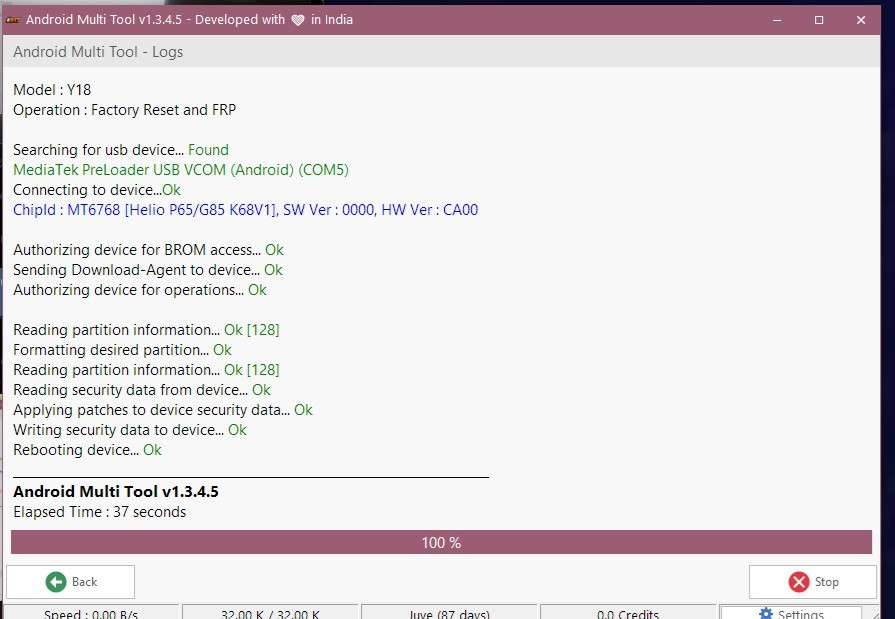
- Tool will detect MTK Preloader
- Select FRP Reset / Factory Reset
- Click Start
- Wait for AUTH verification
- Device reboots automatically
FRP is removed successfully within seconds.
Network Unlock (If Supported)
Some tools also support network unlocking, depending on firmware.
- Removes SIM restrictions
- Useful for imported devices
- Not available on all Vivo Y18 variants
IMEI Repair and Other Services
Advanced technicians can also perform:
- IMEI repair (region-dependent legality)
- NV data restore
- Baseband repair
- Bootloop fix (limited cases)
Always follow local laws before performing IMEI-related operations.
Comparison with Other Tools
| Feature | Vivo Y18 FRP Unlock Latest Security | Old FRP Tools |
|---|---|---|
| Latest Patch Support | Yes | No |
| AUTH Required | Yes | No |
| MT6768 Support | Yes | Limited |
| Speed | Very Fast | Slow |
| Reliability | High | Low |
| Technician Friendly | Yes | No |
Safety Tips and Legal Considerations
Important Safety Tips
- Always confirm device ownership
- Backup data if possible
- Use verified tools only
- Avoid cracked software
- Do not interrupt process mid-way
Legal Considerations
FRP unlock is legal when:
- You own the device
- You have customer consent
- You are performing authorized repair
Using FRP unlock for stolen devices is illegal and unethical.
Troubleshooting Common Errors
Device Not Detected
- Reinstall USB drivers
- Try different USB port
- Use original cable
AUTH Failed Error
- Ensure tool is activated
- Check internet connection
- Update tool version
Operation Stuck
- Restart PC and phone
- Retry in BROM mode
Pricing and Subscription Plans
Pricing varies depending on tool provider.
Common Pricing Models
- Monthly subscription
- Credit-based system
- Yearly technician license
Best For
- Individual users: Short-term plan
- Technicians: Monthly or yearly plan
- Repair shops: Unlimited license
FAQs – Vivo Y18 FRP Unlock Latest Security
Q1: Is Vivo Y18 FRP Unlock Latest Security safe?
Yes, when used with authorized tools and proper steps.
Q2: Can I unlock FRP without a PC?
No, latest security requires PC-based AUTH tools.
Q3: Does this erase data?
Yes, FRP reset usually clears user data.
Q4: Is internet required?
Yes, for AUTH verification and tool activation.
Q5: Can beginners use it?
Yes, step-by-step tools are beginner-friendly.
Final Thoughts – Download & Contact
The Vivo Y18 FRP Unlock Latest Security solution is currently the most reliable and professional method to bypass FRP on new Vivo Y18 devices. With AUTH-based access, modern tools ensure safety, speed, and compatibility with the latest security updates.
Why Buy from GsmRadix
- 100% genuine and verified firmware
- Official download mirror of TSM Pro Tool
- Instant auto-delivery 24/7
- Secure checkout with fast technical support