

Introduction
If you work in mobile phone repair, GSM servicing, software troubleshooting or professional device maintenance, having the right servicing software can save significant time. Fix Hexa Tool is a professional GSM servicing solution designed around ISP searching, tested dump files, Fastboot flashing and additional servicing operations.
The official Fix Hexa website currently lists Fix Hexa Tool v1.8.7, with existing users able to receive updates automatically when launching the application. The current release includes ISP Fastboot Search, DUMP Smart Finder, Premium Flasher, ACC MENU operations, Moto CID/Dead Fix support and other servicing functions.
For users planning to Buy Fix Hexa Tool, choosing the correct activation period is important. The official pricing currently lists three subscription options: 3 months, 6 months and 1 year. The official site lists these at $15, $22 and $30 respectively, with payment information shown in USDT.
This guide explains what Fix Hexa Tool does, how to download and install it, how registration and activation work, which features are available, how subscription plans compare, and what users should check before purchasing.
What Is Fix Hexa Tool and Why Is It Needed?
Fix Hexa Tool is a professional GSM servicing application intended for mobile repair professionals and users who need software-based servicing capabilities.
One of its major strengths is its combination of ISP searching, dump searching and Fastboot flashing in a single application. Instead of manually searching different resources for every repair job, technicians can use the application’s database and search functions to locate relevant information and files.
The official website describes the platform as having a large tested dump database and ISP database. It also states that its dump files and ISP pinouts are created and verified by the Fix Hexa team.
Why technicians use Fix Hexa Tool
A professional repair environment often involves repetitive tasks such as:
- Finding the correct ISP pinout
- Searching for a suitable dump
- Locating firmware-related resources
- Preparing devices for Fastboot operations
- Flashing supported devices
- Performing supported account-menu operations
- Working with supported Motorola dead-boot or CID-related cases
A tool that brings several of these functions together can make a technician’s workflow more organized.
However, software tools should always be used according to the device manufacturer’s requirements, applicable laws and the tool’s license terms.

Key Features of Fix Hexa Tool Latest Version
The latest version listed by the official website is Fix Hexa Tool v1.8.7. Existing users can receive the update automatically when they launch the application.
1. ISP Finder
The ISP Finder is designed to help users locate ISP pinout information.
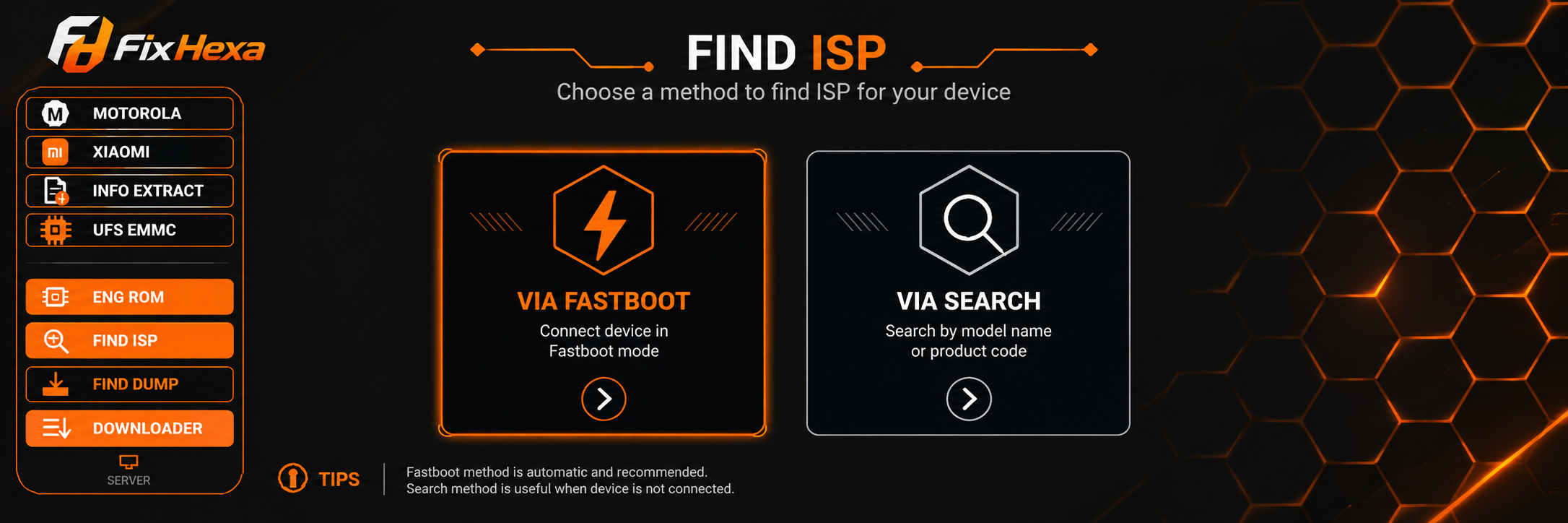
According to the official Fix Hexa website, ISP pinouts can be searched through Fastboot mode or manually through the ISP database. This can be useful when a technician needs board-level information for a supported device.
2. DUMP Smart Finder
The DUMP Smart Finder allows users to search the available dump database.
The official platform describes its dump collection as tested data, with files searchable through Fastboot or its smart search system.
For technicians, a structured dump search can reduce the time spent searching through unrelated files.
3. Premium Flasher
Fix Hexa Tool also includes a Premium Flasher designed around Fastboot flashing.
Flashing should always be performed carefully. Users should verify the exact device model, firmware compatibility and required procedure before starting any operation.
4. ACC MENU
The ACC MENU provides advanced one-click account-menu operations for supported servicing workflows.
Because device security systems and firmware policies can change, users should only perform operations that they are authorized to perform on the device.
5. Moto CID / Dead Fix
One of the current highlighted features is Moto CID / Dead Fix, with the official website stating support up to Android 16 for the supported Motorola cases.
This can be particularly relevant for technicians handling supported Motorola repair jobs.
6. Moto FRP via Fastboot
The current website also highlights a 1-click Moto FRP operation through Fastboot.
Such functionality should only be used for devices that the user owns or has explicit authorization to service. Never use servicing software to bypass security protections on stolen, lost or unauthorized devices.
7. OPLUS Demo Removal
The current feature list also includes OPLUS DEMO 1-Click Remove.
Availability and compatibility can depend on the specific device, software version and supported workflow.
Supported Devices and Brands
Fix Hexa Tool is positioned as a professional GSM servicing tool rather than a general-purpose phone application.
Its official feature information currently highlights Motorola-related operations, Fastboot workflows and ISP/dump resources. The website also presents examples and servicing information relevant to brands such as Motorola, Xiaomi, Redmi and other supported devices.
Before starting any operation, technicians should check the latest supported list rather than assuming that every model from a particular brand is compatible.
What should be checked?
Before using Fix Hexa Tool, verify:
- Exact device model
- Chipset/platform
- Android version
- Boot mode
- Firmware version
- Available ISP information
- Dump compatibility
- Fastboot availability
- Current tool version
- Applicable operation and license limitations
Support can change with new firmware releases, so checking the latest official information is always recommended.
Download and Installation Process
Users planning to Buy Fix Hexa Tool should first obtain the software from an official source.
The official website currently provides a download option for Fix Hexa Tool v1.8.7 and recommends downloading from official sources.
Step-by-Step Installation Guide
Step 1: Download the Latest Version
Visit the official Fix Hexa Tool website and download the latest available release.
At the time of publication, the listed version is v1.8.7.
Avoid downloading modified or unofficial packages from unknown websites because modified software can create security and stability risks.
Step 2: Extract the Package if Required
If the downloaded package is compressed, extract it to a suitable folder on the Windows computer.
Keep the complete application files together.
Step 3: Launch the Application
Open the Fix Hexa Tool application.
If Windows displays a security warning, verify that the software was obtained from a trusted official source before proceeding.
Step 4: Create an Account
New users need to register an account inside the application.
Enter the required registration information and complete the account creation process.
Step 5: Purchase an Activation
After creating an account, purchase an appropriate activation plan.
The official website currently lists 3-month, 6-month and 1-year options.
Step 6: Enter the Activation Key
Enter the activation key received after purchase.
Complete the activation process inside the application.
Step 7: Start Using the Tool
After successful activation, access the features included with the subscription.

How to Register and Activate Fix Hexa Tool
Registration and activation are separate steps.
Registration creates the user account, while activation gives the account access to the licensed features.
The official Fix Hexa process is:
- Download the tool.
- Create an account.
- Purchase an activation key.
- Enter the activation key.
- Complete activation.
- Start using the software.
Fix Hexa Tool Activation Key
A Fix Hexa Tool Activation Key is required to activate the subscription.
When purchasing, always verify the seller and activation duration before making payment.
The official website publishes a list of trusted resellers and specifically warns users to purchase activation keys only from authorized sources.
For GsmRadix customers, the recommended approach is to confirm the current Fix Hexa Tool Price and availability before placing the order.
How to Use Fix Hexa Tool
The exact workflow depends on the repair requirement and supported device.
For Individual Users
Individual users should first identify the exact problem and verify whether Fix Hexa Tool supports the required operation.
A simple workflow is:
- Identify the device model.
- Check the Android/software version.
- Install the latest Fix Hexa Tool.
- Register an account.
- Activate the required subscription.
- Connect the device using the correct mode.
- Select the appropriate operation.
- Follow the on-screen instructions.
- Wait for the operation to complete.
- Reboot and test the device.
For Professional Technicians
Technicians can integrate Fix Hexa Tool into their regular workshop workflow.
Before servicing a customer device:
- Record the device model.
- Confirm customer authorization.
- Back up important data when possible.
- Check the current software version.
- Verify the required operation.
- Confirm file compatibility.
- Use the correct USB drivers.
- Avoid disconnecting the device during critical operations.
- Test the device after completion.
A professional workflow helps reduce avoidable errors.
IMEI Repair and Other Services
IMEI-related operations require particular caution.
IMEI modification or repair may be restricted by local laws, manufacturer policies or network regulations. Therefore, users should not assume that Buy Fix Hexa Tool automatically means that every IMEI-related service is supported or legally permitted.
The current official Fix Hexa feature list emphasizes ISP Finder, Dump Finder, Premium Flasher, ACC MENU and Motorola CID/Dead Fix capabilities. It does not list general IMEI repair as a primary feature on the current homepage.
For any IMEI-related requirement, verify current tool support and local legal requirements before performing an operation.
Fix Hexa Tool vs Other GSM Tools
Every GSM tool has a different focus. Instead of choosing software only because another technician uses it, compare the features with your actual workflow.
| Feature | Fix Hexa Tool | Other GSM Tools |
|---|---|---|
| ISP database | Yes | Depends on tool |
| Dump search | Yes | Depends on tool |
| Fastboot flashing | Yes | Common on many tools |
| ACC MENU | Yes | Depends on tool |
| Moto CID / Dead Fix | Supported feature | Depends on tool |
| Subscription options | 3, 6 and 12 months | Varies |
| HWID-based licensing | Yes | Depends on provider |
| Professional workshop use | Yes | Depends on tool |
Fix Hexa’s current website specifically highlights its ISP and dump databases, Fastboot flashing and Motorola-related servicing functions.
The best choice depends on the devices and operations a technician handles regularly.
Fix Hexa Tool Price and Subscription Plans
One of the most important questions before purchasing is Fix Hexa Tool Price.
The official Fix Hexa website currently lists the following activation plans:
| Plan | Duration | Official Listed Price |
|---|---|---|
| Silver | 3 Months | $15 |
| Gold | 6 Months | $22 |
| Platinum | 1 Year | $30 |
Prices can change, so users should verify the latest price before placing an order.
Fix Hexa Tool 3 Months
The Fix Hexa Tool 3 Months plan can be suitable for users who want to test the workflow or have occasional servicing requirements.
It provides a lower initial commitment compared with longer plans.
Fix Hexa Tool 6 Months
The Fix Hexa Tool 6 Months plan is a middle option for technicians who use the software regularly but do not want to commit to a full year.
Fix Hexa Tool 1 Year
For regular workshops, the Fix Hexa Tool 1 Year plan can provide better long-term value.
The official website currently lists the 1-year Platinum plan at $30, making it the lowest listed monthly equivalent among the three plans.
License Terms
The official license information states that plans include unlimited ISP finding, up to 5 dump downloads per day and up to 5 ENG ROM downloads per day. It also states that the tool is for personal use, rental or sharing is not allowed, and the key is HWID-locked to a single PC.
Always review the latest license conditions before purchasing.
Best Buy Fix Hexa Tool 2025 vs Current Version
Searches such as Best Buy Fix Hexa Tool 2025 may still appear in Google because users often search using older year-based terms.
However, the current official website lists v1.8.7 and identifies it as the 2026 release.
Therefore, users searching for an older 2025 version should consider the current release instead.
For SEO, year-based keywords can be useful as secondary search variations, but the primary page should focus on the current product and current activation information.

Fix Hexa Tool Update
Keeping the software updated is important because mobile firmware and device security systems continue to change.
The official website currently states that existing users receive updates automatically when they launch the application.
Before performing important servicing work:
- Check whether a new version is available.
- Confirm compatibility with your device.
- Read the latest update information.
- Use the latest official application.
- Avoid modified versions.
A current version can provide compatibility improvements and updated servicing capabilities.
Is Fix Hexa Tool a Mobile Unlock Program or Phone Unlock App?
Fix Hexa Tool is better described as a professional GSM servicing tool rather than a simple phone unlock app.
Its current feature set includes ISP searching, dump searching, Fastboot flashing, ACC MENU operations and Motorola-related servicing functions.
Users searching for terms such as mobile unlock program, phone unlock app or GSM servicing tool should check the exact operation they need before purchasing.
Not every operation is available for every phone model, firmware version or security level.
Safety Tips Before Using Fix Hexa Tool
Professional servicing software should be used carefully.
1. Use Official Software
Download the application from the official source whenever possible.
2. Purchase from Authorized Sellers
The official Fix Hexa website publishes trusted resellers and warns users against unauthorized activation-key sellers.
3. Verify the Device
Always check the exact model and firmware before performing a flashing or servicing operation.
4. Back Up Data
Whenever possible, back up customer data before performing operations that may affect userdata.
5. Use Stable USB Connections
Do not disconnect the USB cable during critical operations.
6. Follow Local Laws
Security-related operations, IMEI-related work and device unlocking can be regulated differently across countries.
Only service devices that you own or are authorized to repair.
7. Respect License Restrictions
The current Fix Hexa license terms state that subscriptions are intended for personal use and that rental or sharing is not permitted.
Troubleshooting Common Fix Hexa Tool Errors
Tool Does Not Open
Try:
- Restarting Windows.
- Installing required drivers.
- Running the latest official version.
- Checking Windows security software.
- Reinstalling the application from an official source.
Device Is Not Detected
Check:
- USB cable.
- USB port.
- Device drivers.
- Correct boot mode.
- Device battery level.
- Windows Device Manager.
Activation Key Is Not Working
Verify:
- Correct account.
- Correct activation key.
- Subscription duration.
- Internet connection.
- PC/HWID status.
Because the license is HWID-locked to a single PC according to the current official terms, changing computers may require support assistance where applicable.
Dump Search Does Not Show the Required File
Confirm:
- Exact model number.
- Region.
- Storage configuration.
- Chipset.
- Firmware version.
A dump that belongs to a different variant should not be used simply because the device name looks similar.
Flashing Operation Fails
Stop and verify the device and firmware information before trying repeatedly.
Using an incorrect file can create additional problems.
Who Should Buy Fix Hexa Tool?
Buy Fix Hexa Tool if you regularly work with supported GSM servicing operations and need access to ISP, dump and Fastboot-related functions.
It can be useful for:
- Mobile repair technicians
- GSM technicians
- Board-level repair professionals
- Mobile repair shops
- Service centers
- Freelance technicians
- Users who regularly perform supported device servicing
For occasional users, the 3-month plan may be a practical starting point. For active repair shops, 6-month or 1-year access may make more sense depending on usage.
Frequently Asked Questions
What is Fix Hexa Tool?
Fix Hexa Tool is a professional GSM servicing application featuring ISP search, dump search, Fastboot flashing, ACC MENU operations and selected Motorola servicing functions.
What is the latest Buy Fix Hexa Tool version?
The official website currently lists Fix Hexa Tool v1.8.7. Existing users can receive updates automatically when launching the application.
Where can I download Fix Hexa Tool?
The safest option is to download the application from the official Fix Hexa website and avoid modified third-party packages.
How do I activate Fix Hexa Tool?
Download the application, create an account, purchase an activation key and enter the key inside the application to activate the subscription.
How much is Buy Fix Hexa Tool?
The current official prices listed are $15 for 3 months, $22 for 6 months and $30 for 1 year. Prices may change, so confirm the latest price before purchasing.
Is Fix Hexa Tool available for 3 months?
Yes. The official Silver plan provides 3 months of access and is currently listed at $15.
Is Fix Hexa Tool available for 6 months?
Yes. The Gold plan currently provides 6 months of access and is listed at $22 on the official website.
Is there a Fix Hexa Tool 1 Year plan?
Yes. The Platinum plan provides 1 year of access and is currently listed at $30.
Is the Fix Hexa Tool key HWID locked?
Yes. The current official license information states that the key is bound to a single PC through HWID.
Can I share or rent my Fix Hexa Tool activation?
No. The current license terms state that personal use is permitted and rental or sharing is not allowed.
Does Fix Hexa Tool support IMEI repair?
Do not assume that it does. The current official homepage highlights ISP, dump, flashing, ACC MENU and Motorola-related features rather than general IMEI repair. Always verify the current supported operation and local legal requirements.
Is Fix Hexa Tool suitable for professional technicians?
Yes. Its ISP, dump, Fastboot and servicing features are specifically positioned for professional GSM and mobile repair workflows.
Should I buy a 3-month or 1-year activation?
Choose according to your usage. Occasional users may prefer 3 months, while technicians and repair shops that use the tool regularly may prefer 6 months or 1 year.
Final Thoughts
If you are searching for a professional GSM servicing solution that combines ISP searching, dump searching, Fastboot flashing and selected advanced servicing functions, Buy Fix Hexa Tool can be worth considering.