The mobile repair industry is evolving rapidly, and tools that simplify unlocking, flashing, and repairing smartphones are more important than ever. The TFM Multi Tool Latest Update 2026 is gaining strong popularity among both individual users and professional technicians due to its powerful features, simplicity, and support for the latest devices.
Whether you are running a repair shop or handling personal devices, this tool works as a complete mobile unlock program and phone unlock app. It is especially useful for MediaTek-based smartphones, including popular brands like Tecno and Infinix.
This detailed guide will help you understand everything about the Best TFM Multi Tool Latest Update 2026 2026, including features, supported devices, installation, usage, pricing, and troubleshooting.

What is TFM Multi Tool Latest Update 2026 and Why It is Needed
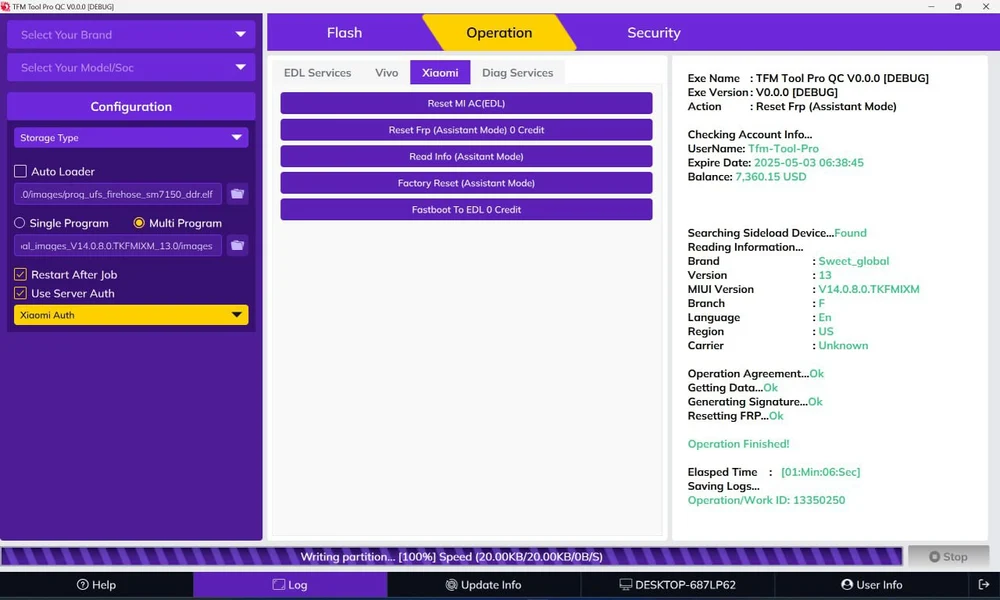
The TFM Multi Tool Latest Update 2026 is a professional mobile servicing software designed to perform multiple tasks such as FRP unlock, PIN unlock, flashing firmware, and partition management.
With increasing device security and frequent software updates, unlocking and repairing phones manually has become more complex. This is where the tool becomes essential.
Why it is needed
- It simplifies complex unlocking processes
- It supports the latest MTK devices
- It reduces repair time for technicians
- It provides all-in-one functionality in a single interface
Who should use it
- Mobile repair technicians
- GSM professionals
- Shop owners
- Advanced Android users
Key Features of TFM Multi Tool Latest Update 2026
The latest version brings improvements in performance, compatibility, and usability. The TFM Multi Tool V0.0.1 Features are designed to handle modern smartphones efficiently.
Core Features
- Flash firmware on MTK devices
- PIN, pattern, and password unlock
- FRP remove functionality
- Read and write firmware
- Erase partition
- Boot repair support
Advanced Features
- One-click operations for beginners
- Advanced options for technicians
- Support for new security patches up to 25/09
- Stable and fast processing
Special Feature Integration
The tool combines multiple operations like TFM Multi Tool Flash PIN Unlock FRP Tool, making it a complete solution for unlocking and repair.
Supported Devices and Brands
The TFM Multi Tool MTK Support List is continuously expanding. It currently supports a wide range of Tecno and Infinix devices.
Infinix Supported Models
GT20 Pro – X6871
GT30 Pro 5G – X6873
HOT 50 4G – X6882
HOT 50 5G – X6720B
HOT 50 PRO – X6881
HOT 50 PRO Plus 4G – X6880
HOT 50i – X6531
HOT 60 5G – X6726B
HOT 60 PRO – X6885
HOT 60 PRO Plus – X6886
HOT 60i 4G – X6728
NOTE 40 – X6853
NOTE 40 5G – X6852
NOTE 40 PRO 4G – X6850
NOTE 50 4G – X6858
NOTE 50 PRO 4G – X6855
NOTE 50 PRO Plus 5G – X6856
NOTE 50X – X6857
NOTE 50S 5G Plus – X6870
SMART 9 – X6532
SMART 9 HD – X6532C
ZERO 30 4G – X6731B
Tecno Supported Models
CAMON 30 – CL6K
CAMON 30 5G – CL7
CAMON 30 PRO – CL8
CAMON 30 PREMIER – CL9
CAMON 30S – CLA5
CAMON 30S PRO – CLA6
CAMON 40 – CM5
CAMON 40 PREMIER 5G – CM8
CAMON 40 PRO 4G – CM6
CAMON 40 PRO 5G – CM7
POVA 6 – LI7
POVA 6 NEO – LI6
POVA 6 PRO – LI9
POVA 7 4G – LJ6
POVA 7 5G – LJ7
POVA 7 ULTRA 5G – LJ9
POVA CURVE – LJ8K
SPARK 20 PRO – KJ6
SPARK 30 – KL6
SPARK 40 – KM5
SPARK 40 PRO Plus – KM7
This clearly shows that the TFM Multi Tool Tecno Infinix Unlock Tool is optimized for MTK-based devices.
Download and Installation Process
How to Download TFM Multi Tool Latest Update 2026
You can download the tool from trusted GSM platforms or authorized providers. Always ensure you are using a safe and verified source.
Step-by-Step Installation Guide
- Download the setup file
- Extract the file using extraction software
- Temporarily disable antivirus if needed
- Run the setup as Administrator
- Install all required drivers
- Launch the software

How to Register and Activate
- Open the tool
- Enter your email or username
- Purchase a subscription plan
- Login with your credentials
- Activation will be completed automatically
How to Use TFM Multi Tool Latest Update 2026
For Individual Users
- Open the tool
- Select the function (FRP, Flash, Unlock)
- Connect your device
- Click Start
- Wait for the process to complete
For Professional Technicians
- Use read/write options for backup
- Perform deep flashing for dead devices
- Use partition erase carefully
- Verify device after repair
IMEI Repair and Other Services
The tool provides multiple repair options, but IMEI repair depends on legal regulations in your country.
Available Services
- Firmware repair
- Boot repair
- Partition management
- Device recovery
Comparison with Other Tools
| Feature | TFM Multi Tool | Other Tools |
|---|---|---|
| MTK Support | Strong | Limited |
| Ease of Use | Beginner Friendly | Complex |
| Speed | Fast | Moderate |
| Price | Affordable | Expensive |
| Updates | Frequent | Irregular |
Safety Tips and Legal Considerations
Safety Tips
- Always backup your data
- Use original USB cable
- Do not disconnect during process
Legal Considerations
- Use only on authorized devices
- Do not misuse unlocking features
- Follow local regulations
Troubleshooting Common Errors
Tool Not Detecting Device
- Install correct drivers
- Try different USB port
Device Stuck
- Restart device
- Reconnect properly
Activation Issues
- Check internet connection
- Verify login credentials
Pricing and Subscription Plans
The tool is available in multiple plans:
- 3 Months Plan
- 12 Months Plan
- 24 Months Plan
Pricing may vary depending on the provider.
Frequently Asked Questions
What is TFM Multi Tool Latest Update 2026
It is a professional mobile unlock program for MTK-based smartphones.
Does it support FRP unlock
Yes, TFM Multi Tool FRP Unlock MTK is fully supported.
Is it beginner-friendly
Yes, it provides simple one-click operations.
Which devices are supported
Mainly Tecno and Infinix MTK devices.
Is it safe to use
Yes, if used correctly with proper instructions.
Final Thoughts
The TFM Multi Tool Latest Update 2026 is one of the most powerful and user-friendly tools available today for mobile unlocking and repair. With its strong MTK support, wide device compatibility, and easy interface, it is suitable for both beginners and professionals.